> ## Documentation Index
> Fetch the complete documentation index at: https://chatbotx.io/docs/llms.txt
> Use this file to discover all available pages before exploring further.
# How to create a TikTok Business account
> Guide to creating a TikTok Business account and enabling Advanced Access.
The TikTok account used to connect with ChatbotX must have the appropriate permissions for business messaging. This guide helps you check your current account status and choose the fastest option.
## Check your TikTok account status
If your TikTok account is already business-verified or already belongs to a **Business Center**, skip this guide and go directly to [**Connect TikTok**](/docs/channels/tiktok/connect-tiktok).
| Current Status | What to Do |
| ------------------------------------------- | ------------------------------------------------------------------------------------------- |
| Already has a **Verified Business Account** | Skip this guide, go to [**Connect TikTok**](/docs/channels/tiktok/connect-tiktok) |
| Already in a **Business Center** | Check account permissions, then go to [**Connect TikTok**](/docs/channels/tiktok/connect-tiktok) |
| Has a regular TikTok account only | Follow the steps in the **Advanced Access** section |
| Needs a full business profile | Complete the **Verified Business Account** section |
If you are not sure which level your account is at, read the comparison table below first. For most shops and marketing teams, **Advanced Access** is the fastest way to get started.
## Understand TikTok account types
TikTok categorizes business account permissions into 3 main levels. Each level determines which business tools the account can use in TikTok for Business, Business Suite, and related integration flows.
| Account Level | Brief Explanation | What Should You Do? |
| --------------------------------------- | ---------------------------------------------------------------------------------------------- | -------------------------------------------------------------------------------------- |
| **General TikTok Account** | A regular TikTok account. This level does not have full Business Suite permissions. | Upgrade to **Advanced Access** before connecting ChatbotX. |
| **TikTok Account with Advanced Access** | An account already linked to **TikTok for Business** or an unverified **Business Center**. | Most suitable for preparing a quick connection with ChatbotX. |
| **Verified Business Account** | An account that has completed business verification. This level has full business permissions. | Use when TikTok requires verification or when your business needs an official profile. |
**Advanced Access** does not necessarily require a business license. You can reach this level by linking your TikTok account to TikTok for Business or an unverified Business Center.
## Preparation before creating or upgrading
Before you begin, prepare the following:
* The TikTok account you want to use to receive customer messages.
* An email or login credentials for **TikTok for Business**.
* A phone logged in to the TikTok account to confirm **Authorize**, scan QR codes, or accept invitations.
* Basic business information such as business name, country or region, and website (if available).
* A valid business license if you want to set up a **Verified Business Account**.
An **Organization Account** cannot be used to register or log in to TikTok for Business using the **Sign up with TikTok** or **Log in with TikTok** flows.
## Create a TikTok Account with Advanced Access
There are 2 paths to upgrade your TikTok account to **Advanced Access**. Choose the path that fits how you manage your account.
### Path A: Link TikTok with TikTok for Business
Choose this path if you are managing a single TikTok account and want a quick setup.
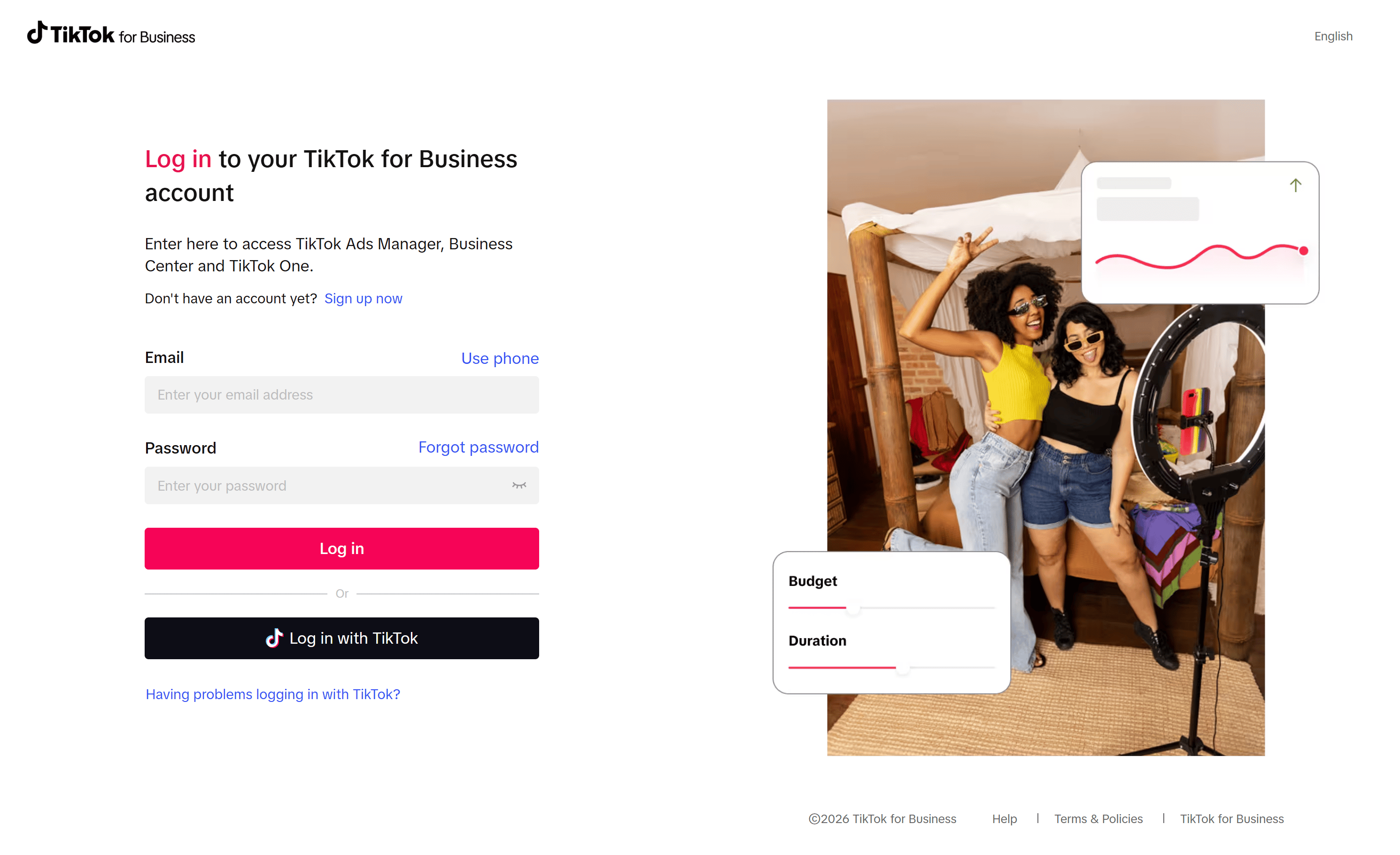
Go to [business.tiktok.com](https://business.tiktok.com) and select **Sign up** or **Log in**, then log in to the TikTok account you want to use for business.
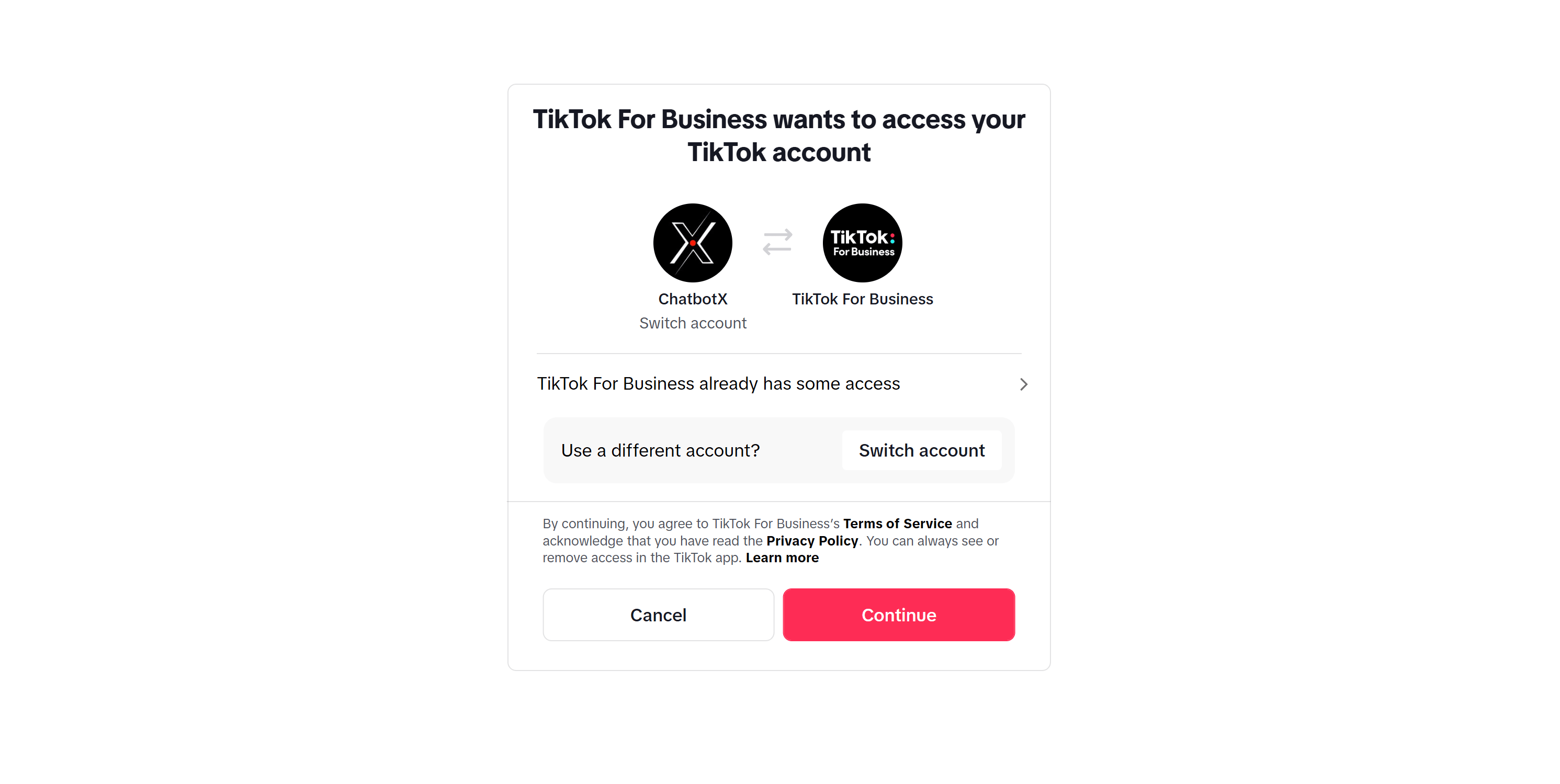
 Click **Continue** to authorize linking your TikTok account with TikTok for Business.
 Fill in the basic business information requested by TikTok for Business. Once completed, the TikTok account will receive **Advanced Access**.
### Path B: Link TikTok to Business Center
Choose this path if multiple people manage the account, or if you want to centralize your TikTok assets in one place.
Go to [business.tiktok.com](https://business.tiktok.com) and log in to your company's **Business Center**.
If you do not have a Business Center account yet, select **Sign up** and fill in your business type, country or region, business name, and contact details.
In Business Center, navigate to **Accounts > TikTok accounts**.
Click **Add a TikTok account**, select **Link an existing TikTok account**, and then choose to scan the QR code or approve the request following TikTok's instructions.
Fill in the basic business information requested by TikTok for Business. Once completed, the TikTok account will receive **Advanced Access**.
### Path B: Link TikTok to Business Center
Choose this path if multiple people manage the account, or if you want to centralize your TikTok assets in one place.
Go to [business.tiktok.com](https://business.tiktok.com) and log in to your company's **Business Center**.
If you do not have a Business Center account yet, select **Sign up** and fill in your business type, country or region, business name, and contact details.
In Business Center, navigate to **Accounts > TikTok accounts**.
Click **Add a TikTok account**, select **Link an existing TikTok account**, and then choose to scan the QR code or approve the request following TikTok's instructions.
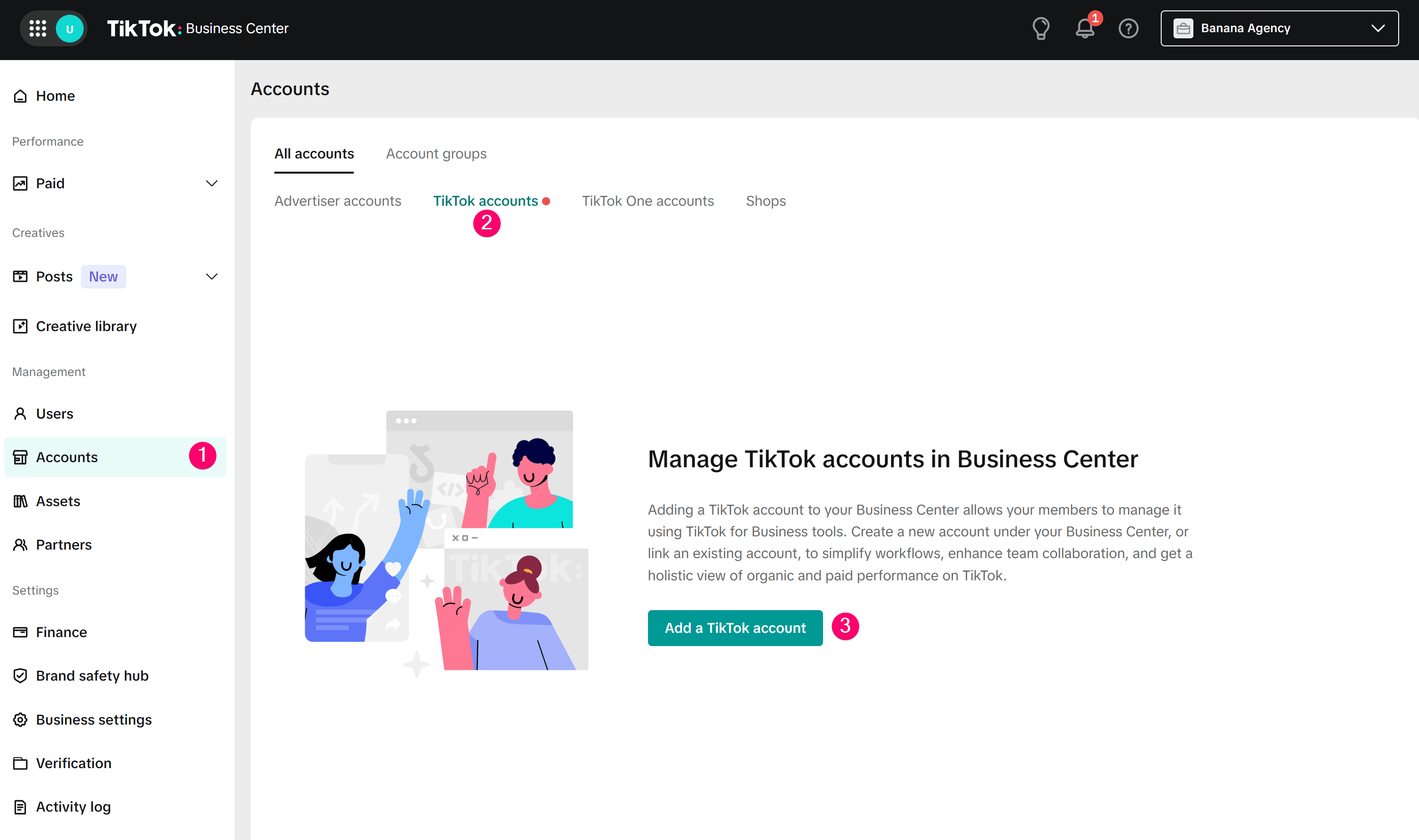 Open the TikTok app with the account you want to link, then scan the QR code or accept the invitation. Once completed, the account will appear in your Business Center.
## When to use a Verified Business Account
You should only set up a **Verified Business Account** when TikTok requires additional permissions, when your business needs a complete verification profile, or when you want to use the verification from your Business Center to verify linked TikTok accounts.
Business verification is TikTok's process for reviewing business details and valid documents. This process is different from the blue checkmark on a TikTok profile.
You can complete verification using one of the following methods:
* Open **Web Business Suite** or TikTok Ads Manager and complete **Business Verification**.
* Open the TikTok app, go to **Profile > Menu > Business Suite > Verification**.
* Link your TikTok account to a verified **Business Center** to use shared verification.
When preparing for verification, use a clear, valid business license with details that match your business name. TikTok may take 1-5 days to review requests in the app, or up to a few business days in the Business Center depending on the approval queue.
## Next steps
Once your TikTok account has **Advanced Access** or **Verified Business Account** status, go to the [**Connect TikTok**](/docs/channels/tiktok/connect-tiktok) guide to connect the account to ChatbotX.
TikTok Business Messaging is restricted by region. If your account belongs to the UK, EEA, or Switzerland, please check the details in the **Connect TikTok** guide before setting up message automation.
## FAQ
Not always. To get **Advanced Access**, you can link your TikTok account to TikTok for Business or an unverified Business Center. A business license is usually required when you want a **Verified Business Account**.
**Advanced Access** is an intermediate level, sufficient to unlock basic business tools after linking the account. **Verified Business Account** is a higher level that requires business verification, suitable when your business needs a fully verified profile.
Usually not. You only need to verify that the account has been correctly linked to the Business Center and has the appropriate permissions.
Open the TikTok app with the account you want to link, then scan the QR code or accept the invitation. Once completed, the account will appear in your Business Center.
## When to use a Verified Business Account
You should only set up a **Verified Business Account** when TikTok requires additional permissions, when your business needs a complete verification profile, or when you want to use the verification from your Business Center to verify linked TikTok accounts.
Business verification is TikTok's process for reviewing business details and valid documents. This process is different from the blue checkmark on a TikTok profile.
You can complete verification using one of the following methods:
* Open **Web Business Suite** or TikTok Ads Manager and complete **Business Verification**.
* Open the TikTok app, go to **Profile > Menu > Business Suite > Verification**.
* Link your TikTok account to a verified **Business Center** to use shared verification.
When preparing for verification, use a clear, valid business license with details that match your business name. TikTok may take 1-5 days to review requests in the app, or up to a few business days in the Business Center depending on the approval queue.
## Next steps
Once your TikTok account has **Advanced Access** or **Verified Business Account** status, go to the [**Connect TikTok**](/docs/channels/tiktok/connect-tiktok) guide to connect the account to ChatbotX.
TikTok Business Messaging is restricted by region. If your account belongs to the UK, EEA, or Switzerland, please check the details in the **Connect TikTok** guide before setting up message automation.
## FAQ
Not always. To get **Advanced Access**, you can link your TikTok account to TikTok for Business or an unverified Business Center. A business license is usually required when you want a **Verified Business Account**.
**Advanced Access** is an intermediate level, sufficient to unlock basic business tools after linking the account. **Verified Business Account** is a higher level that requires business verification, suitable when your business needs a fully verified profile.
Usually not. You only need to verify that the account has been correctly linked to the Business Center and has the appropriate permissions.