> ## Documentation Index
> Fetch the complete documentation index at: https://chatbotx.io/docs/llms.txt
> Use this file to discover all available pages before exploring further.
# WhatsApp Conversation Orchestration
> Configure WhatsApp Conversation Orchestration in ChatbotX to coordinate between partner bots and human agents on a single WhatsApp number.
**WhatsApp Conversation Orchestration** allows a single WhatsApp Business phone number to connect and operate across multiple technology partner integrations simultaneously on the same account.
You need this feature when using a third-party AI bot to handle initial customer inquiries while connecting ChatbotX for human agents to take over complex conversations in Live Chat without message conflicts.
## Core Conversation Thread States
Under Meta's conversation orchestration model, any conversation between a customer and your WhatsApp phone number always belongs to one of three states:
Another partner owns the conversation. The ChatbotX message box is safely locked to prevent duplicate replies.
ChatbotX has active ownership. Agents can freely send direct messages to the contact in Live Chat.
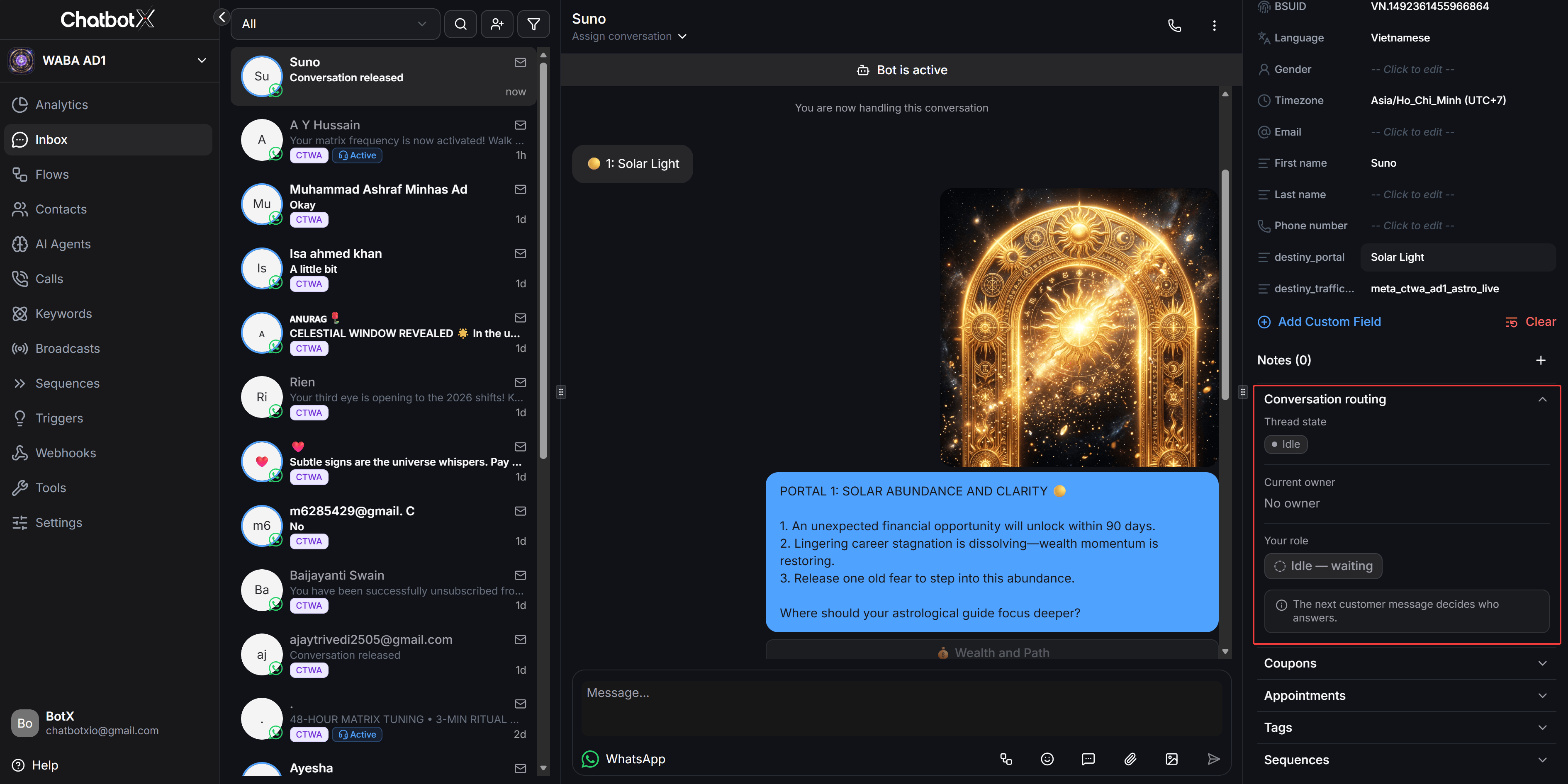
No partner currently owns the conversation. The next customer message determines which partner responds.
The table below outlines permissions across the three states:
| Thread State | Conversation Owner | ChatbotX Composer Status | Messaging Permissions |
| - | - | - | - |
| **Standby** | Third-party partner | Safely locked | Read-only, cannot send service messages |
| **Owned** | ChatbotX (Agent) | Fully unlocked | Can send direct service messages |
| **Idle** | None | Waiting | Waiting for the next inbound message |
## Configure Handover Resume Flow
When a third-party partner encounters an unanswerable question or a contact requests human assistance, that partner passes thread control to ChatbotX. You can configure an automated flow to greet contacts and collect details immediately upon receiving control.
From the left navigation menu, go to **Settings > Channels**. In the list of connected WhatsApp numbers, click **Manage** next to the phone number you want to configure.
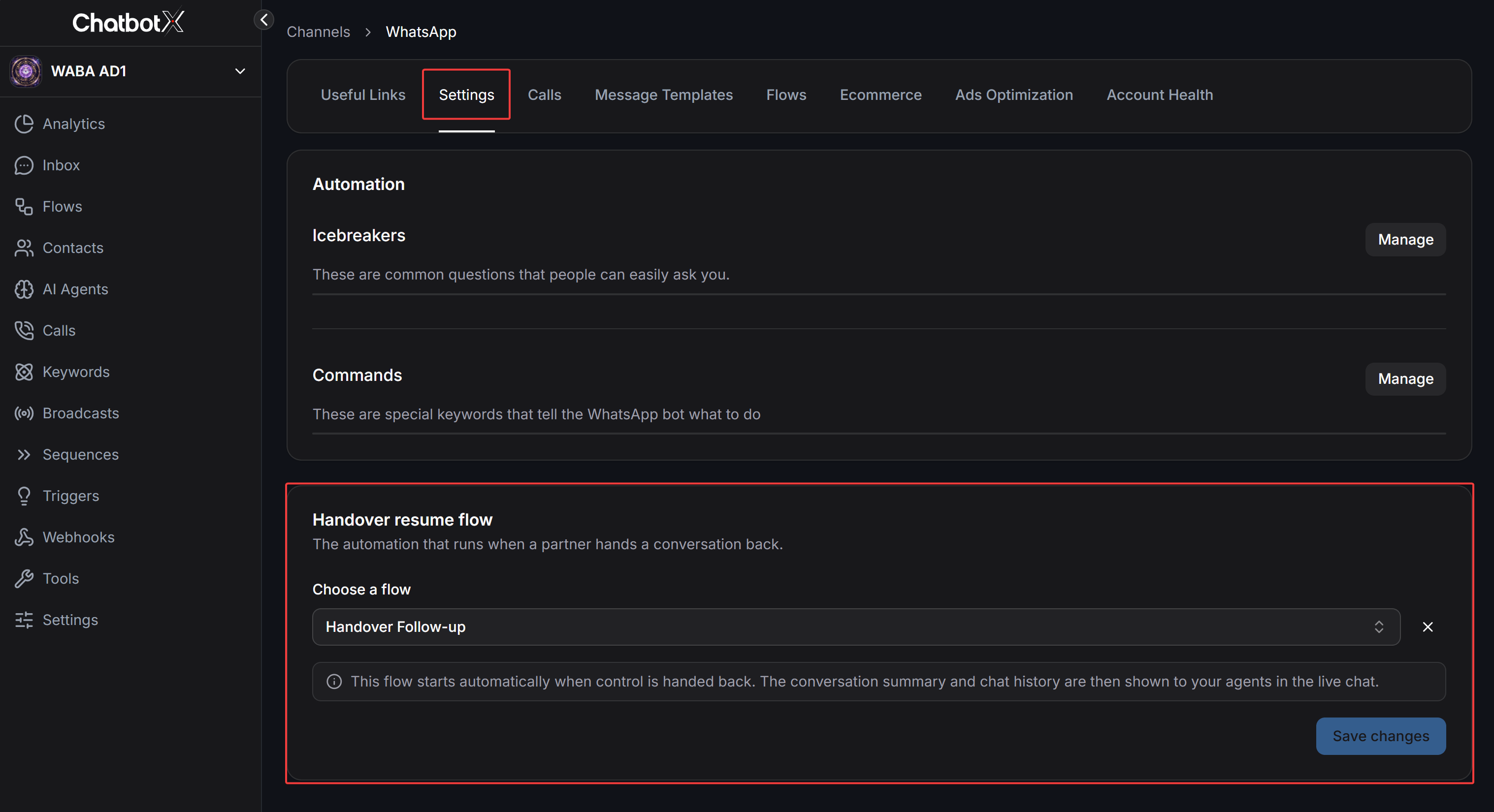
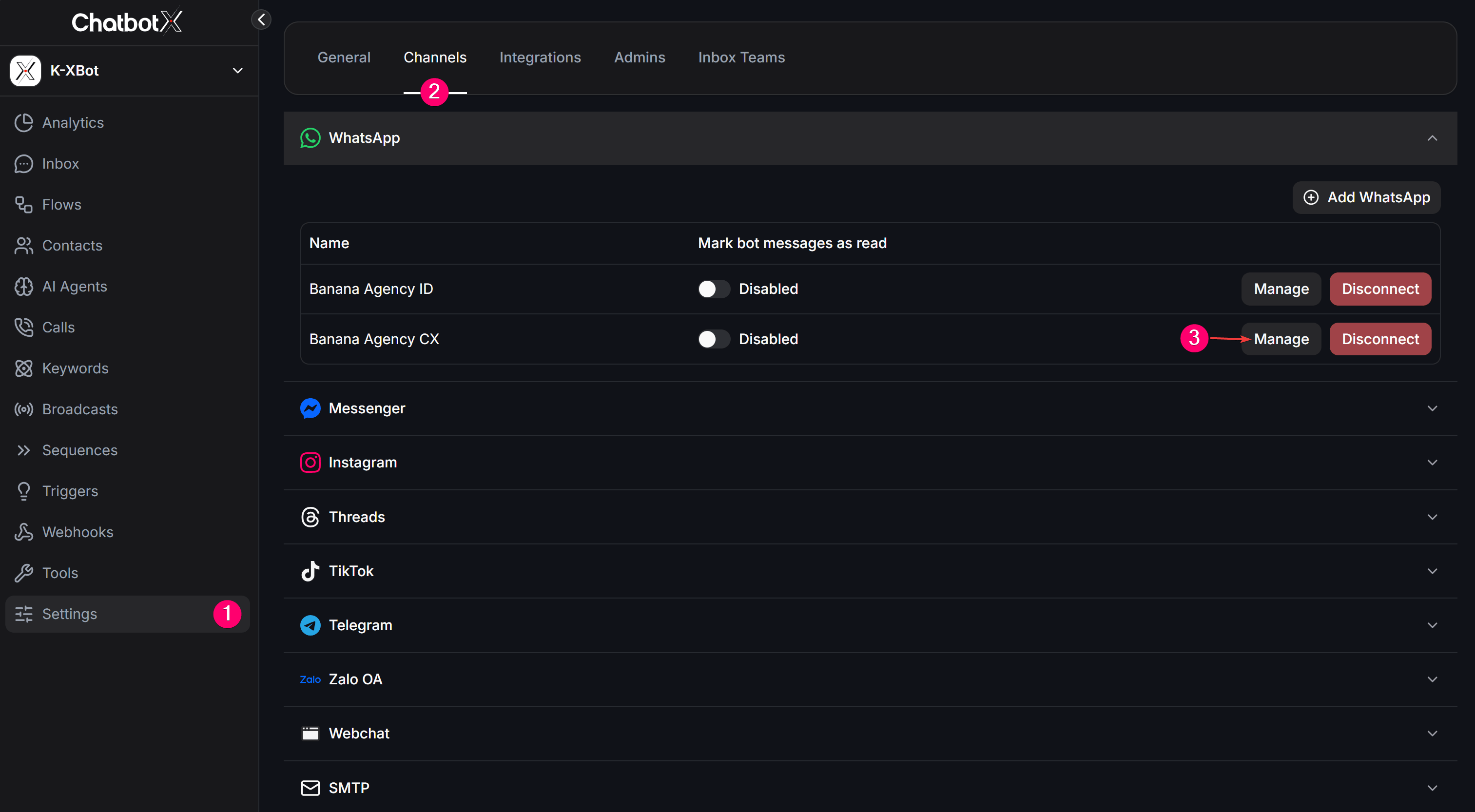 Switch to the **Settings** tab, scroll down to the **Automation** section, and locate **Handover resume flow**. Under **Choose a flow**, select the automated flow you want to trigger when control is handed back.
Click **Save changes** to complete the setup. The system displays a confirmation notification.
Switch to the **Settings** tab, scroll down to the **Automation** section, and locate **Handover resume flow**. Under **Choose a flow**, select the automated flow you want to trigger when control is handed back.
Click **Save changes** to complete the setup. The system displays a confirmation notification.
 When a partner hands control back, ChatbotX automatically pins the conversation summary and chat history inside Live Chat so agents understand context immediately without reading through older message threads.
## Manage Conversations in Inbox
### Standby Mode While Another Partner Responds
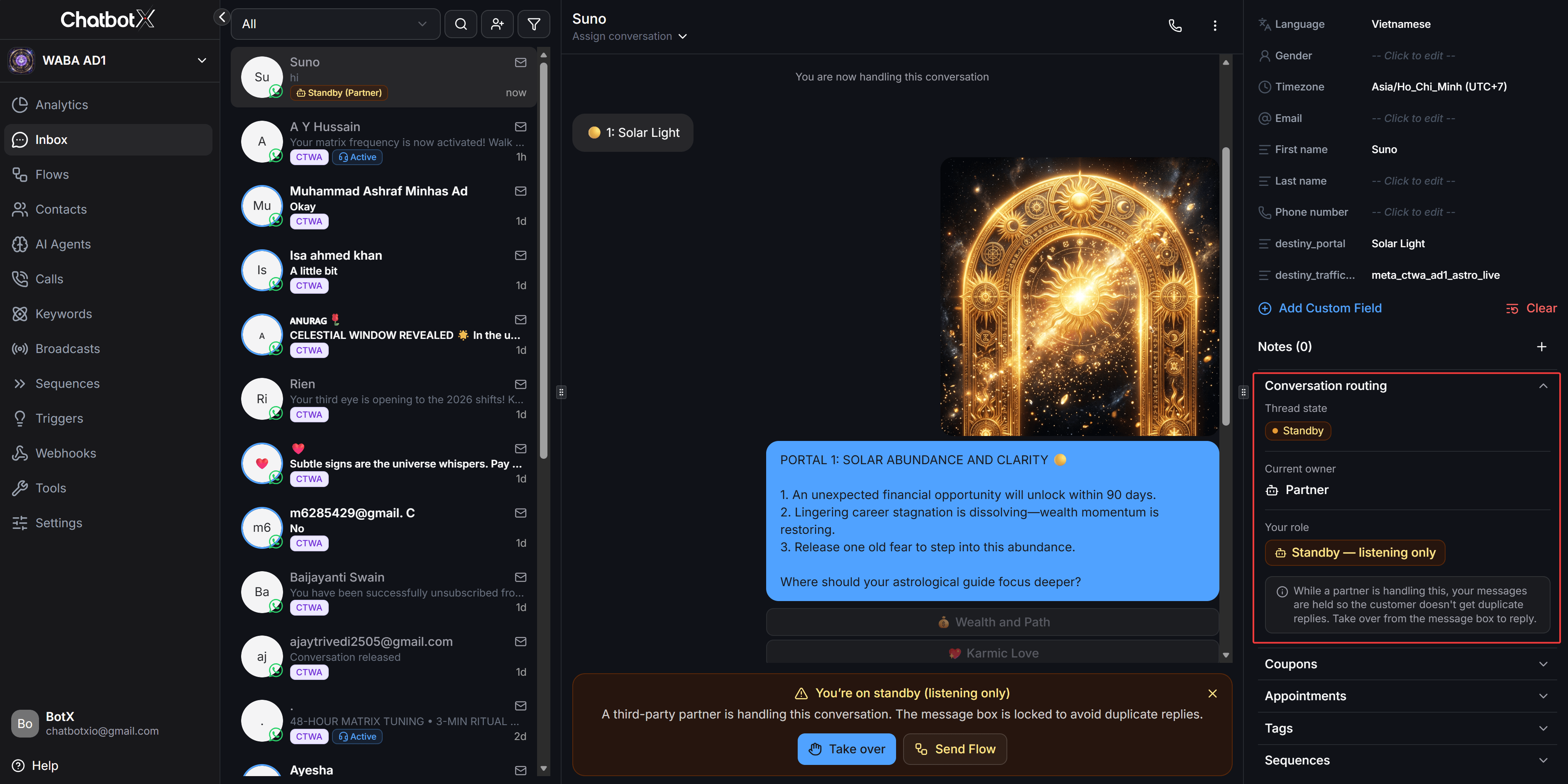
When a third-party partner owns the conversation, ChatbotX automatically enters passive listening mode:
* The contact list displays an orange badge labeled **Standby (Partner)**.
* The **Conversation routing** panel on the right sidebar displays the `Standby` state and `Standby - listening only` role.
* The central chat area displays a warning banner and locks the message composer to prevent duplicate customer replies.
When a partner hands control back, ChatbotX automatically pins the conversation summary and chat history inside Live Chat so agents understand context immediately without reading through older message threads.
## Manage Conversations in Inbox
### Standby Mode While Another Partner Responds
When a third-party partner owns the conversation, ChatbotX automatically enters passive listening mode:
* The contact list displays an orange badge labeled **Standby (Partner)**.
* The **Conversation routing** panel on the right sidebar displays the `Standby` state and `Standby - listening only` role.
* The central chat area displays a warning banner and locks the message composer to prevent duplicate customer replies.
 ### Take Over Conversation Control
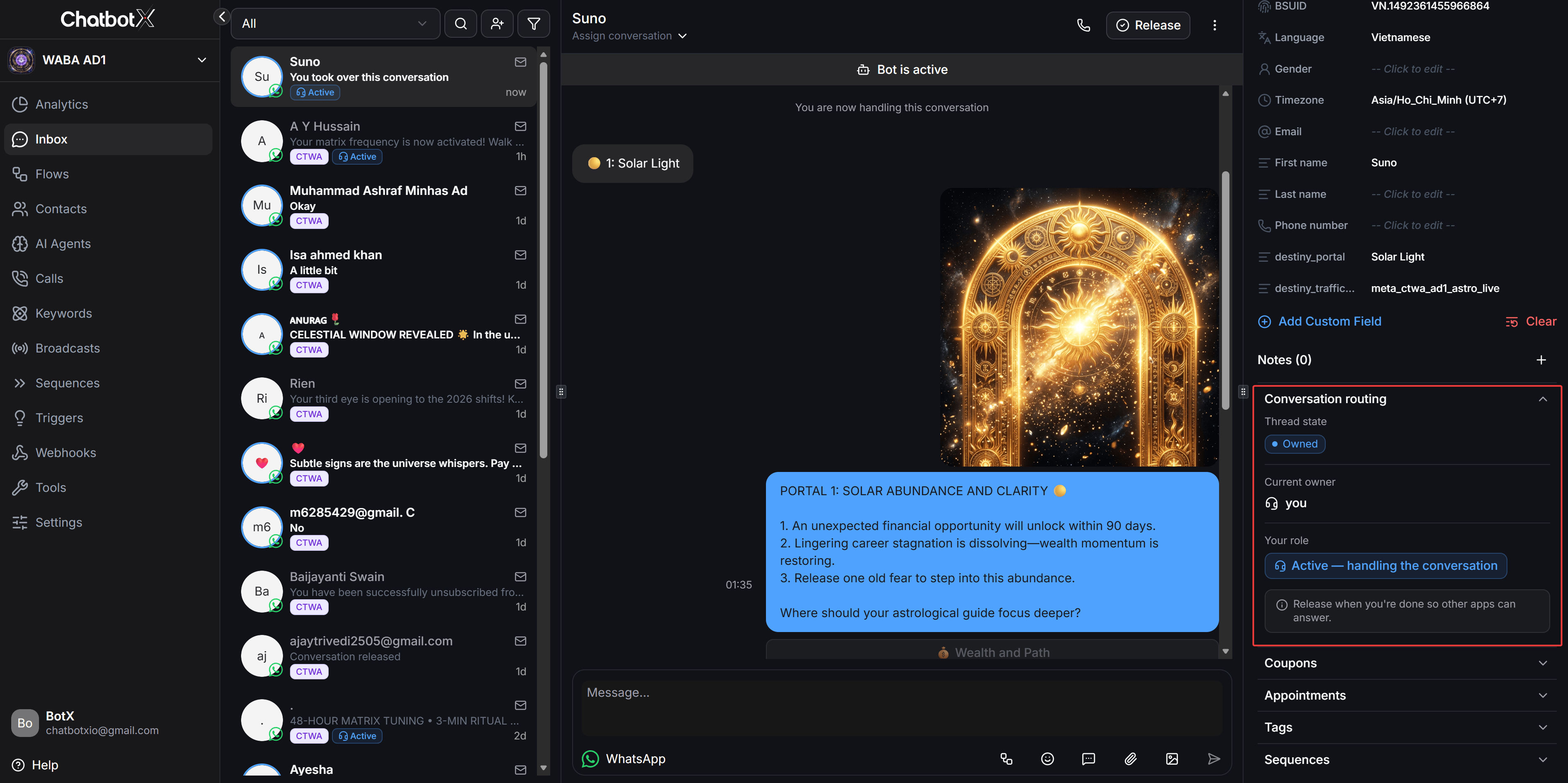
When human intervention is urgently required, agents can take over conversation ownership immediately:
* Click **Take over** on the bottom warning banner, or directly send a message from the Inbox.
* The system invokes escalation privileges, reclaims ownership from the previous partner, and transitions the thread to **Owned**.
* The contact badge changes to blue **Active**, and the message composer unlocks completely for real-time conversation.
### Take Over Conversation Control
When human intervention is urgently required, agents can take over conversation ownership immediately:
* Click **Take over** on the bottom warning banner, or directly send a message from the Inbox.
* The system invokes escalation privileges, reclaims ownership from the previous partner, and transitions the thread to **Owned**.
* The contact badge changes to blue **Active**, and the message composer unlocks completely for real-time conversation.
 ### Release Conversation After Resolution
After resolving the contact inquiry, release the thread back to Idle so automated entry flows can resume:
* Click **Release** on the top header toolbar.
* The system displays a confirmation notification that the conversation has been released.
* The thread transitions to **Idle** with the role `Idle - waiting`. The next inbound customer message routes according to your business entry-point settings without waiting for the 24-hour inactivity timeout.
### Release Conversation After Resolution
After resolving the contact inquiry, release the thread back to Idle so automated entry flows can resume:
* Click **Release** on the top header toolbar.
* The system displays a confirmation notification that the conversation has been released.
* The thread transitions to **Idle** with the role `Idle - waiting`. The next inbound customer message routes according to your business entry-point settings without waiting for the 24-hour inactivity timeout.
 ## Messaging Rules and Platform Policies
Under Meta policy, only the current thread owner can send free-form 24-hour service messages. Any partner currently on Standby attempting to send service messages will be rejected by Meta.
Pre-approved template messages (marketing, authentication, and utility) can be sent by any authorized partner at any time without altering conversation ownership.
This documentation is built and hosted on [Mintlify](https://mintlify.com), a developer documentation platform.
## Messaging Rules and Platform Policies
Under Meta policy, only the current thread owner can send free-form 24-hour service messages. Any partner currently on Standby attempting to send service messages will be rejected by Meta.
Pre-approved template messages (marketing, authentication, and utility) can be sent by any authorized partner at any time without altering conversation ownership.
This documentation is built and hosted on [Mintlify](https://mintlify.com), a developer documentation platform.