> ## Documentation Index
> Fetch the complete documentation index at: https://chatbotx.io/docs/llms.txt
> Use this file to discover all available pages before exploring further.
# WhatsApp Usernames & BSUID: Complete Business Guide
> Understand WhatsApp Usernames and BSUID from 2026. Learn how to manage contacts, synchronize CRM data, and automate workflows seamlessly in ChatbotX.
Starting in 2026, WhatsApp officially introduces usernames. This marks a major transition in how customer identity is managed across the platform. If your contact management or chatbot flows rely solely on phone numbers as the unique identifier, this update will directly impact your day-to-day operations.
With this update, customers can message or call businesses without sharing their personal phone numbers. Instead, WhatsApp provides a new identifier: **BSUID** (Business-Scoped User ID).
This guide provides a comprehensive overview of how BSUID works, how to prepare your systems, and the built-in automation solutions ChatbotX offers to ensure continuous, seamless operation.
 ## Why WhatsApp Is Introducing Usernames
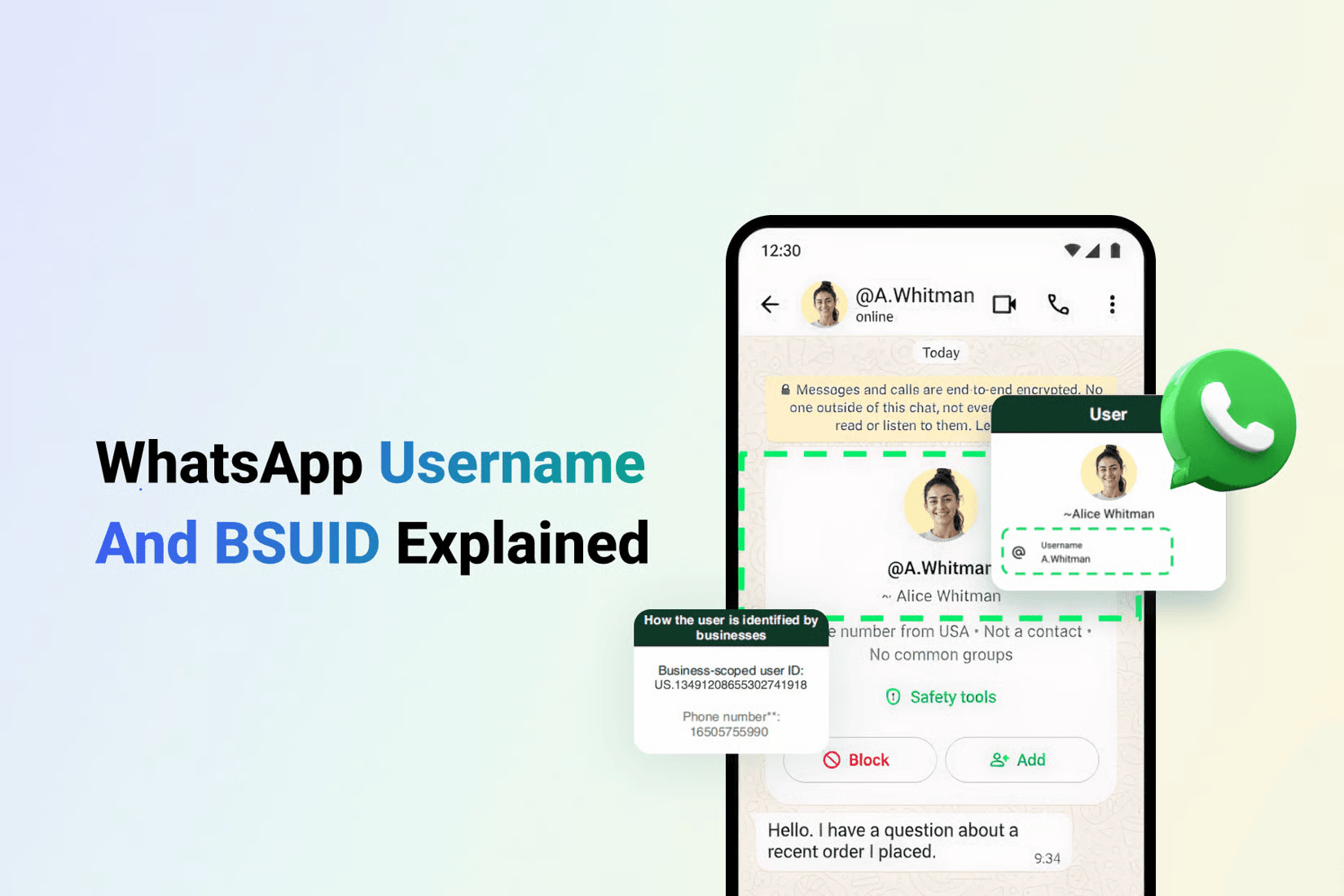
Privacy is a top priority for modern messaging app users. Previously, whenever customers initiated a conversation with a business on WhatsApp, they had to reveal their personal phone number. This created hesitation for users who simply wanted quick product information or preliminary assistance.
The username feature addresses this concern:
* **For Users:** Users can create a unique username (@username) and use it to communicate with businesses instead of sharing their phone number.
* **For Businesses:** Businesses can establish distinct usernames, allowing prospective customers to find them directly via WhatsApp search without saving phone numbers in advance, increasing lead acquisition and conversion rates.
## Contact Identification: Before vs. After the Update
The table below summarizes the key changes in customer identification:
| Feature | Before Update | After Update |
| ----------------------------------- | -------------------------------------- | -------------------------------------------------------------------- |
| **Primary Identifier** | Phone number (`wa_id`) | BSUID (`user_id`) is mandatory; phone number is optional |
| **Customer Privacy** | Phone number always visible in chat | Phone number can be masked with a Username |
| **Inbound Messages from New Leads** | Receives both phone number and `wa_id` | Receives only BSUID (if the user hides their phone number) |
| **OTP & Verification Messages** | Sent directly to phone number | Must collect phone number prior to sending OTP |
| **Historical Contact Records** | Stored and indexed by phone number | Automatically synchronized and mapped between BSUID and phone number |
## Why WhatsApp Is Introducing Usernames
Privacy is a top priority for modern messaging app users. Previously, whenever customers initiated a conversation with a business on WhatsApp, they had to reveal their personal phone number. This created hesitation for users who simply wanted quick product information or preliminary assistance.
The username feature addresses this concern:
* **For Users:** Users can create a unique username (@username) and use it to communicate with businesses instead of sharing their phone number.
* **For Businesses:** Businesses can establish distinct usernames, allowing prospective customers to find them directly via WhatsApp search without saving phone numbers in advance, increasing lead acquisition and conversion rates.
## Contact Identification: Before vs. After the Update
The table below summarizes the key changes in customer identification:
| Feature | Before Update | After Update |
| ----------------------------------- | -------------------------------------- | -------------------------------------------------------------------- |
| **Primary Identifier** | Phone number (`wa_id`) | BSUID (`user_id`) is mandatory; phone number is optional |
| **Customer Privacy** | Phone number always visible in chat | Phone number can be masked with a Username |
| **Inbound Messages from New Leads** | Receives both phone number and `wa_id` | Receives only BSUID (if the user hides their phone number) |
| **OTP & Verification Messages** | Sent directly to phone number | Must collect phone number prior to sending OTP |
| **Historical Contact Records** | Stored and indexed by phone number | Automatically synchronized and mapped between BSUID and phone number |
 ## How BSUID Operates
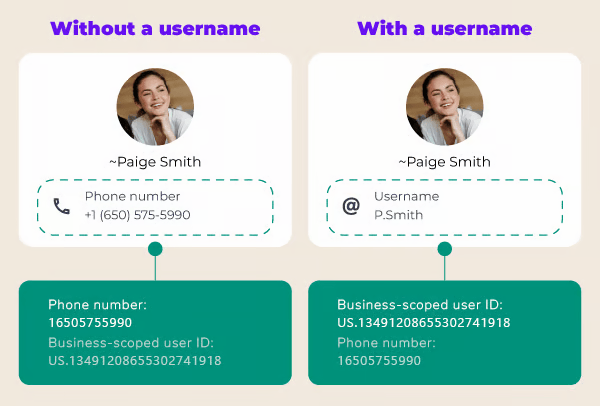
**BSUID** (Business-Scoped User ID) is a unique identifier automatically generated by Meta for each specific pair between a user and a business. This identifier allows you to message and track customers without requiring access to their phone number.
## How BSUID Operates
**BSUID** (Business-Scoped User ID) is a unique identifier automatically generated by Meta for each specific pair between a user and a business. This identifier allows you to message and track customers without requiring access to their phone number.
 ### 4 Core Technical Rules of BSUID
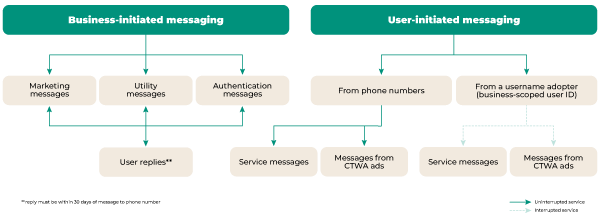
Businesses should understand the following operational characteristics of BSUID:
* **Business-Scoped Uniqueness:** The same WhatsApp user will have different BSUIDs when interacting with Business A versus Business B. This architecture protects user privacy and prevents unauthorized cross-business data sharing.
* **Fixed String Format:** A BSUID starts with a 2-letter ISO 3166 country code, followed by a period and an alphanumeric string up to 128 characters (e.g., `US.13491208655302741918`). You must use this string verbatim in API calls without modification or truncation.
* **Scoped to Business Portfolio (Meta Business Manager):** A BSUID generated under one Meta Business Portfolio cannot be used to message a customer from a different Portfolio.
* **Automatic Webhook Delivery:** Meta automatically generates and returns the BSUID in webhook payloads under the `user_id` field, even if the user has not configured a public username.
A user's BSUID changes if they update their registered WhatsApp phone number. In this event, your system receives an updated webhook payload to re-link contact records.
## What ChatbotX Is Doing About It
ChatbotX provides enterprise-ready infrastructure to handle BSUID seamlessly across all communication channels:
### Already Live
* **Automatic BSUID Capture:** Automatically captures BSUIDs from all inbound interactions and all successfully delivered outbound messages with zero manual setup required.
* **Contact Profile Visibility:** BSUID displays directly inside Contact Profiles and Audience Segmentation lists.
* **Webhook & Open API Support:** The `bsuid` field is included in all webhook payloads and Open API responses alongside the phone number (`phone`).
* **Automatic Contact Matching:** When a customer with a username messages in, ChatbotX uses the captured BSUID to match them accurately with existing contact profiles, preventing duplicates.
* **Multi-channel Messaging via BSUID:** Supports direct messaging via BSUID across Live Chat, Flows, Sequences, Broadcast campaigns, and Open APIs.
* **Search Contacts by BSUID:** Easily search and filter contact records by BSUID within the Contacts directory.
* **1-Tap Get Contact Info Button:** Native action card inside Flow Builder that allows customers to share their verified phone number in a single tap.
* **One-Way CRM Sync:** Seamlessly syncs BSUID data from ChatbotX to external CRM platforms (like HubSpot and Salesforce) via Webhooks or automation tools like Make and n8n.
### 4 Core Technical Rules of BSUID
Businesses should understand the following operational characteristics of BSUID:
* **Business-Scoped Uniqueness:** The same WhatsApp user will have different BSUIDs when interacting with Business A versus Business B. This architecture protects user privacy and prevents unauthorized cross-business data sharing.
* **Fixed String Format:** A BSUID starts with a 2-letter ISO 3166 country code, followed by a period and an alphanumeric string up to 128 characters (e.g., `US.13491208655302741918`). You must use this string verbatim in API calls without modification or truncation.
* **Scoped to Business Portfolio (Meta Business Manager):** A BSUID generated under one Meta Business Portfolio cannot be used to message a customer from a different Portfolio.
* **Automatic Webhook Delivery:** Meta automatically generates and returns the BSUID in webhook payloads under the `user_id` field, even if the user has not configured a public username.
A user's BSUID changes if they update their registered WhatsApp phone number. In this event, your system receives an updated webhook payload to re-link contact records.
## What ChatbotX Is Doing About It
ChatbotX provides enterprise-ready infrastructure to handle BSUID seamlessly across all communication channels:
### Already Live
* **Automatic BSUID Capture:** Automatically captures BSUIDs from all inbound interactions and all successfully delivered outbound messages with zero manual setup required.
* **Contact Profile Visibility:** BSUID displays directly inside Contact Profiles and Audience Segmentation lists.
* **Webhook & Open API Support:** The `bsuid` field is included in all webhook payloads and Open API responses alongside the phone number (`phone`).
* **Automatic Contact Matching:** When a customer with a username messages in, ChatbotX uses the captured BSUID to match them accurately with existing contact profiles, preventing duplicates.
* **Multi-channel Messaging via BSUID:** Supports direct messaging via BSUID across Live Chat, Flows, Sequences, Broadcast campaigns, and Open APIs.
* **Search Contacts by BSUID:** Easily search and filter contact records by BSUID within the Contacts directory.
* **1-Tap Get Contact Info Button:** Native action card inside Flow Builder that allows customers to share their verified phone number in a single tap.
* **One-Way CRM Sync:** Seamlessly syncs BSUID data from ChatbotX to external CRM platforms (like HubSpot and Salesforce) via Webhooks or automation tools like Make and n8n.
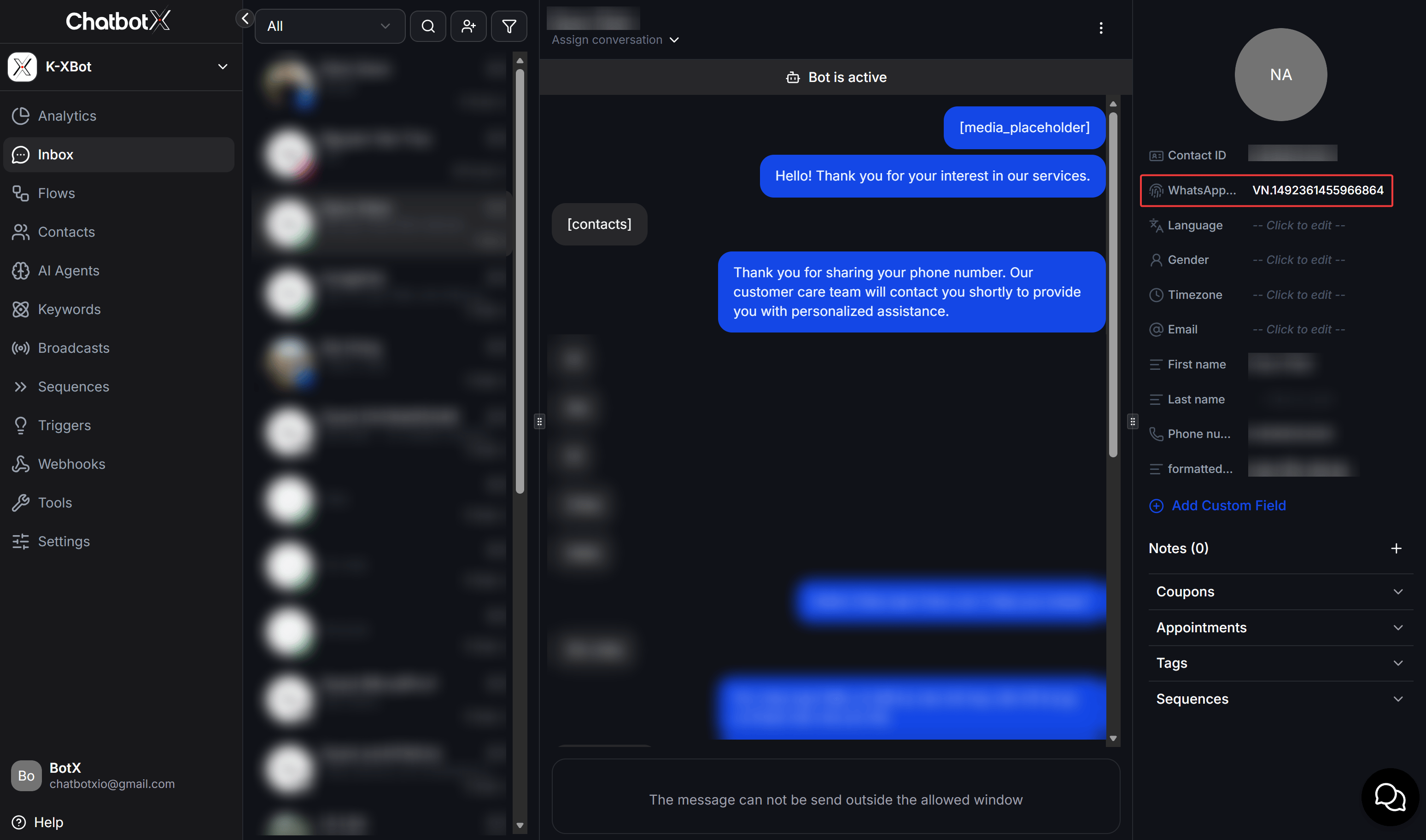 Inside the ChatbotX **Live Chat Inbox**:
* **Direct BSUID Visibility:** On the contact profile panel on the right sidebar, the WhatsApp BSUID (e.g., `VN.1492361455966864`) is clearly visible, enabling support teams to identify users even when phone numbers are masked.
* **1-Tap Contact Information Capture:** When a user shares their phone number, a `[contacts]` card is received in the chat and automatically linked to the active BSUID record.
* **Seamless Live Support:** Support agents can easily monitor active automation states (`Bot is active`), add tags, create notes, and reassign conversations smoothly.
### Rolling Out
| Upcoming Capability | Focus & Functionality |
| ------------------------------------------ | ----------------------------------------------------------------------------------------------------------------------------------------------------- |
| **Auto-Merge & Conversation Interlinking** | Automatically merges contact records upon phone capture, displays BSUID in the Live Chat Inbox, and links historical conversation threads seamlessly. |
| **Request Contact Info Template Message** | Send pre-approved WhatsApp Template Messages with a native Request Contact Info share button for outreach outside the 24-hour window. |
## Operational Impact & Business Solutions
When WhatsApp transitions to BSUID customer identification, businesses should proactively adapt across 3 operational domains to maintain uninterrupted service and reliable customer records:
### CRM and Database Management
If your CRM uses phone numbers as primary keys, new conversations from username-only leads could result in anonymous contacts or synchronization errors.
* **Challenge:** Traditional CRM setups will reject or create duplicate empty records when new leads reach out without a phone number.
* **Solution:** Update your database schemas to store `BSUID` alongside `Phone`. Upgrade search and lookup queries to support both fields. ChatbotX automatically associates the `BSUID` with the correct customer record as soon as a phone number is provided during conversation.
### Click-to-WhatsApp (CTWA) Ads
For users who click Click-to-WhatsApp ads with phone-masking enabled, initial contact data is recorded solely via BSUID.
* **Challenge:** Businesses risk losing re-engagement access once the 72-hour free messaging window closes if no phone number was gathered.
* **Solution:** Design a Welcome Flow that automatically greets users and presents a convenient Native 1-tap Get Contact Info button to collect their phone number for long-term customer care.
### Support and Inbox Management
Inside the ChatbotX Live Chat Inbox, customer conversations initiated through WhatsApp are managed seamlessly without disruptions.
* **Challenge:** Support agents may encounter customer profiles displaying alphanumeric BSUIDs instead of conventional phone numbers.
* **Solution:** Train support teams to recognize BSUIDs as valid, persistent customer identifiers. Agents can utilize built-in canned responses or contact request actions whenever phone verification is necessary for specialized actions (e.g., shipping, warranty, or authentication).
## 5-Step Implementation Roadmap
To prepare your operations smoothly for WhatsApp updates, follow this 5-step implementation plan:
Review all chatbot flows, API integrations, and database tables to identify dependencies where phone numbers are used as the sole unique identifier.
Add a `BSUID` field (up to 131 characters, supporting alphanumeric strings) to your contact tables to store alongside phone numbers.
Configure ChatbotX Flows to support BSUID branching. Add automated phone collection blocks for order placement and OTP verification flows.
Run end-to-end tests using username-enabled WhatsApp test accounts to verify data capture accuracy and contact profile deduplication.
Launch your updated workflows. Monitor response rates, phone capture conversion metrics, and user feedback to refine conversation steps proactively.
## Frequently Asked Questions (FAQ)
No. All historical contacts and their recorded phone numbers remain fully intact in ChatbotX. You do not need to re-collect data for existing leads.
No. You can continue sending Broadcast campaigns to existing phone number lists as usual. The update only affects new users who proactively reach out via username.
No. OTP authentication messages must be delivered to a verified physical phone number. You must collect the customer's phone number before triggering an OTP flow.
No. BSUIDs are isolated per Meta Business Portfolio. If you manage two brands under separate Portfolios, the same user will have two independent BSUIDs.
No. The BSUID is anchored to the persistent relationship between the user and your business, independent of whether the user changes or removes their public username.
Inside the ChatbotX **Live Chat Inbox**:
* **Direct BSUID Visibility:** On the contact profile panel on the right sidebar, the WhatsApp BSUID (e.g., `VN.1492361455966864`) is clearly visible, enabling support teams to identify users even when phone numbers are masked.
* **1-Tap Contact Information Capture:** When a user shares their phone number, a `[contacts]` card is received in the chat and automatically linked to the active BSUID record.
* **Seamless Live Support:** Support agents can easily monitor active automation states (`Bot is active`), add tags, create notes, and reassign conversations smoothly.
### Rolling Out
| Upcoming Capability | Focus & Functionality |
| ------------------------------------------ | ----------------------------------------------------------------------------------------------------------------------------------------------------- |
| **Auto-Merge & Conversation Interlinking** | Automatically merges contact records upon phone capture, displays BSUID in the Live Chat Inbox, and links historical conversation threads seamlessly. |
| **Request Contact Info Template Message** | Send pre-approved WhatsApp Template Messages with a native Request Contact Info share button for outreach outside the 24-hour window. |
## Operational Impact & Business Solutions
When WhatsApp transitions to BSUID customer identification, businesses should proactively adapt across 3 operational domains to maintain uninterrupted service and reliable customer records:
### CRM and Database Management
If your CRM uses phone numbers as primary keys, new conversations from username-only leads could result in anonymous contacts or synchronization errors.
* **Challenge:** Traditional CRM setups will reject or create duplicate empty records when new leads reach out without a phone number.
* **Solution:** Update your database schemas to store `BSUID` alongside `Phone`. Upgrade search and lookup queries to support both fields. ChatbotX automatically associates the `BSUID` with the correct customer record as soon as a phone number is provided during conversation.
### Click-to-WhatsApp (CTWA) Ads
For users who click Click-to-WhatsApp ads with phone-masking enabled, initial contact data is recorded solely via BSUID.
* **Challenge:** Businesses risk losing re-engagement access once the 72-hour free messaging window closes if no phone number was gathered.
* **Solution:** Design a Welcome Flow that automatically greets users and presents a convenient Native 1-tap Get Contact Info button to collect their phone number for long-term customer care.
### Support and Inbox Management
Inside the ChatbotX Live Chat Inbox, customer conversations initiated through WhatsApp are managed seamlessly without disruptions.
* **Challenge:** Support agents may encounter customer profiles displaying alphanumeric BSUIDs instead of conventional phone numbers.
* **Solution:** Train support teams to recognize BSUIDs as valid, persistent customer identifiers. Agents can utilize built-in canned responses or contact request actions whenever phone verification is necessary for specialized actions (e.g., shipping, warranty, or authentication).
## 5-Step Implementation Roadmap
To prepare your operations smoothly for WhatsApp updates, follow this 5-step implementation plan:
Review all chatbot flows, API integrations, and database tables to identify dependencies where phone numbers are used as the sole unique identifier.
Add a `BSUID` field (up to 131 characters, supporting alphanumeric strings) to your contact tables to store alongside phone numbers.
Configure ChatbotX Flows to support BSUID branching. Add automated phone collection blocks for order placement and OTP verification flows.
Run end-to-end tests using username-enabled WhatsApp test accounts to verify data capture accuracy and contact profile deduplication.
Launch your updated workflows. Monitor response rates, phone capture conversion metrics, and user feedback to refine conversation steps proactively.
## Frequently Asked Questions (FAQ)
No. All historical contacts and their recorded phone numbers remain fully intact in ChatbotX. You do not need to re-collect data for existing leads.
No. You can continue sending Broadcast campaigns to existing phone number lists as usual. The update only affects new users who proactively reach out via username.
No. OTP authentication messages must be delivered to a verified physical phone number. You must collect the customer's phone number before triggering an OTP flow.
No. BSUIDs are isolated per Meta Business Portfolio. If you manage two brands under separate Portfolios, the same user will have two independent BSUIDs.
No. The BSUID is anchored to the persistent relationship between the user and your business, independent of whether the user changes or removes their public username.