> ## Documentation Index
> Fetch the complete documentation index at: https://chatbotx.io/docs/llms.txt
> Use this file to discover all available pages before exploring further.
# How to create a Zalo OA account
> Learn how to create a Zalo Official Account and connect it to ChatbotX so you can automate customer care on Zalo.
Zalo OA, or Zalo Official Account, is the official business presence for a company, brand, organization, or community on Zalo. During your Zalo business operations, you can use this page together with personal Zalo or Zalo Shop to sell products and interact with customers.
 Zalo OA brings together the features businesses need most. From there, you can run marketing activities and build customer communication on the Zalo platform.
## 1. Steps to register an OA
### Step 1: Open the OA creation page
Sign in to your OA account through [this link](http://oa.zalo.me/manage).
There are 2 sign-in methods:
* Sign in with the phone number and password already registered with Zalo
* Scan the QR code
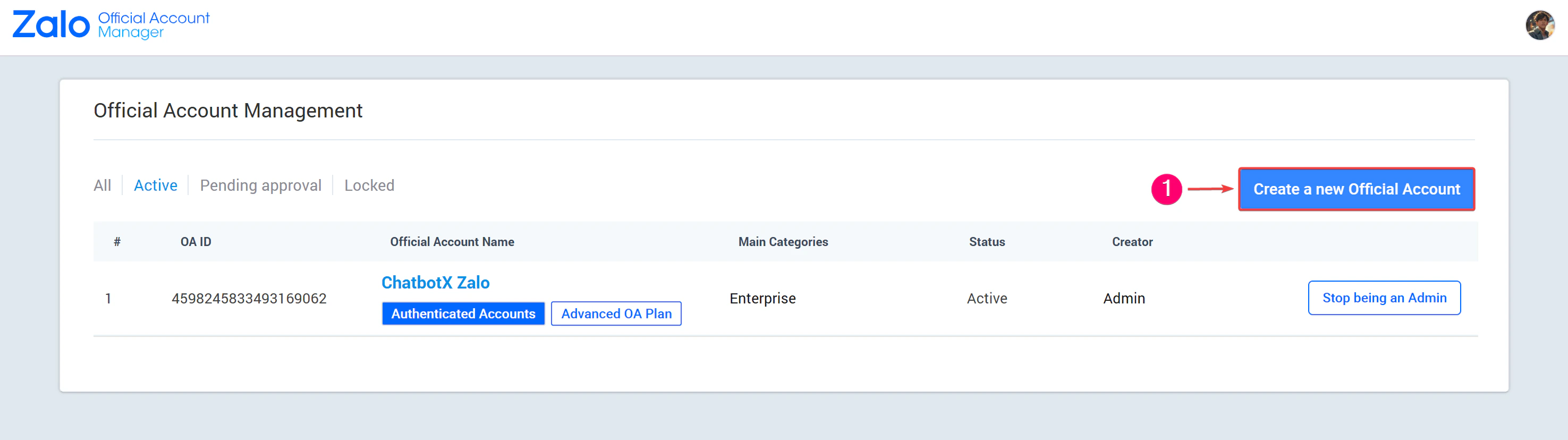
Click **Create new Official Account**.
Zalo OA brings together the features businesses need most. From there, you can run marketing activities and build customer communication on the Zalo platform.
## 1. Steps to register an OA
### Step 1: Open the OA creation page
Sign in to your OA account through [this link](http://oa.zalo.me/manage).
There are 2 sign-in methods:
* Sign in with the phone number and password already registered with Zalo
* Scan the QR code
Click **Create new Official Account**.
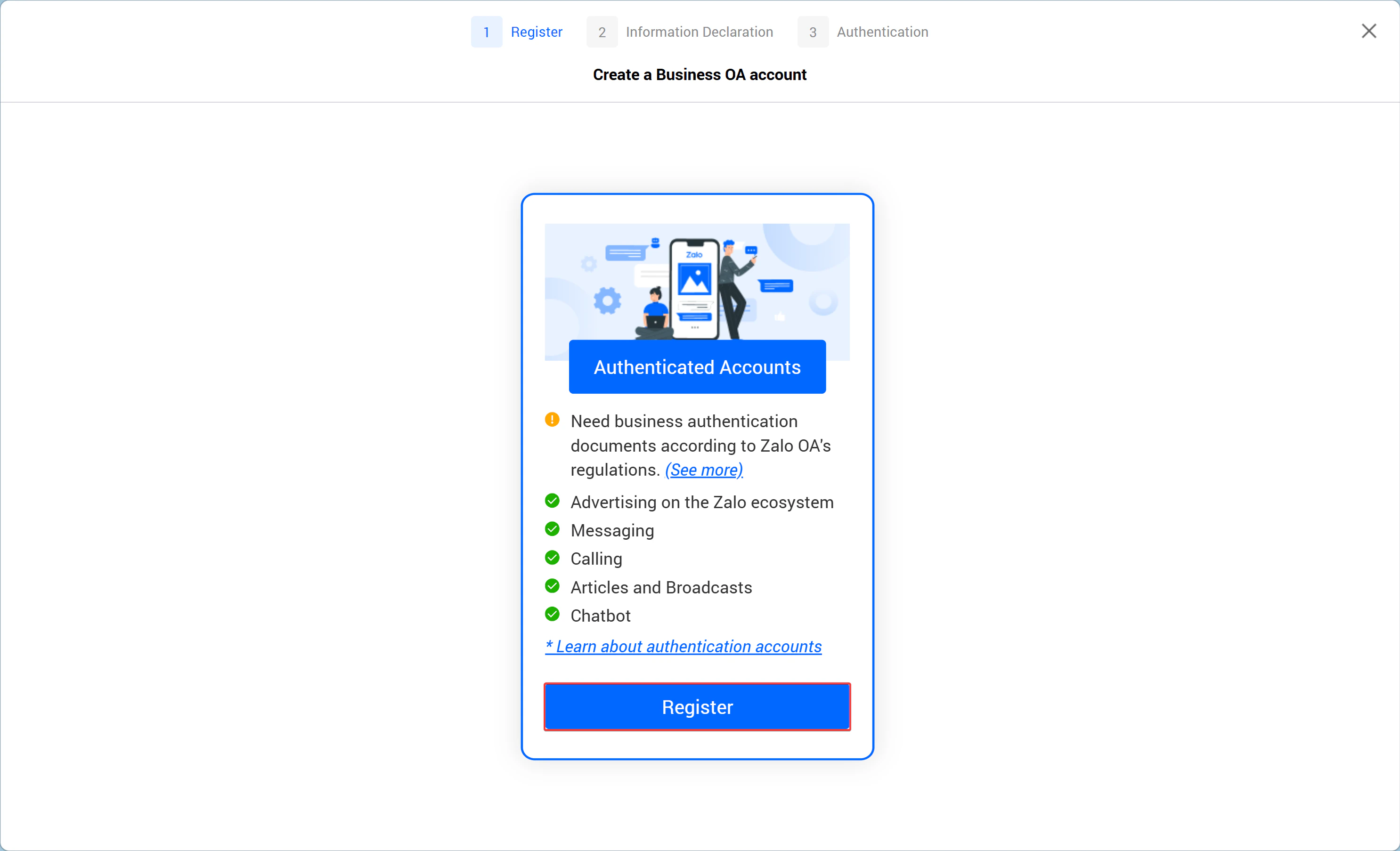
 ### Step 2: Start registration
 ### Step 3: Enter business information
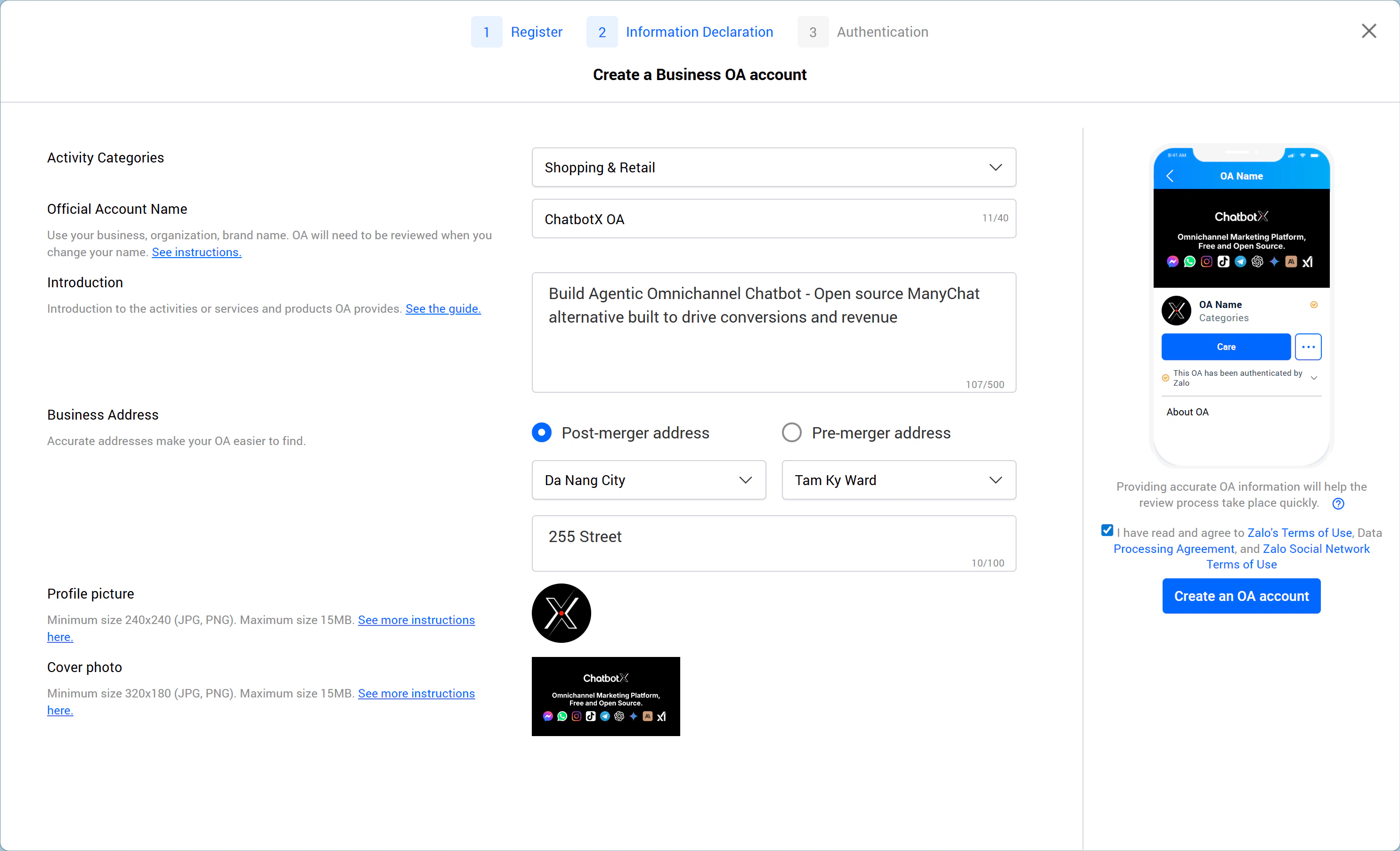
Fill in the required details: **Category, Official Account name, description, address,** and the company **logo**.
### Step 3: Enter business information
Fill in the required details: **Category, Official Account name, description, address,** and the company **logo**.
 ### Step 4: Verify the OA account
Zalo Official Account represents a business, so Zalo requires verification to confirm that the account belongs to the real business. Once approved, the business receives the yellow badge, similar in concept to the blue check on a Facebook Fanpage. Upload the required information to start the verification process.
### Step 4: Verify the OA account
Zalo Official Account represents a business, so Zalo requires verification to confirm that the account belongs to the real business. Once approved, the business receives the yellow badge, similar in concept to the blue check on a Facebook Fanpage. Upload the required information to start the verification process.
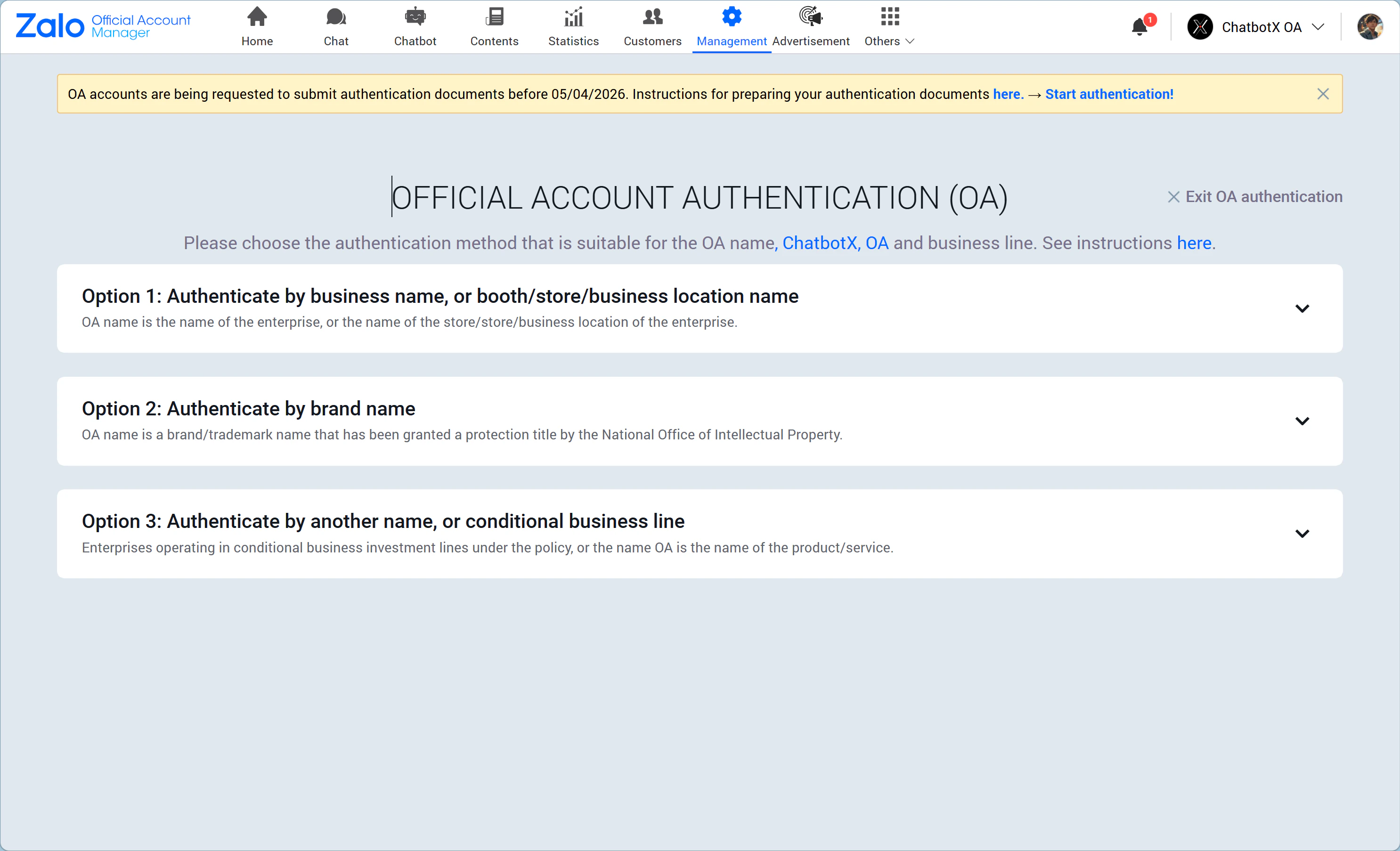 You can choose 1 of 3 verification paths and provide the proof documents Zalo requires.
The details are as follows:
### Method 1: Verify using the business name, store name, or business location name
You can choose one of these two document sets:
You can choose 1 of 3 verification paths and provide the proof documents Zalo requires.
The details are as follows:
### Method 1: Verify using the business name, store name, or business location name
You can choose one of these two document sets:
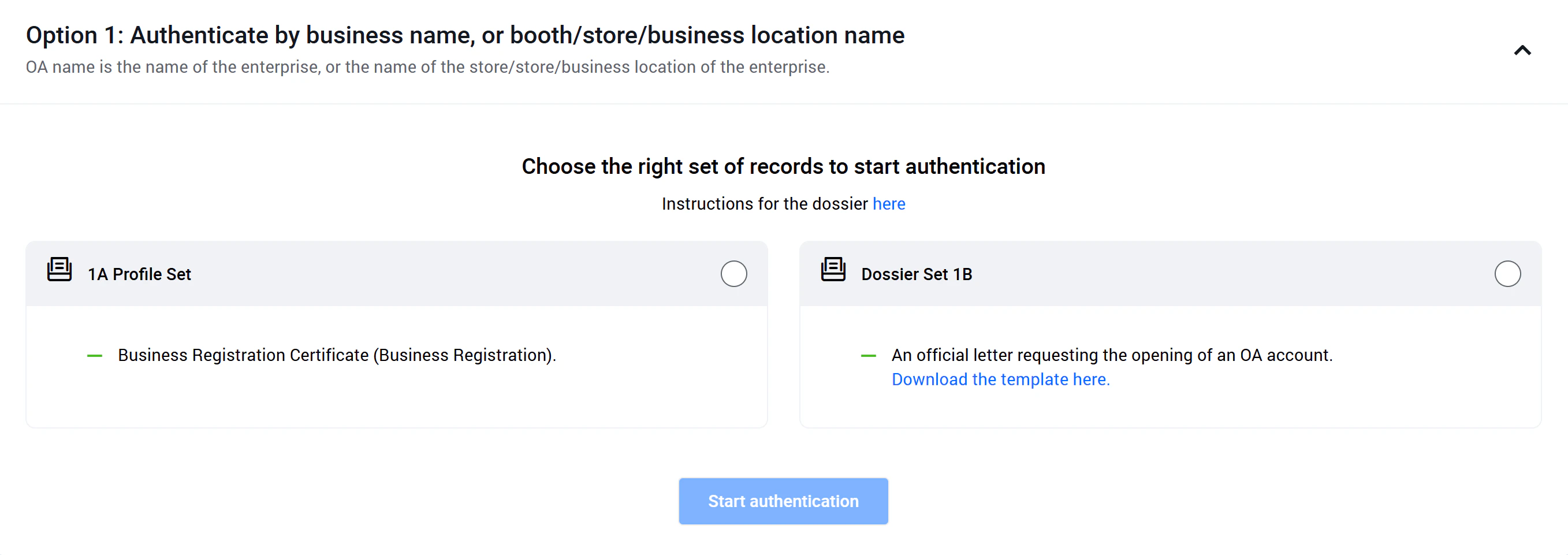 **Document set 1A:** Business registration certificate.
* **Business license:** The registered business category must match your service according to the law, and the document must still be valid.
* **Citizen ID / national ID / passport:** The information must match the legal representative named on the business registration certificate. If you cannot provide the representative's ID or passport, use document set 1B instead.
**Document set 1B:** A photo or scan of the official OA account verification letter with the company's red stamp, following [this template](https://docs.google.com/document/d/1gf7rnO0wgiEc0B_RJ-0hLFZHA3Kh2HRZ/edit?usp=sharing\&ouid=100080466753103792521\&rtpof=true\&sd=true).
### Method 2: Verify using the brand name
You can choose one of these two proof sets:
**Document set 1A:** Business registration certificate.
* **Business license:** The registered business category must match your service according to the law, and the document must still be valid.
* **Citizen ID / national ID / passport:** The information must match the legal representative named on the business registration certificate. If you cannot provide the representative's ID or passport, use document set 1B instead.
**Document set 1B:** A photo or scan of the official OA account verification letter with the company's red stamp, following [this template](https://docs.google.com/document/d/1gf7rnO0wgiEc0B_RJ-0hLFZHA3Kh2HRZ/edit?usp=sharing\&ouid=100080466753103792521\&rtpof=true\&sd=true).
### Method 2: Verify using the brand name
You can choose one of these two proof sets:
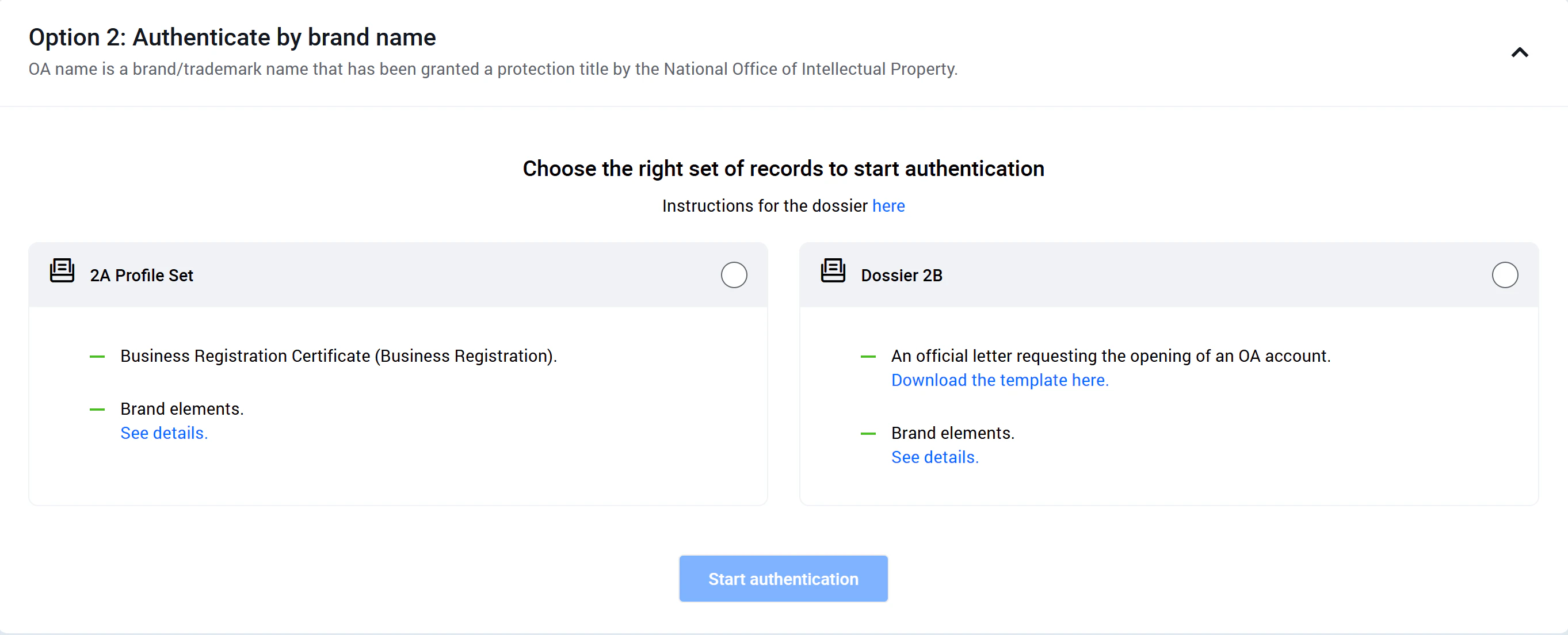 **Document set 2A:** A photo or scan of the business registration certificate, the ID or passport of the authorized representative, and documents proving the right to use the brand.
* **Business license:** The registered business category must match the business activity, and the document must still be valid.
* **Citizen ID / national ID / passport:** The information must match the legal representative on the business registration certificate. If you cannot provide that ID, use document set 2B instead.
* **Brand verification documents:** This may include a valid trademark registration certificate issued by the Intellectual Property Office, a valid trademark authorization from the parent company, or any other legal document proving that the OA has the right to own or use the protected trademark in Vietnam. [See more details here.](https://oa.zalo.me/home/documents/guides/theo-ten-thuong-hieu-nhan-hieu_155219148209277740)
**Document set 2B:**
* A photo or scan of the official OA verification letter with the company's red stamp, based on [this template](https://docs.google.com/document/d/1gf7rnO0wgiEc0B_RJ-0hLFZHA3Kh2HRZ/edit?usp=sharing\&ouid=100080466753103792521\&rtpof=true\&sd=true).
* **Brand verification documents:** This can be a trademark registration certificate, a valid trademark authorization, or another legal document proving the OA has the right to use the protected brand in Vietnam. [See more details here.](https://oa.zalo.me/home/documents/guides/theo-ten-thuong-hieu-nhan-hieu_155219148209277740)
### Method 3: Verify using another name or a regulated business category
You can choose one of these two document sets:
**Document set 2A:** A photo or scan of the business registration certificate, the ID or passport of the authorized representative, and documents proving the right to use the brand.
* **Business license:** The registered business category must match the business activity, and the document must still be valid.
* **Citizen ID / national ID / passport:** The information must match the legal representative on the business registration certificate. If you cannot provide that ID, use document set 2B instead.
* **Brand verification documents:** This may include a valid trademark registration certificate issued by the Intellectual Property Office, a valid trademark authorization from the parent company, or any other legal document proving that the OA has the right to own or use the protected trademark in Vietnam. [See more details here.](https://oa.zalo.me/home/documents/guides/theo-ten-thuong-hieu-nhan-hieu_155219148209277740)
**Document set 2B:**
* A photo or scan of the official OA verification letter with the company's red stamp, based on [this template](https://docs.google.com/document/d/1gf7rnO0wgiEc0B_RJ-0hLFZHA3Kh2HRZ/edit?usp=sharing\&ouid=100080466753103792521\&rtpof=true\&sd=true).
* **Brand verification documents:** This can be a trademark registration certificate, a valid trademark authorization, or another legal document proving the OA has the right to use the protected brand in Vietnam. [See more details here.](https://oa.zalo.me/home/documents/guides/theo-ten-thuong-hieu-nhan-hieu_155219148209277740)
### Method 3: Verify using another name or a regulated business category
You can choose one of these two document sets:
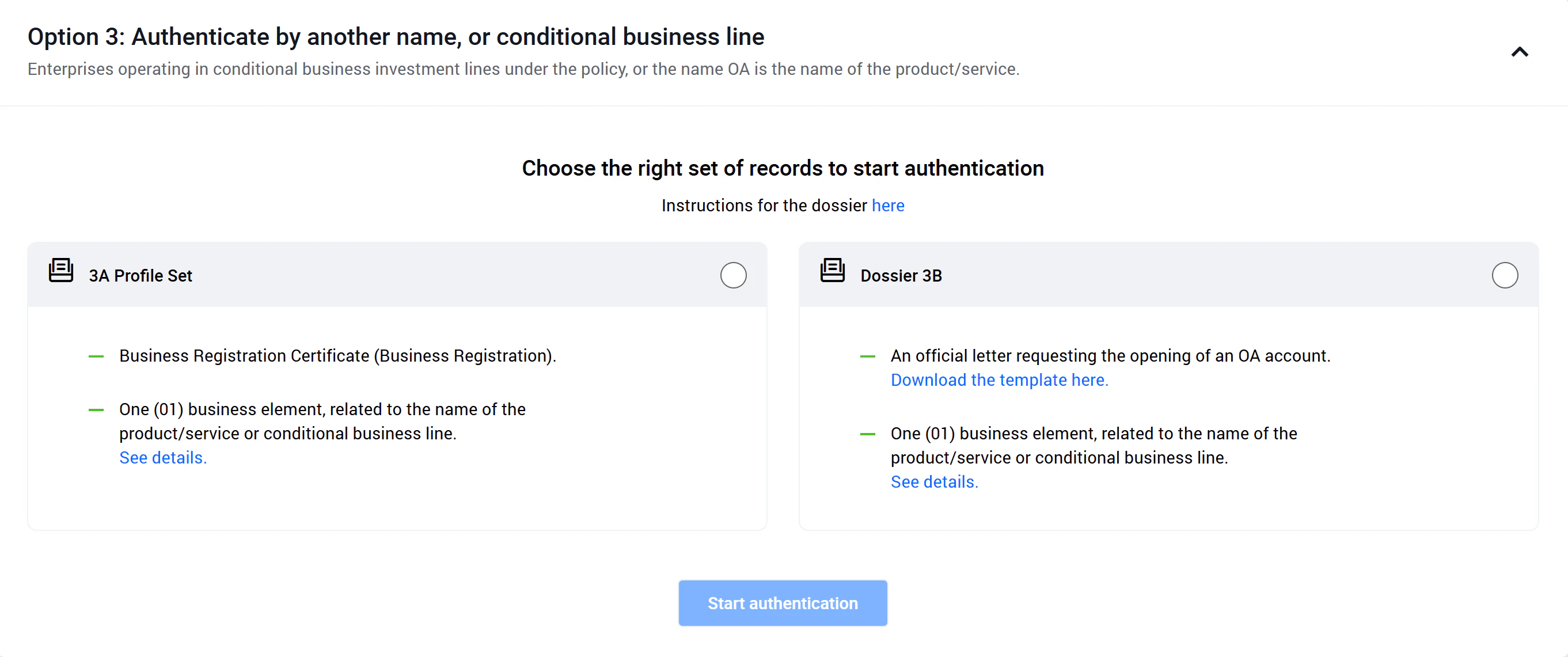 **Document set 3A:** A photo or scan of the business registration certificate, the ID or passport of the authorized representative, and one supporting document that proves the industry, business type, product, or service.
* **Business license:** The business category on the license must match the service provided and must still be valid.
* **Citizen ID / national ID / passport:** The information must match the legal representative listed on the certificate. If you cannot provide the representative's ID, use document set 3B instead.
* **One business proof document:** Please review the accepted document types [here](https://zalooa.freshdesk.com/support/solutions/articles/64000259632#giao_dich).
**Document set 3B:**
* A photo or scan of the official OA verification letter with the company's red stamp, based on [this template](https://docs.google.com/document/d/1gf7rnO0wgiEc0B_RJ-0hLFZHA3Kh2HRZ/edit?usp=sharing\&ouid=100080466753103792521\&rtpof=true\&sd=true).
* **One business proof document:** Please review the accepted document types [here](https://zalooa.freshdesk.com/support/solutions/articles/64000259632#giao_dich).
Zalo OA support will usually send a confirmation within about 7 working days. Once the approval is complete, you can access the full set of advanced Zalo OA features. Wishing you a smooth and successful launch.
**Document set 3A:** A photo or scan of the business registration certificate, the ID or passport of the authorized representative, and one supporting document that proves the industry, business type, product, or service.
* **Business license:** The business category on the license must match the service provided and must still be valid.
* **Citizen ID / national ID / passport:** The information must match the legal representative listed on the certificate. If you cannot provide the representative's ID, use document set 3B instead.
* **One business proof document:** Please review the accepted document types [here](https://zalooa.freshdesk.com/support/solutions/articles/64000259632#giao_dich).
**Document set 3B:**
* A photo or scan of the official OA verification letter with the company's red stamp, based on [this template](https://docs.google.com/document/d/1gf7rnO0wgiEc0B_RJ-0hLFZHA3Kh2HRZ/edit?usp=sharing\&ouid=100080466753103792521\&rtpof=true\&sd=true).
* **One business proof document:** Please review the accepted document types [here](https://zalooa.freshdesk.com/support/solutions/articles/64000259632#giao_dich).
Zalo OA support will usually send a confirmation within about 7 working days. Once the approval is complete, you can access the full set of advanced Zalo OA features. Wishing you a smooth and successful launch.