> ## Documentation Index
> Fetch the complete documentation index at: https://chatbotx.io/docs/llms.txt
> Use this file to discover all available pages before exploring further.
# Configure App Credentials
> Guide to configure Platform Credentials: set up custom developer applications for branded user logins and channel connections.
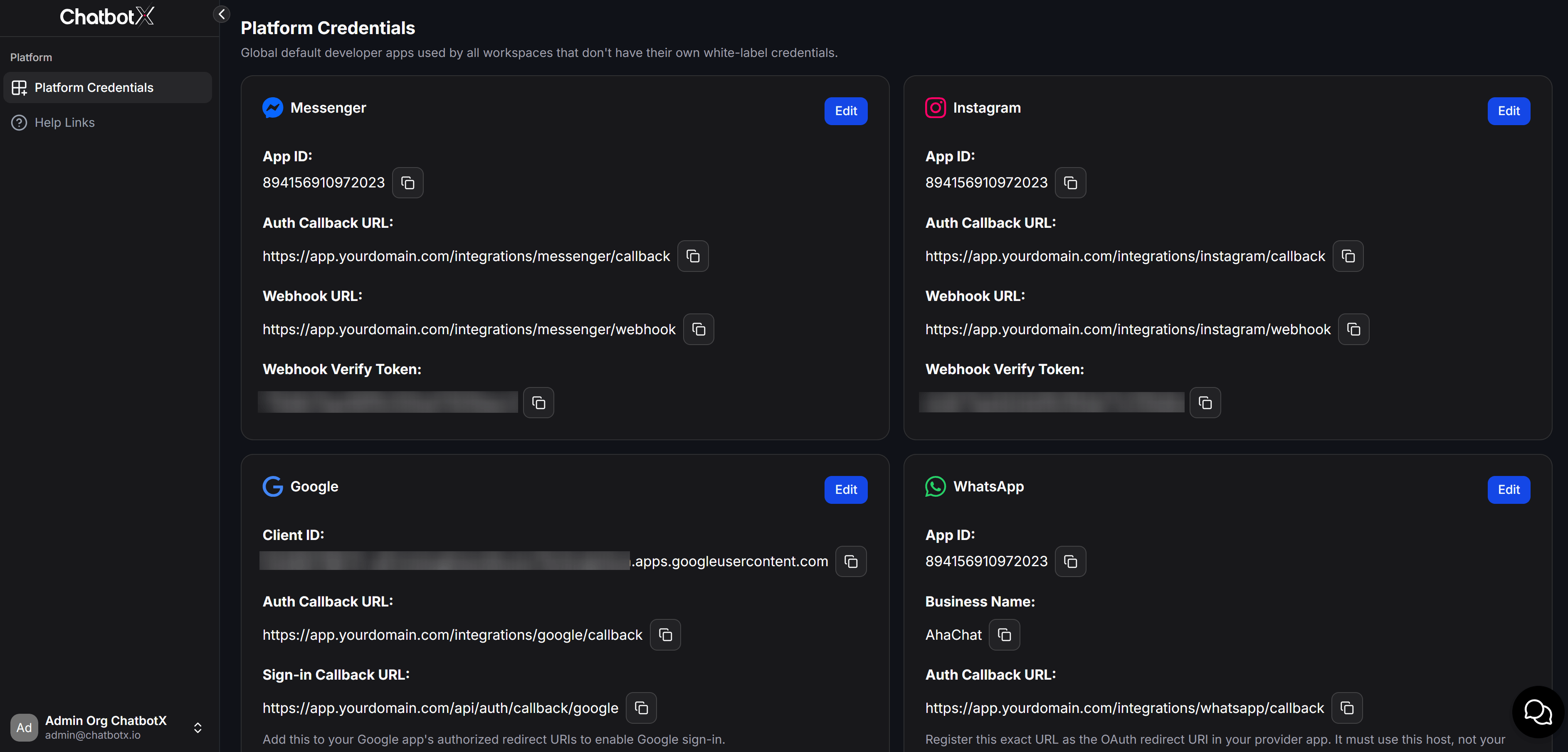
**Platform Credentials** is where you configure API connection credentials for third-party platforms and developer applications (such as Meta, Google, TikTok, Zalo, GIPHY) to integrate into your self-hosted portal.
Because your system operates independently on your own servers and custom domains, configuring these API credentials is **mandatory** for the Super Admin. The system does not support sharing default pre-configured developer applications from ChatbotX. All user channel connections will route directly through developer applications owned and managed by you.
Go to your Super Admin portal:
```text theme={null}
https://app.yourdomain.com/admin
```
And log in with your credentials.
From the left sidebar menu, go to **Super Admin > Platform Credentials**.
Select the platform you want to set up and click the **Edit** button to enter your custom developer credentials.
 ## Goal of Configuring Custom Developer Apps
Setting up your own developer applications allows you to control your infrastructure and personalize the experience for your users:
* **Branded Authorization:** When a user connects a channel (e.g., logging into Facebook to connect a Messenger page), the platform authorization dialog displays your own brand name and logo instead of ChatbotX.
* **API Resource Control:** You manage your own API quotas and limits for integrated services (such as Google Sheets, Google Calendar, Zalo OA), preventing rate limits from being affected by external systems.
* **Maximum Security:** User authorization tokens and data are processed directly through your servers and developer apps that you fully control.
## List of Mandatory Applications to Configure
You must configure custom values for Client ID, Client Secret, or API Key for the following platforms to activate their corresponding features for your users:
| Platform | Core Functionality | Configuration Requirement |
| ------------- | --------------------------------------------- | ---------------------------------------------------------------------------------------------------------------------- |
| **Messenger** | Connect Facebook Fanpage | Mandatory to configure a Meta App to handle user login flows and receive Facebook Webhook events. |
| **Instagram** | Connect Instagram Business | Mandatory to configure a Meta App to allow users to integrate Instagram Business Messaging. |
| **Google** | Google Login, sync Sheets & Calendar | Mandatory to configure a Google App to show your own branded OAuth Consent screen and provide custom API quota limits. |
| **WhatsApp** | Connect WhatsApp Business via Embedded Signup | Mandatory to configure a Meta App and setup Embedded Signup under your custom organization branding. |
| **Zalo** | Connect Zalo OA | Mandatory to link Zalo Developer App credentials so users can authorize and connect Zalo OA accounts directly. |
| **TikTok** | Connect TikTok account | Mandatory to configure a TikTok Developer App to synchronize and manage incoming messages from TikTok. |
| **GIPHY** | Search and send GIFs in messages | Mandatory to configure your own GIPHY API key to activate the GIF search feature inside the message composer toolbar. |
## Detailed Setup Guides for Each Platform
To start configuring custom developer applications, follow these detailed setup guides:
Connect and manage user Facebook Fanpages using your custom Meta developer application.
Configure your Meta app to integrate Instagram Business Messaging for your portal users.
Set up Client ID, Client Secret, and Webhook Verify Token for Google Login, Sheets, and Calendar.
Configure WhatsApp Business integration via the Embedded Signup flow branded under your organization.
Link your Zalo Developer app so users can authorize and connect Zalo OA accounts directly.
Integrate your TikTok Developer app to synchronize and manage incoming messages from TikTok.
Before configuring any custom developer applications, ensure you have updated your brand's legal policies on the **Super Admin > Platform Branding** page (including Privacy Policy URL and Terms of Service URL). These links are mandatory when registering developer apps on Facebook, Google, or TikTok.
## Goal of Configuring Custom Developer Apps
Setting up your own developer applications allows you to control your infrastructure and personalize the experience for your users:
* **Branded Authorization:** When a user connects a channel (e.g., logging into Facebook to connect a Messenger page), the platform authorization dialog displays your own brand name and logo instead of ChatbotX.
* **API Resource Control:** You manage your own API quotas and limits for integrated services (such as Google Sheets, Google Calendar, Zalo OA), preventing rate limits from being affected by external systems.
* **Maximum Security:** User authorization tokens and data are processed directly through your servers and developer apps that you fully control.
## List of Mandatory Applications to Configure
You must configure custom values for Client ID, Client Secret, or API Key for the following platforms to activate their corresponding features for your users:
| Platform | Core Functionality | Configuration Requirement |
| ------------- | --------------------------------------------- | ---------------------------------------------------------------------------------------------------------------------- |
| **Messenger** | Connect Facebook Fanpage | Mandatory to configure a Meta App to handle user login flows and receive Facebook Webhook events. |
| **Instagram** | Connect Instagram Business | Mandatory to configure a Meta App to allow users to integrate Instagram Business Messaging. |
| **Google** | Google Login, sync Sheets & Calendar | Mandatory to configure a Google App to show your own branded OAuth Consent screen and provide custom API quota limits. |
| **WhatsApp** | Connect WhatsApp Business via Embedded Signup | Mandatory to configure a Meta App and setup Embedded Signup under your custom organization branding. |
| **Zalo** | Connect Zalo OA | Mandatory to link Zalo Developer App credentials so users can authorize and connect Zalo OA accounts directly. |
| **TikTok** | Connect TikTok account | Mandatory to configure a TikTok Developer App to synchronize and manage incoming messages from TikTok. |
| **GIPHY** | Search and send GIFs in messages | Mandatory to configure your own GIPHY API key to activate the GIF search feature inside the message composer toolbar. |
## Detailed Setup Guides for Each Platform
To start configuring custom developer applications, follow these detailed setup guides:
Connect and manage user Facebook Fanpages using your custom Meta developer application.
Configure your Meta app to integrate Instagram Business Messaging for your portal users.
Set up Client ID, Client Secret, and Webhook Verify Token for Google Login, Sheets, and Calendar.
Configure WhatsApp Business integration via the Embedded Signup flow branded under your organization.
Link your Zalo Developer app so users can authorize and connect Zalo OA accounts directly.
Integrate your TikTok Developer app to synchronize and manage incoming messages from TikTok.
Before configuring any custom developer applications, ensure you have updated your brand's legal policies on the **Super Admin > Platform Branding** page (including Privacy Policy URL and Terms of Service URL). These links are mandatory when registering developer apps on Facebook, Google, or TikTok.