> ## Documentation Index
> Fetch the complete documentation index at: https://chatbotx.io/docs/llms.txt
> Use this file to discover all available pages before exploring further.
# Facebook & Instagram Comment Automation Analytics
> Track and analyze Facebook and Instagram comment automation performance in ChatbotX: delivery rates, open rates, clicks, error logs, and comment insights.
**Comment Automation Analytics** is the dedicated analytics hub for tracking the performance of your automated comment response campaigns in ChatbotX. The system provides real-time, visual reporting for both automated actions: publishing public replies under post comments and sending private direct messages into the customer's Inbox.
This analytics dashboard is shared seamlessly across both supported platforms:
* [Facebook Comment Automation](/docs/tools/facebook-comment-automation): Automate responses across Fanpage posts, ads, and Reels.
* [Instagram Comment Automation](/docs/tools/instagram-comment-automation): Automate replies across Instagram Business posts and Reels.
 ## How to Access the Analytics Dashboard
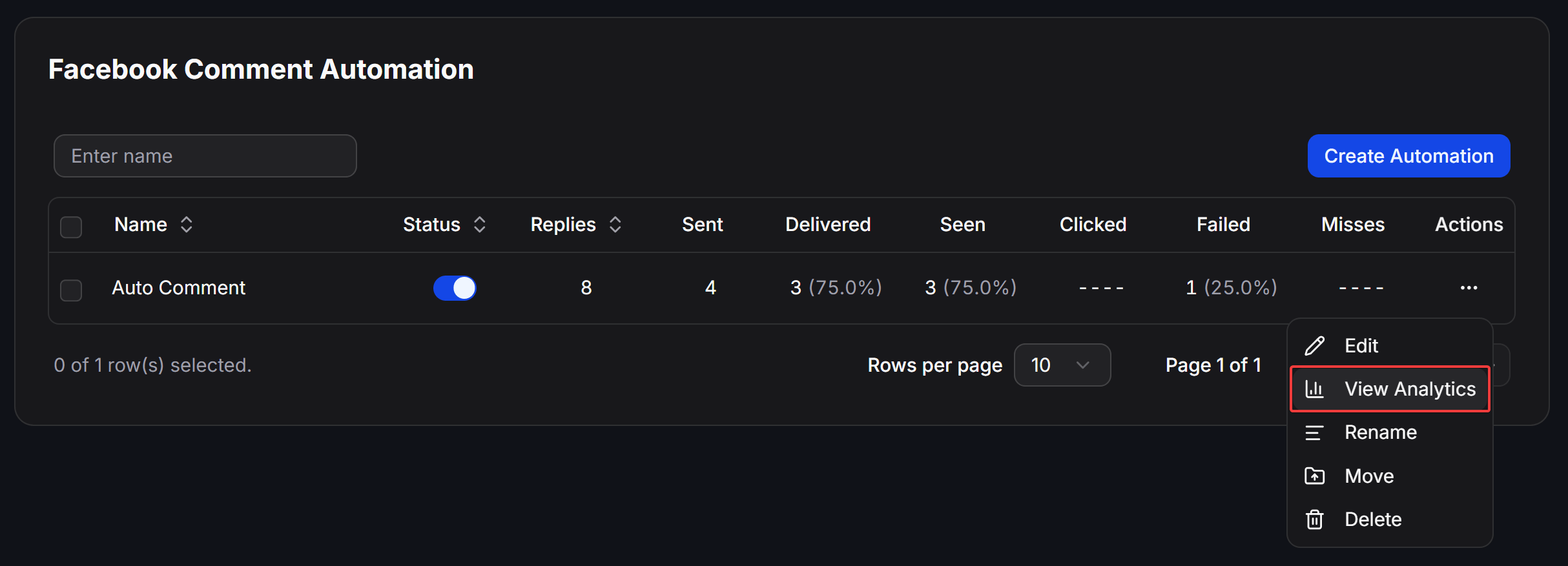
You can access the dedicated analytics screen for any individual campaign by following these steps:
From the left sidebar of your portal, click **Tools**, then select **Facebook Comment Automation** or **Instagram Comment Automation** depending on the channel you are monitoring.
In the campaign data table, find the specific automation row you want to inspect.
Click the three dots `...` in the **Actions** column on the far right of the row, then select **View Analytics**. You will be directed immediately to the campaign's comprehensive reporting page.
## Core Metrics on the Campaign Table
Directly within the campaign management table, ChatbotX displays high-level funnel metrics so you can review real-time performance at a glance:
| Metric | Calculation & Definition | Diagnostic Purpose |
| ------------- | ----------------------------------------------------------------------------------------------- | ---------------------------------------------------------------------------------------------------------- |
| **Replies** | Total count of customer comments that the bot processed and publicly replied to. | Measures total public engagement generated on the post. |
| **Sent** | Total count of private messages the system attempted to send to customer Inboxes. | Gauges top-of-funnel lead generation transitioning from comments to 1-on-1 chats. |
| **Delivered** | Number and percentage of private messages successfully delivered (`Delivered / Sent`). | Reflects delivery reliability and alerts you to possible reach issues or platform blocks. |
| **Seen** | Number and percentage of delivered messages opened and viewed by contacts (`Seen / Delivered`). | Measures initial customer interest and how compelling your message preview or push notification was. |
| **Clicked** | Number and percentage of contacts who clicked a button or link within the automated message. | Directly evaluates the conversion rate of your call-to-action (CTA) inside the Flow. |
| **Failed** | Number and percentage of message deliveries that failed (`Failed / Sent`). | Warns of 24-hour messaging window violations, blocked contacts, or missing channel permissions. |
| **Misses** | Number of comments evaluated but intentionally skipped without dispatching a private reply. | Highlights contacts filtered out based on keywords, rules (e.g., reply once per user), or repeat comments. |
## Reply Volume Trends Over Time
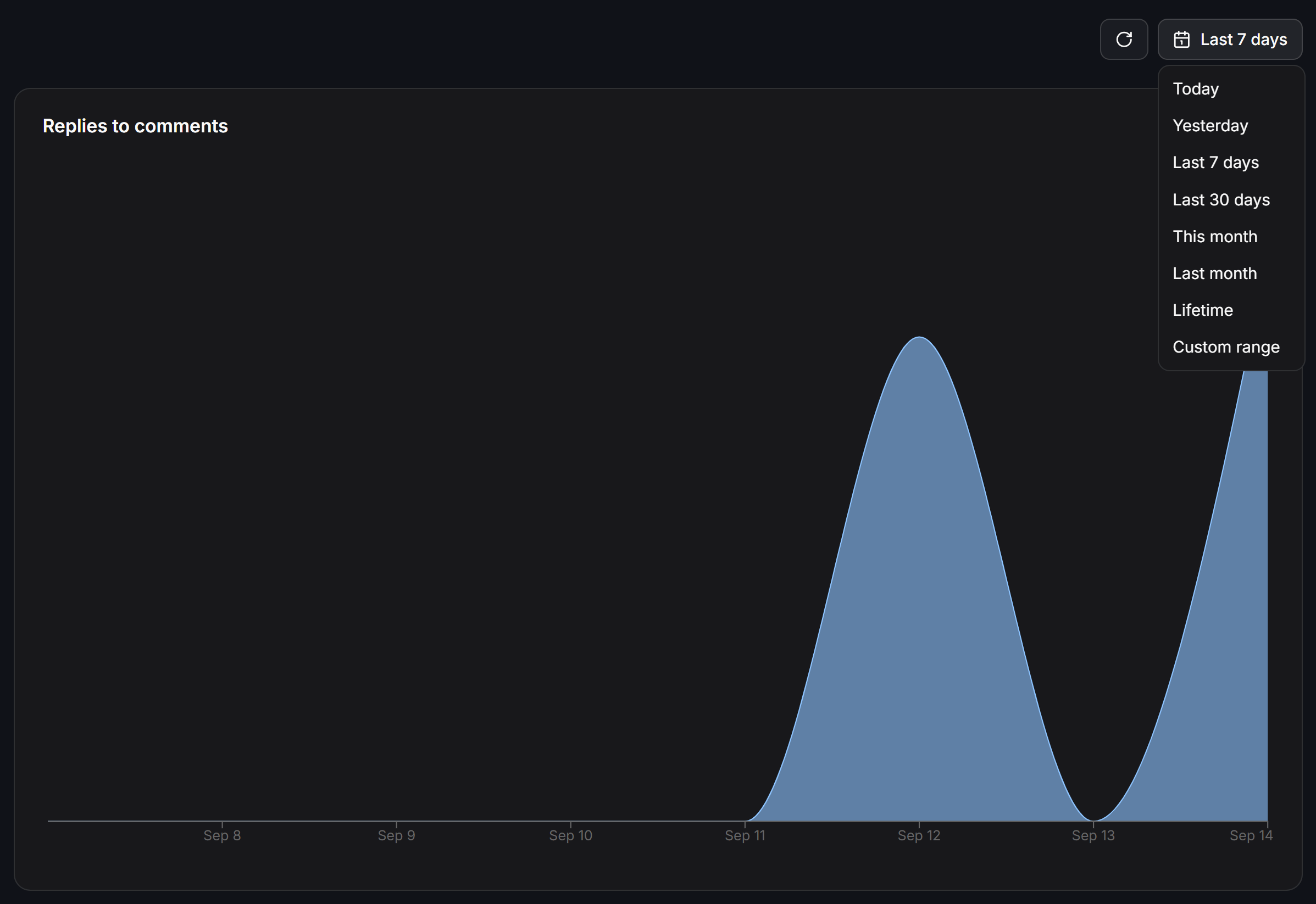
The **Replies to comments** section features a visual trend chart plotting the volume of public replies executed each day over your selected date range.
## How to Access the Analytics Dashboard
You can access the dedicated analytics screen for any individual campaign by following these steps:
From the left sidebar of your portal, click **Tools**, then select **Facebook Comment Automation** or **Instagram Comment Automation** depending on the channel you are monitoring.
In the campaign data table, find the specific automation row you want to inspect.
Click the three dots `...` in the **Actions** column on the far right of the row, then select **View Analytics**. You will be directed immediately to the campaign's comprehensive reporting page.
## Core Metrics on the Campaign Table
Directly within the campaign management table, ChatbotX displays high-level funnel metrics so you can review real-time performance at a glance:
| Metric | Calculation & Definition | Diagnostic Purpose |
| ------------- | ----------------------------------------------------------------------------------------------- | ---------------------------------------------------------------------------------------------------------- |
| **Replies** | Total count of customer comments that the bot processed and publicly replied to. | Measures total public engagement generated on the post. |
| **Sent** | Total count of private messages the system attempted to send to customer Inboxes. | Gauges top-of-funnel lead generation transitioning from comments to 1-on-1 chats. |
| **Delivered** | Number and percentage of private messages successfully delivered (`Delivered / Sent`). | Reflects delivery reliability and alerts you to possible reach issues or platform blocks. |
| **Seen** | Number and percentage of delivered messages opened and viewed by contacts (`Seen / Delivered`). | Measures initial customer interest and how compelling your message preview or push notification was. |
| **Clicked** | Number and percentage of contacts who clicked a button or link within the automated message. | Directly evaluates the conversion rate of your call-to-action (CTA) inside the Flow. |
| **Failed** | Number and percentage of message deliveries that failed (`Failed / Sent`). | Warns of 24-hour messaging window violations, blocked contacts, or missing channel permissions. |
| **Misses** | Number of comments evaluated but intentionally skipped without dispatching a private reply. | Highlights contacts filtered out based on keywords, rules (e.g., reply once per user), or repeat comments. |
## Reply Volume Trends Over Time
The **Replies to comments** section features a visual trend chart plotting the volume of public replies executed each day over your selected date range.
 ### Date Range Selector and Refresh Button
The upper-right corner of the chart contains quick controls:
* **Refresh button (↻):** Click to fetch real-time updates immediately without reloading the entire page.
* **Date Range dropdown:** Select predefined or customized intervals:
* **Today:** Activity recorded so far today.
* **Yesterday:** Full-day metrics from the previous day.
* **Last 7 days:** Aggregate performance over the past 7 days (default).
* **Last 30 days:** Long-term trend over the previous month.
* **This month:** Month-to-date activity.
* **Last month:** Complete previous calendar month.
* **Lifetime:** Entire campaign history since creation.
* **Custom range:** Select custom start and end dates tailored to your reporting cycle.
### Interpreting the Trend Chart
The smooth area chart helps you:
* Correlate engagement spikes with marketing initiatives, post publishing dates, or active ad campaigns.
* Identify abrupt drops in engagement that may point to stalled ads, expired tokens, or fatigue with post creatives.
## Daily Breakdown Table
The **Replies by date** table provides an itemized log of successful reply counts per day:
### Date Range Selector and Refresh Button
The upper-right corner of the chart contains quick controls:
* **Refresh button (↻):** Click to fetch real-time updates immediately without reloading the entire page.
* **Date Range dropdown:** Select predefined or customized intervals:
* **Today:** Activity recorded so far today.
* **Yesterday:** Full-day metrics from the previous day.
* **Last 7 days:** Aggregate performance over the past 7 days (default).
* **Last 30 days:** Long-term trend over the previous month.
* **This month:** Month-to-date activity.
* **Last month:** Complete previous calendar month.
* **Lifetime:** Entire campaign history since creation.
* **Custom range:** Select custom start and end dates tailored to your reporting cycle.
### Interpreting the Trend Chart
The smooth area chart helps you:
* Correlate engagement spikes with marketing initiatives, post publishing dates, or active ad campaigns.
* Identify abrupt drops in engagement that may point to stalled ads, expired tokens, or fatigue with post creatives.
## Daily Breakdown Table
The **Replies by date** table provides an itemized log of successful reply counts per day:
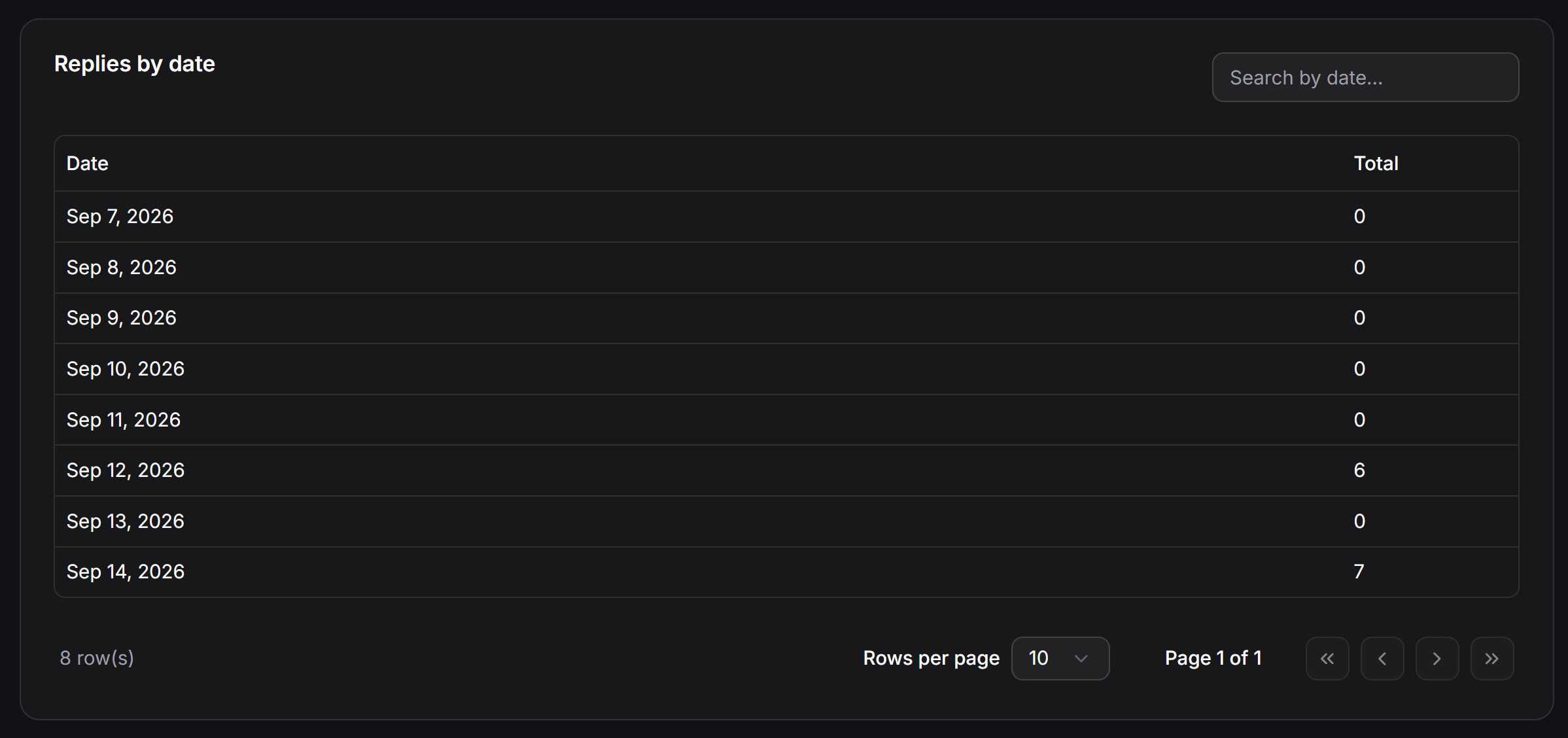 * **Date:** The exact calendar day (formatted as Month Day, Year).
* **Total:** Total public comment replies executed on that date.
* **Search by date...:** Fast search field to locate data for a specific day without scrolling.
* **Pagination controls:** Switch between 10, 20, or more rows per page with page jump buttons.
## User Comments Breakdown
The **User comments on this post** table aggregates the actual phrases and text strings left by users in the comment section:
* **Date:** The exact calendar day (formatted as Month Day, Year).
* **Total:** Total public comment replies executed on that date.
* **Search by date...:** Fast search field to locate data for a specific day without scrolling.
* **Pagination controls:** Switch between 10, 20, or more rows per page with page jump buttons.
## User Comments Breakdown
The **User comments on this post** table aggregates the actual phrases and text strings left by users in the comment section:
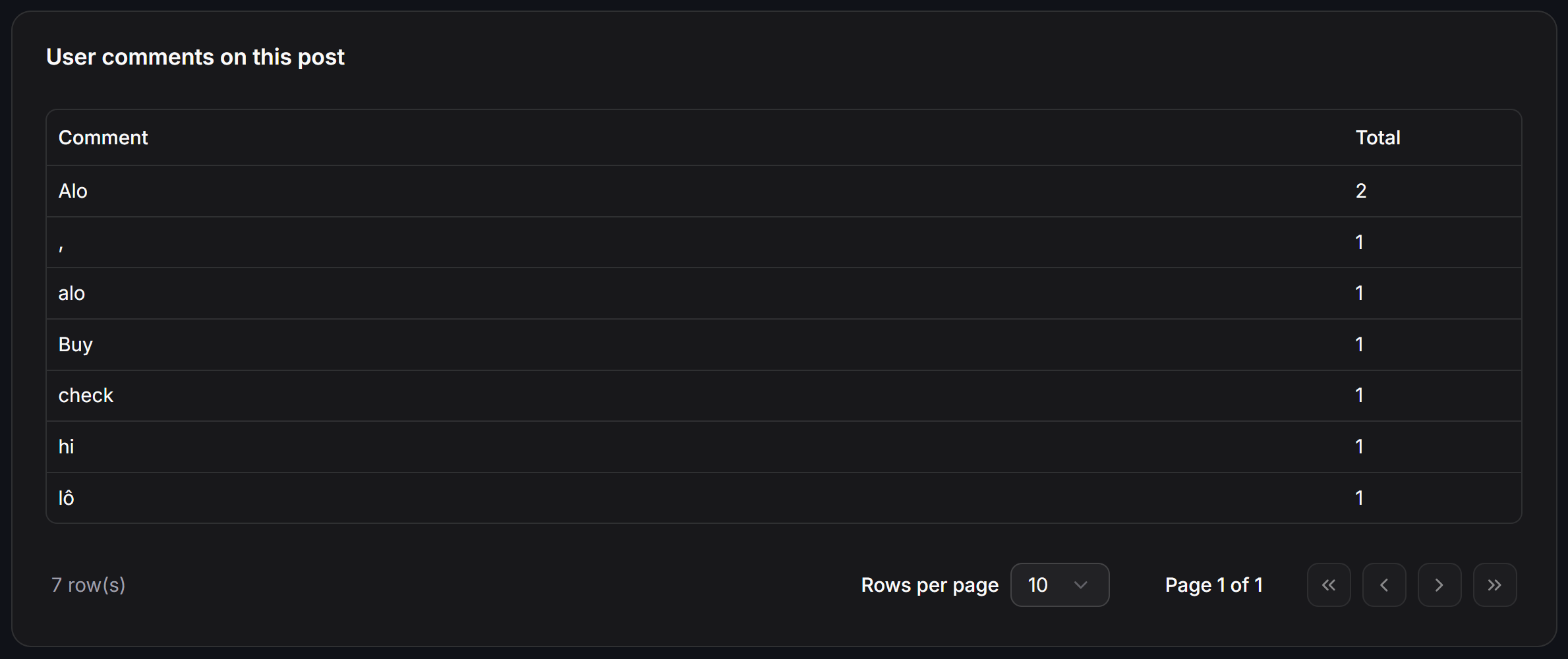 * **Comment:** The exact comment content submitted by customers on the post.
* **Total:** Total frequency count of that specific comment over the post's active lifetime.
**Practical Keyword Optimization:**
Use this breakdown to discover real-world slang, abbreviations, typos, and inquiry patterns commonly typed by your audience. You can copy these terms directly into the **Keywords to match** setting in [Facebook Comment Automation](/docs/tools/facebook-comment-automation) or [Instagram Comment Automation](/docs/tools/instagram-comment-automation) to ensure no lead is missed.
## Bot Reply Distribution
The **Bot replies to comments** table highlights which public reply variations the automation published:
* **Comment:** The exact comment content submitted by customers on the post.
* **Total:** Total frequency count of that specific comment over the post's active lifetime.
**Practical Keyword Optimization:**
Use this breakdown to discover real-world slang, abbreviations, typos, and inquiry patterns commonly typed by your audience. You can copy these terms directly into the **Keywords to match** setting in [Facebook Comment Automation](/docs/tools/facebook-comment-automation) or [Instagram Comment Automation](/docs/tools/instagram-comment-automation) to ensure no lead is missed.
## Bot Reply Distribution
The **Bot replies to comments** table highlights which public reply variations the automation published:
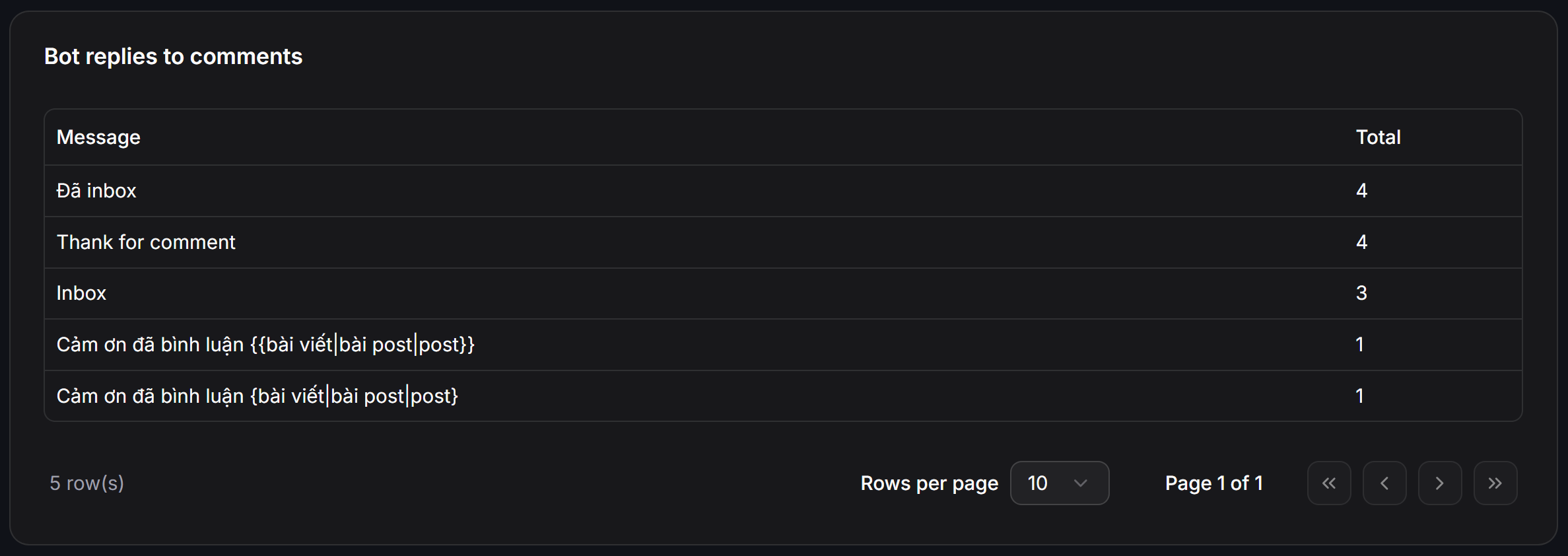 * **Message:** The public reply text posted by the bot.
* **Total:** Number of times that specific message was dispatched.
* **Spintax Validation:** When utilizing random word rotation with spintax syntax like `{bài viết|bài post|post}` or `{Hi|Hello|Hey}`, this table confirms that variants are evenly rotated. This natural variance prevents Facebook and Instagram algorithms from flagging your account for repetitive spam behavior.
## Error Logs and Troubleshooting
The **Error Logs** table captures all technical failures preventing the bot from delivering a public reply or private inbox message.
ChatbotX retains error logs for **the last 30 days** (Only the last 30 days of error logs are kept). Historical entries older than 30 days are automatically purged.
* **Message:** The public reply text posted by the bot.
* **Total:** Number of times that specific message was dispatched.
* **Spintax Validation:** When utilizing random word rotation with spintax syntax like `{bài viết|bài post|post}` or `{Hi|Hello|Hey}`, this table confirms that variants are evenly rotated. This natural variance prevents Facebook and Instagram algorithms from flagging your account for repetitive spam behavior.
## Error Logs and Troubleshooting
The **Error Logs** table captures all technical failures preventing the bot from delivering a public reply or private inbox message.
ChatbotX retains error logs for **the last 30 days** (Only the last 30 days of error logs are kept). Historical entries older than 30 days are automatically purged.
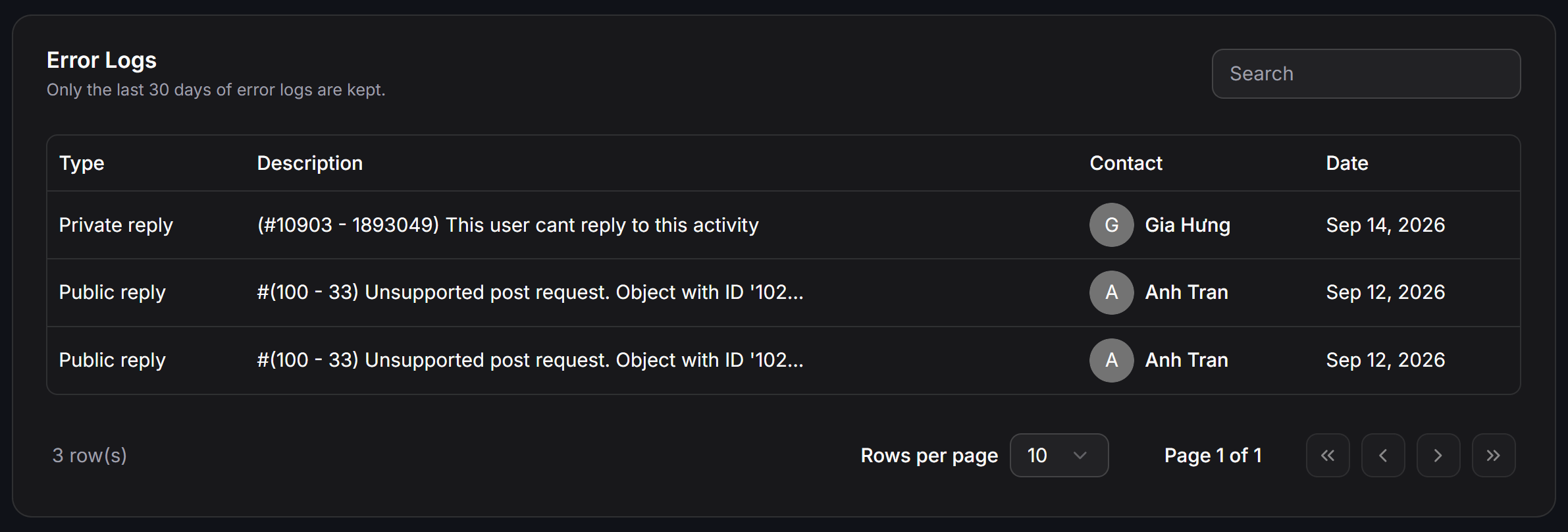 ### Error Log Data Structure
* **Type:** The specific action that failed:
* `Private reply`: Failure when attempting to send an automated inbox message.
* `Public reply`: Failure when attempting to publish a public comment under the user's remark.
* **Description:** Raw Meta Graph API error code and descriptive payload.
* **Contact:** The contact name and avatar icon associated with the failed action.
* **Date:** Precise timestamp of the event.
* **Search bar:** Real-time filter to quickly find entries by contact name or specific error keywords.
### Common Meta Errors and Solutions
The table below summarizes the most common Meta Graph API error codes logged in Error Logs, their technical root causes, and recommended solutions:
| Displayed Error Code | Root Cause | Recommended Solution |
| ------------------------------------------------------------------ | -------------------------------------------------------------------------------------------------------------------------------------------------------------- | ----------------------------------------------------------------------------------------------------------------------------------------------------------------------------------------- |
| `(#10903 - 1893049) This user cant reply to this activity` | The customer's account has privacy restrictions disabling messages from business pages, or their account profile is unverified on the platform. | The system automatically halts private messaging for this user. Post a helpful public comment encouraging the user to initiate a direct message or review their message request settings. |
| `#(100 - 33) Unsupported post request` | The target post was removed, hidden, changed to private, or the connected page lost access privileges on the post. | Verify post visibility on your Fanpage or Instagram account. Re-authenticate your channel credentials under the Channels menu to refresh permissions. |
| `(#190) Invalid OAuth access token` | The Page or Instagram access token expired, the account password was changed, or the app permission was revoked in Meta Business Manager. | Navigate to Channels, locate the channel, and click Reconnect to generate a fresh Access Token. |
| `(#10 - 2018001) Message outside the allowed 7-day comment window` | Meta limits private replies to comments created within the last 7 days. Comments older than 7 days are automatically rejected by Meta. | Ensure timely automation response timing. For comments older than 7 days, use Public reply to invite the user to initiate a DM. |
| `(#3) Application does not have capability to make this API call` | Instagram connected via Facebook Page attempted dispatch through the wrong node, or the app lacks pages\_messaging or instagram\_manage\_messages permissions. | Confirm that the Instagram account is properly linked to the Facebook Page in Meta Business Suite, then reconnect the channel in ChatbotX. |
| `(#200 - 1545041) Permissions error / User has opted out` | The user blocked messages from your page, or Meta temporarily suspended the page's messaging capabilities due to abnormal dispatch volume. | Check the page inbox status in Meta Business Suite. Avoid sending repetitive bursts of messages in short timeframes. |
| `(#4) / (#17) User request limit reached` | The channel exceeded Meta's API call rate limits during high-traffic events with sudden surges of inbound comments. | Enable random delays under the Reply after setting in your automation to spread API dispatches across time intervals. |
| `(PAYLOAD_INVALID) Media step not supported in public reply` | The public reply flow on Instagram contains images or video steps, whereas Meta API only supports plain text for Instagram public replies. | Shift rich media content to Private reply in Inbox and maintain text-only messages for Instagram public comments. |
| `(#100 - 368) The action attempted has been deemed abusive` | Outgoing content was flagged by Meta automated moderation filters due to suspect links, spam keywords, or identical repetitive wording. | Incorporate spintax variations to vary your phrasing naturally, eliminate shortened redirect URLs, and verify outbound website links. |
## Best Practices for Maximizing Conversion
1. **Benchmark Delivered vs. Seen:** If your `Delivered` rate is healthy but `Seen` is low, test punchier first-line messaging that stands out in lock-screen push notifications.
2. **Monitor the Clicked Rate:** If contacts view messages but do not click buttons, simplify your message copy, remove clutter, and feature a single prominent call-to-action (CTA).
3. **Continuous Keyword Tuning:** Regularly review the **User comments** table to add trending inquiry keywords into your matching rules.
4. **Audit Error Logs Weekly:** Frequent `Public reply` errors bearing code `#(100 - 33)` signal that page access tokens need refreshing in your channel settings.
### Error Log Data Structure
* **Type:** The specific action that failed:
* `Private reply`: Failure when attempting to send an automated inbox message.
* `Public reply`: Failure when attempting to publish a public comment under the user's remark.
* **Description:** Raw Meta Graph API error code and descriptive payload.
* **Contact:** The contact name and avatar icon associated with the failed action.
* **Date:** Precise timestamp of the event.
* **Search bar:** Real-time filter to quickly find entries by contact name or specific error keywords.
### Common Meta Errors and Solutions
The table below summarizes the most common Meta Graph API error codes logged in Error Logs, their technical root causes, and recommended solutions:
| Displayed Error Code | Root Cause | Recommended Solution |
| ------------------------------------------------------------------ | -------------------------------------------------------------------------------------------------------------------------------------------------------------- | ----------------------------------------------------------------------------------------------------------------------------------------------------------------------------------------- |
| `(#10903 - 1893049) This user cant reply to this activity` | The customer's account has privacy restrictions disabling messages from business pages, or their account profile is unverified on the platform. | The system automatically halts private messaging for this user. Post a helpful public comment encouraging the user to initiate a direct message or review their message request settings. |
| `#(100 - 33) Unsupported post request` | The target post was removed, hidden, changed to private, or the connected page lost access privileges on the post. | Verify post visibility on your Fanpage or Instagram account. Re-authenticate your channel credentials under the Channels menu to refresh permissions. |
| `(#190) Invalid OAuth access token` | The Page or Instagram access token expired, the account password was changed, or the app permission was revoked in Meta Business Manager. | Navigate to Channels, locate the channel, and click Reconnect to generate a fresh Access Token. |
| `(#10 - 2018001) Message outside the allowed 7-day comment window` | Meta limits private replies to comments created within the last 7 days. Comments older than 7 days are automatically rejected by Meta. | Ensure timely automation response timing. For comments older than 7 days, use Public reply to invite the user to initiate a DM. |
| `(#3) Application does not have capability to make this API call` | Instagram connected via Facebook Page attempted dispatch through the wrong node, or the app lacks pages\_messaging or instagram\_manage\_messages permissions. | Confirm that the Instagram account is properly linked to the Facebook Page in Meta Business Suite, then reconnect the channel in ChatbotX. |
| `(#200 - 1545041) Permissions error / User has opted out` | The user blocked messages from your page, or Meta temporarily suspended the page's messaging capabilities due to abnormal dispatch volume. | Check the page inbox status in Meta Business Suite. Avoid sending repetitive bursts of messages in short timeframes. |
| `(#4) / (#17) User request limit reached` | The channel exceeded Meta's API call rate limits during high-traffic events with sudden surges of inbound comments. | Enable random delays under the Reply after setting in your automation to spread API dispatches across time intervals. |
| `(PAYLOAD_INVALID) Media step not supported in public reply` | The public reply flow on Instagram contains images or video steps, whereas Meta API only supports plain text for Instagram public replies. | Shift rich media content to Private reply in Inbox and maintain text-only messages for Instagram public comments. |
| `(#100 - 368) The action attempted has been deemed abusive` | Outgoing content was flagged by Meta automated moderation filters due to suspect links, spam keywords, or identical repetitive wording. | Incorporate spintax variations to vary your phrasing naturally, eliminate shortened redirect URLs, and verify outbound website links. |
## Best Practices for Maximizing Conversion
1. **Benchmark Delivered vs. Seen:** If your `Delivered` rate is healthy but `Seen` is low, test punchier first-line messaging that stands out in lock-screen push notifications.
2. **Monitor the Clicked Rate:** If contacts view messages but do not click buttons, simplify your message copy, remove clutter, and feature a single prominent call-to-action (CTA).
3. **Continuous Keyword Tuning:** Regularly review the **User comments** table to add trending inquiry keywords into your matching rules.
4. **Audit Error Logs Weekly:** Frequent `Public reply` errors bearing code `#(100 - 33)` signal that page access tokens need refreshing in your channel settings.