> ## Documentation Index
> Fetch the complete documentation index at: https://chatbotx.io/docs/llms.txt
> Use this file to discover all available pages before exploring further.
# Jackpot Minigame
> Learn how to configure the Jackpot minigame in ChatbotX: player rules, referral rewards, prize probabilities, winning flows, and history tracking.
**Jackpot** is a mobile-responsive slot machine minigame delivered via Webview. Contacts tap the spin button to roll 3 reels and receive real-time winning results directly on their screens.
This feature helps you boost engagement across marketing campaigns, capture new leads, incentivize viral friend referrals for bonus spins, and automate prize fulfillment through chatbot flows.
A real-time Live Mobile Preview lets you fine-tune machine colors, backgrounds, and start buttons before launching.
Automatically award extra spins when contacts invite friends and trigger custom welcome steps for referred users.
Automatically tag openers, active players, and referred friends, while storing winning prize names into Custom Fields.
Maintain a balanced 100% total probability, limit prize inventory, and schedule daily spin resets.
## Accessing Gamification
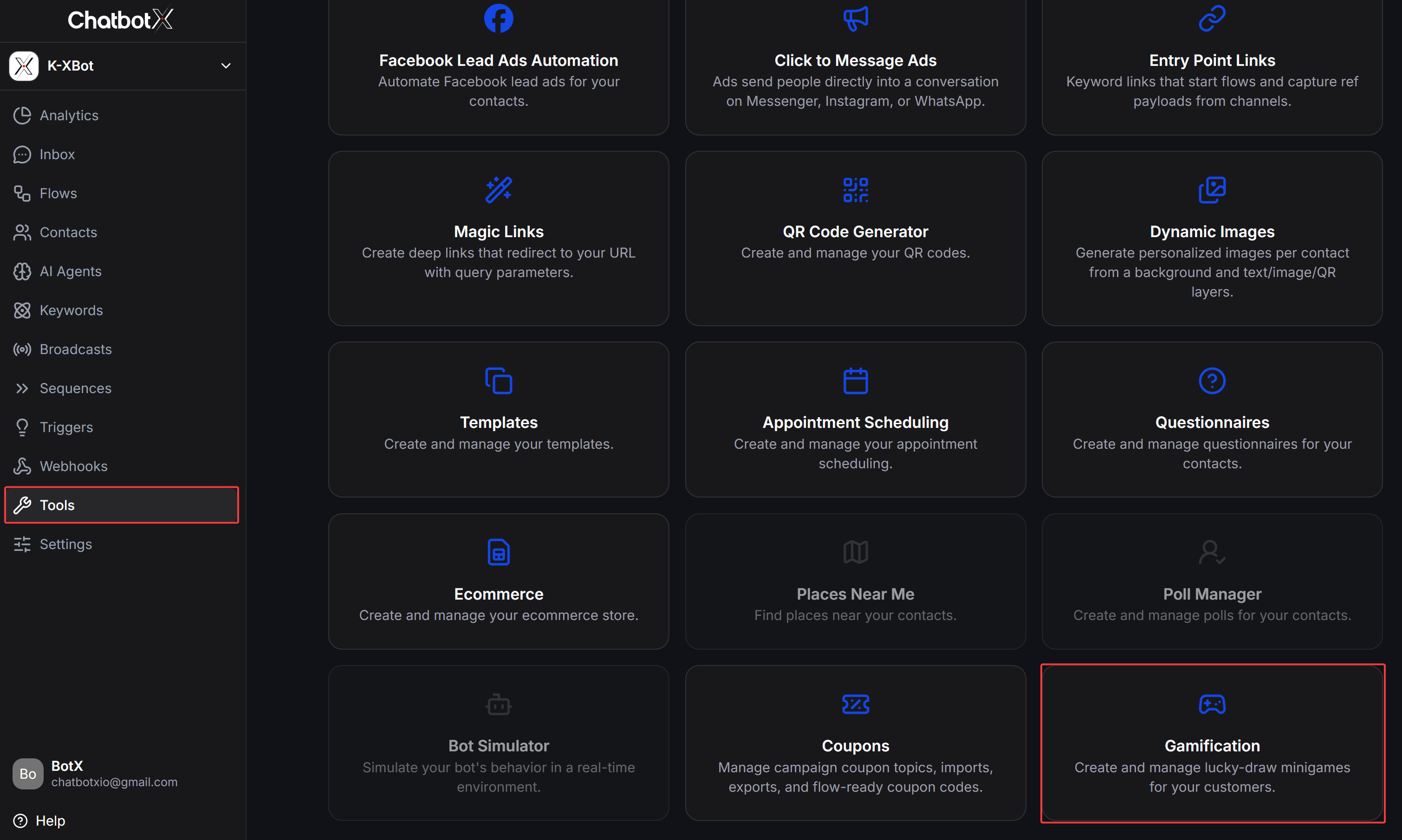
To get started, navigate to **Tools** from the left sidebar of ChatbotX and click the **Gamification** card:
 ## Minigame Dashboard (Game List)
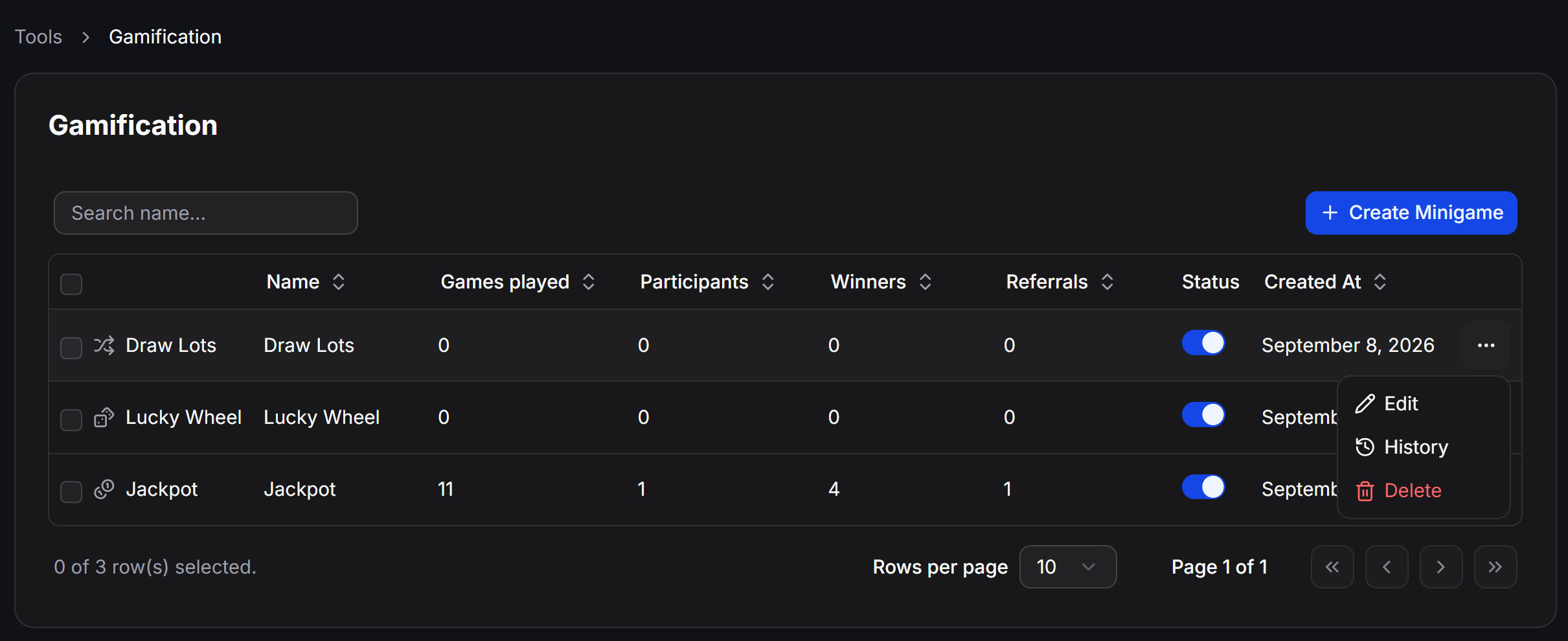
The Gamification overview dashboard displays all created minigames alongside real-time campaign performance metrics:
## Minigame Dashboard (Game List)
The Gamification overview dashboard displays all created minigames alongside real-time campaign performance metrics:
 ### Understanding Dashboard Metrics
| Metric | Description |
| ---------------- | ------------------------------------------------------------------------------------------ |
| **Name** | The title of the minigame displayed internally and at the top of the mobile Webview. |
| **Games played** | Total number of spins completed. For example, if 1 contact plays 3 times, it counts as 3. |
| **Participants** | Total unique contacts who joined. For example, if 1 contact plays 3 times, it counts as 1. |
| **Winners** | Total number of winning draw outcomes recorded across the campaign. |
| **Referrals** | Total number of new friends who joined through player referral links. |
| **Status** | A toggle switch to quickly enable or disable the minigame URL. |
| **Created At** | Date and time the minigame was created. |
### Actions Menu
Click the three dots (`⋮`) in the Actions column of any minigame to:
* **Edit:** Open the configuration editor.
* **History:** View the participant log and gameplay history.
* **Delete:** Remove the minigame from the system.
## Creating a Jackpot Minigame
On the Gamification page, click **+ Create Minigame** in the top-right corner to open the minigame type selection modal:
### Understanding Dashboard Metrics
| Metric | Description |
| ---------------- | ------------------------------------------------------------------------------------------ |
| **Name** | The title of the minigame displayed internally and at the top of the mobile Webview. |
| **Games played** | Total number of spins completed. For example, if 1 contact plays 3 times, it counts as 3. |
| **Participants** | Total unique contacts who joined. For example, if 1 contact plays 3 times, it counts as 1. |
| **Winners** | Total number of winning draw outcomes recorded across the campaign. |
| **Referrals** | Total number of new friends who joined through player referral links. |
| **Status** | A toggle switch to quickly enable or disable the minigame URL. |
| **Created At** | Date and time the minigame was created. |
### Actions Menu
Click the three dots (`⋮`) in the Actions column of any minigame to:
* **Edit:** Open the configuration editor.
* **History:** View the participant log and gameplay history.
* **Delete:** Remove the minigame from the system.
## Creating a Jackpot Minigame
On the Gamification page, click **+ Create Minigame** in the top-right corner to open the minigame type selection modal:
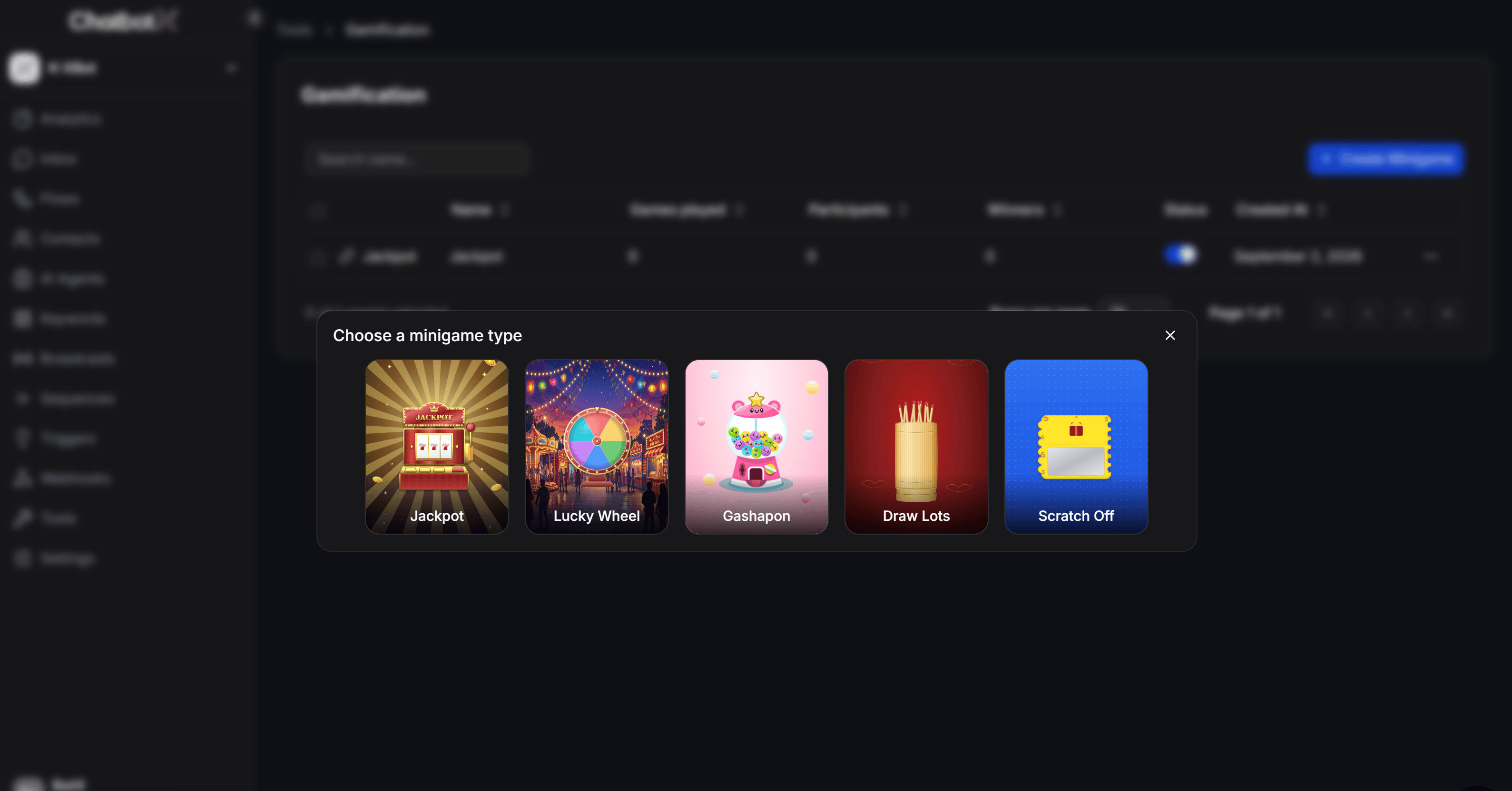 ChatbotX provides 5 interactive minigame formats: **Jackpot**, **Lucky Wheel**, **Gashapon**, **Draw Lots**, and **Scratch Off**. Click **Jackpot** to initialize a new game.
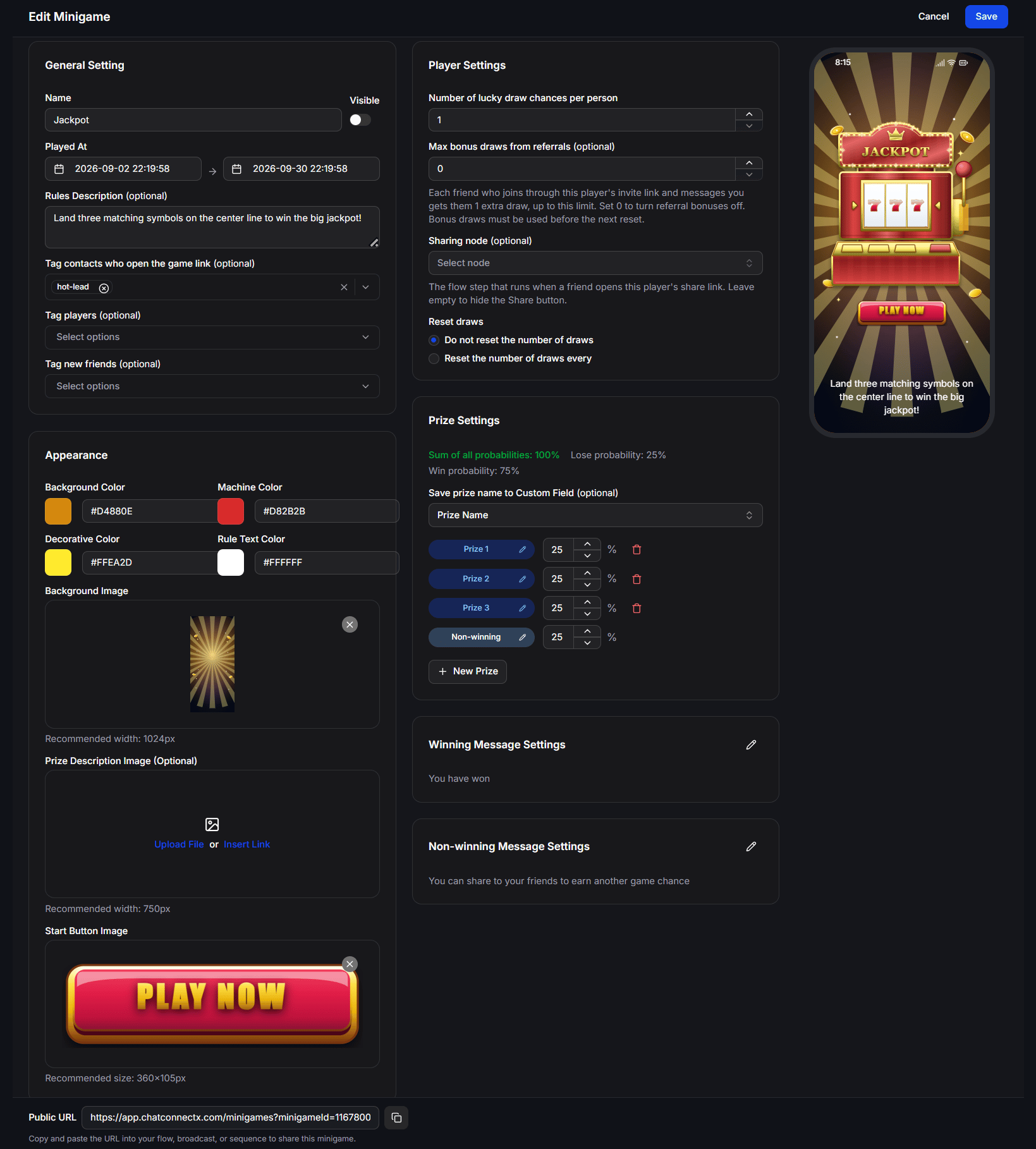
The configuration interface opens with two primary tabs in the top navigation bar: **Edit** (Minigame settings and design) and **History** (Participant tracking and draw logs):
ChatbotX provides 5 interactive minigame formats: **Jackpot**, **Lucky Wheel**, **Gashapon**, **Draw Lots**, and **Scratch Off**. Click **Jackpot** to initialize a new game.
The configuration interface opens with two primary tabs in the top navigation bar: **Edit** (Minigame settings and design) and **History** (Participant tracking and draw logs):
 ## General Setting
Located in the left column, **General Setting** manages basic display options and automated tagging:
* **Name:** Internal and customer-facing title of the game. The adjacent **Visible** toggle enables or hides the title banner at the top of the mobile Webview.
* **Played At:** Active campaign period (start and end date/time). Outside this window, contacts opening the link cannot spin the reels.
* **Rules Description (optional):** Gameplay instructions (e.g., *Land three matching symbols on the center line to win the big jackpot!*). This text appears in the footer area of the mobile Webview.
* **Tag contacts who open the game link (optional):** Assign tags to contacts who open the game link, even if they leave without spinning. Useful for follow-up reminders.
* **Tag players (optional):** Assign tags to contacts who click the start button and complete a spin.
* **Tag new friends (optional):** Assign tags to newly referred contacts who joined through a friend's share link.
## Appearance
The **Appearance** section allows you to customize the color palette and upload branded graphics:
### Color Palette
* **Background Color:** The background color surrounding the mobile Webview (Hex code).
* **Machine Color:** Primary body color of the slot machine.
* **Decorative Color:** Accent trim and decorative border color.
* **Rule Text Color:** Text color of the rules description displayed at the bottom.
### Recommended Asset Dimensions
* **Background Image:** Main backdrop graphic. Recommended width is **1024px**. Height scales automatically.
* **Prize Description Image (Optional):** Header promotional banner. Recommended width is **750px**. You can **Upload File** or **Insert Link**.
* **Start Button Image:** Custom spin button graphic (replaces the default *PLAY NOW* button). Recommended dimensions are **360 x 105px**.
As you adjust colors or upload graphics, the **Live Mobile Preview** on the right updates in real time. A 60px bottom margin is automatically reserved under the rules text to ensure optimal display on mobile screens with navigation bars.
## Player Settings
Located in the middle column, **Player Settings** defines spin allowances, referral rewards, and reset schedules:
### Initial Draws
* **Number of lucky draw chances per person:** Base number of spins granted to each contact (default is 1).
### Referral & Viral Sharing
* **Max bonus draws from referrals (optional):** Maximum extra spins a player can earn by sharing with friends.
* Each friend who clicks the invite link and messages your bot grants the original player 1 bonus draw, up to this limit.
* Set to **0** to disable referral bonus spins.
* **Sharing node (optional):** Select the specific Flow step (**Node**) that executes when a referred friend opens the link. If left empty, the **Share button** is hidden from the game screen.
When a player runs out of default spins, the Webview automatically displays the notice *You are out of draws for this minigame* along with a **Share with friends** button:
## General Setting
Located in the left column, **General Setting** manages basic display options and automated tagging:
* **Name:** Internal and customer-facing title of the game. The adjacent **Visible** toggle enables or hides the title banner at the top of the mobile Webview.
* **Played At:** Active campaign period (start and end date/time). Outside this window, contacts opening the link cannot spin the reels.
* **Rules Description (optional):** Gameplay instructions (e.g., *Land three matching symbols on the center line to win the big jackpot!*). This text appears in the footer area of the mobile Webview.
* **Tag contacts who open the game link (optional):** Assign tags to contacts who open the game link, even if they leave without spinning. Useful for follow-up reminders.
* **Tag players (optional):** Assign tags to contacts who click the start button and complete a spin.
* **Tag new friends (optional):** Assign tags to newly referred contacts who joined through a friend's share link.
## Appearance
The **Appearance** section allows you to customize the color palette and upload branded graphics:
### Color Palette
* **Background Color:** The background color surrounding the mobile Webview (Hex code).
* **Machine Color:** Primary body color of the slot machine.
* **Decorative Color:** Accent trim and decorative border color.
* **Rule Text Color:** Text color of the rules description displayed at the bottom.
### Recommended Asset Dimensions
* **Background Image:** Main backdrop graphic. Recommended width is **1024px**. Height scales automatically.
* **Prize Description Image (Optional):** Header promotional banner. Recommended width is **750px**. You can **Upload File** or **Insert Link**.
* **Start Button Image:** Custom spin button graphic (replaces the default *PLAY NOW* button). Recommended dimensions are **360 x 105px**.
As you adjust colors or upload graphics, the **Live Mobile Preview** on the right updates in real time. A 60px bottom margin is automatically reserved under the rules text to ensure optimal display on mobile screens with navigation bars.
## Player Settings
Located in the middle column, **Player Settings** defines spin allowances, referral rewards, and reset schedules:
### Initial Draws
* **Number of lucky draw chances per person:** Base number of spins granted to each contact (default is 1).
### Referral & Viral Sharing
* **Max bonus draws from referrals (optional):** Maximum extra spins a player can earn by sharing with friends.
* Each friend who clicks the invite link and messages your bot grants the original player 1 bonus draw, up to this limit.
* Set to **0** to disable referral bonus spins.
* **Sharing node (optional):** Select the specific Flow step (**Node**) that executes when a referred friend opens the link. If left empty, the **Share button** is hidden from the game screen.
When a player runs out of default spins, the Webview automatically displays the notice *You are out of draws for this minigame* along with a **Share with friends** button:
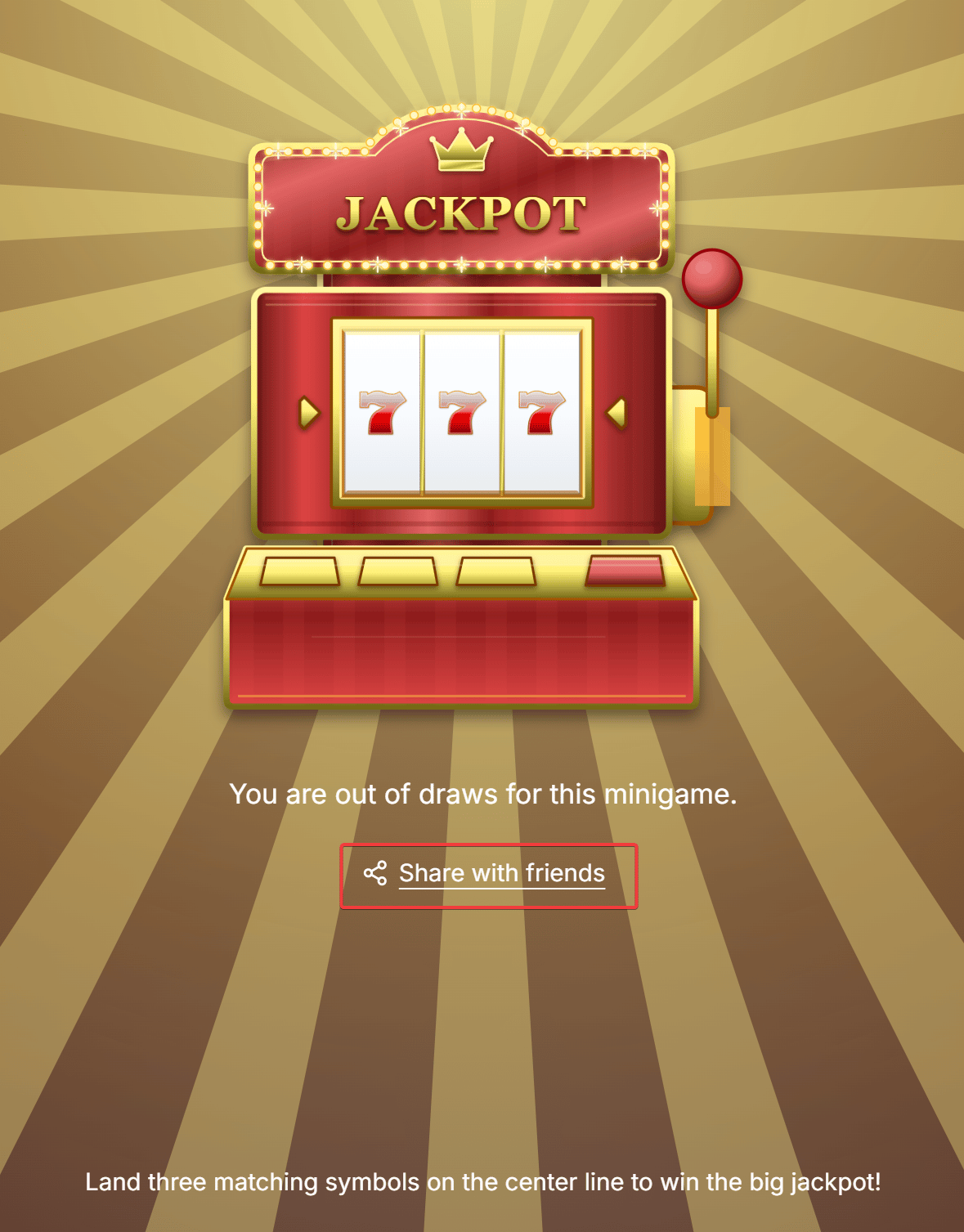 Clicking **Share with friends** opens the native mobile share sheet with a personalized invite link. When a friend taps the link and messages the bot, the designated **Sharing node** runs, and the inviter receives an extra spin.
### Reset Draws
* **Do not reset the number of draws:** Contacts can only play their initial allowance plus any earned referral bonuses.
* **Reset the number of draws every:** Restores the default spin count periodically (e.g., reset every 1 day at 00:00).
**Important reset policy:** When a scheduled reset occurs (e.g., daily at 00:00), **all unused bonus draws earned from referrals are also reset**. Clarify this policy in your rules description to encourage same-day participation.
## Prize Settings
The **Prize Settings** section controls rewards, odds calculations, and winner tracking:
### Probability Indicators
The system calculates total odds at the top of the section:
* **Sum of all probabilities:** Total combined probability across all items (must equal exactly **100%**).
* **Win probability:** Aggregate probability of all winning prizes.
* **Lose probability:** Probability of hitting the **Non-winning** outcome.
### Storing Winning Results
* **Save prize name to Custom Field (optional):** Select a text Custom Field (e.g., *Prize Name*). When a contact wins a prize, its name is automatically saved to their profile for downstream messaging or segmentation.
### Adding and Editing Prizes (Edit Prize)
Adjust probability percentages directly in the list, click the trash icon to delete, or click the pencil icon to open the **Edit Prize** modal:
Clicking **Share with friends** opens the native mobile share sheet with a personalized invite link. When a friend taps the link and messages the bot, the designated **Sharing node** runs, and the inviter receives an extra spin.
### Reset Draws
* **Do not reset the number of draws:** Contacts can only play their initial allowance plus any earned referral bonuses.
* **Reset the number of draws every:** Restores the default spin count periodically (e.g., reset every 1 day at 00:00).
**Important reset policy:** When a scheduled reset occurs (e.g., daily at 00:00), **all unused bonus draws earned from referrals are also reset**. Clarify this policy in your rules description to encourage same-day participation.
## Prize Settings
The **Prize Settings** section controls rewards, odds calculations, and winner tracking:
### Probability Indicators
The system calculates total odds at the top of the section:
* **Sum of all probabilities:** Total combined probability across all items (must equal exactly **100%**).
* **Win probability:** Aggregate probability of all winning prizes.
* **Lose probability:** Probability of hitting the **Non-winning** outcome.
### Storing Winning Results
* **Save prize name to Custom Field (optional):** Select a text Custom Field (e.g., *Prize Name*). When a contact wins a prize, its name is automatically saved to their profile for downstream messaging or segmentation.
### Adding and Editing Prizes (Edit Prize)
Adjust probability percentages directly in the list, click the trash icon to delete, or click the pencil icon to open the **Edit Prize** modal:
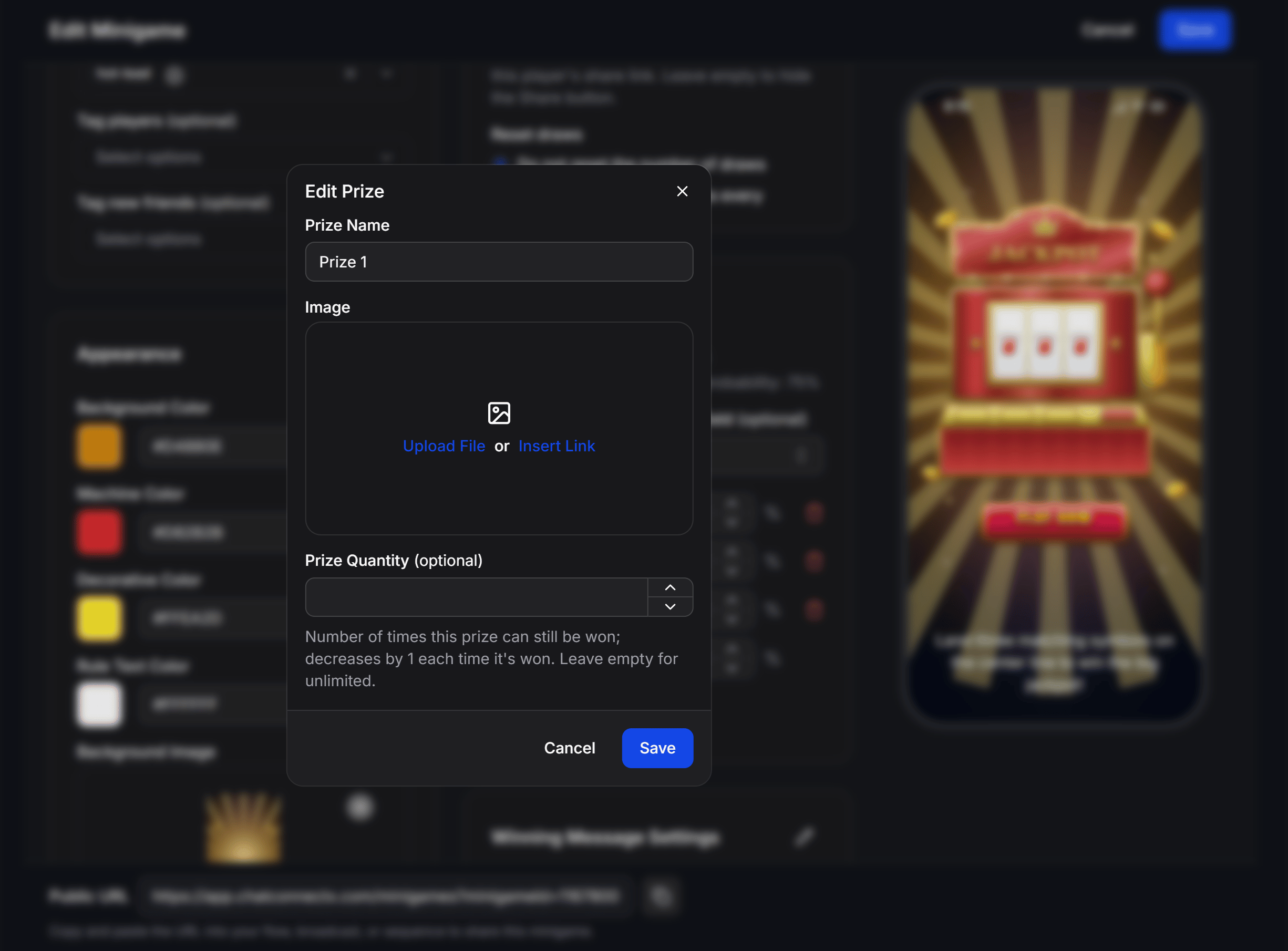 Inside **Edit Prize**, configure:
* **Prize Name:** Title of the prize (e.g., *50% Off Voucher*, *Wireless Earbuds*, *Free Shipping*).
* **Image:** Upload or paste an image URL representing the prize.
* **Prize Quantity (optional):** Inventory limit. Each win decreases this counter by 1. When it reaches 0, the prize can no longer be won. Leave empty for unlimited winners.
Click **+ New Prize** to add more reward tiers, or edit the **Non-winning** row to adjust loss messaging and odds.
**Out-of-Stock Fallback Rule:** When a limited-quantity prize runs out (quantity reaches 0), any subsequent spins that land on this prize are **automatically converted into Non-winning outcomes**. This safeguards your prize budget while preserving a valid 100% probability structure.
## Winning & Non-winning Message Settings
After the reels stop, the Webview displays a result screen. Click the pencil icon next to **Winning Message Settings** or **Non-winning Message Settings** to configure these states:
### Winning Message Settings
Inside **Edit Prize**, configure:
* **Prize Name:** Title of the prize (e.g., *50% Off Voucher*, *Wireless Earbuds*, *Free Shipping*).
* **Image:** Upload or paste an image URL representing the prize.
* **Prize Quantity (optional):** Inventory limit. Each win decreases this counter by 1. When it reaches 0, the prize can no longer be won. Leave empty for unlimited winners.
Click **+ New Prize** to add more reward tiers, or edit the **Non-winning** row to adjust loss messaging and odds.
**Out-of-Stock Fallback Rule:** When a limited-quantity prize runs out (quantity reaches 0), any subsequent spins that land on this prize are **automatically converted into Non-winning outcomes**. This safeguards your prize budget while preserving a valid 100% probability structure.
## Winning & Non-winning Message Settings
After the reels stop, the Webview displays a result screen. Click the pencil icon next to **Winning Message Settings** or **Non-winning Message Settings** to configure these states:
### Winning Message Settings
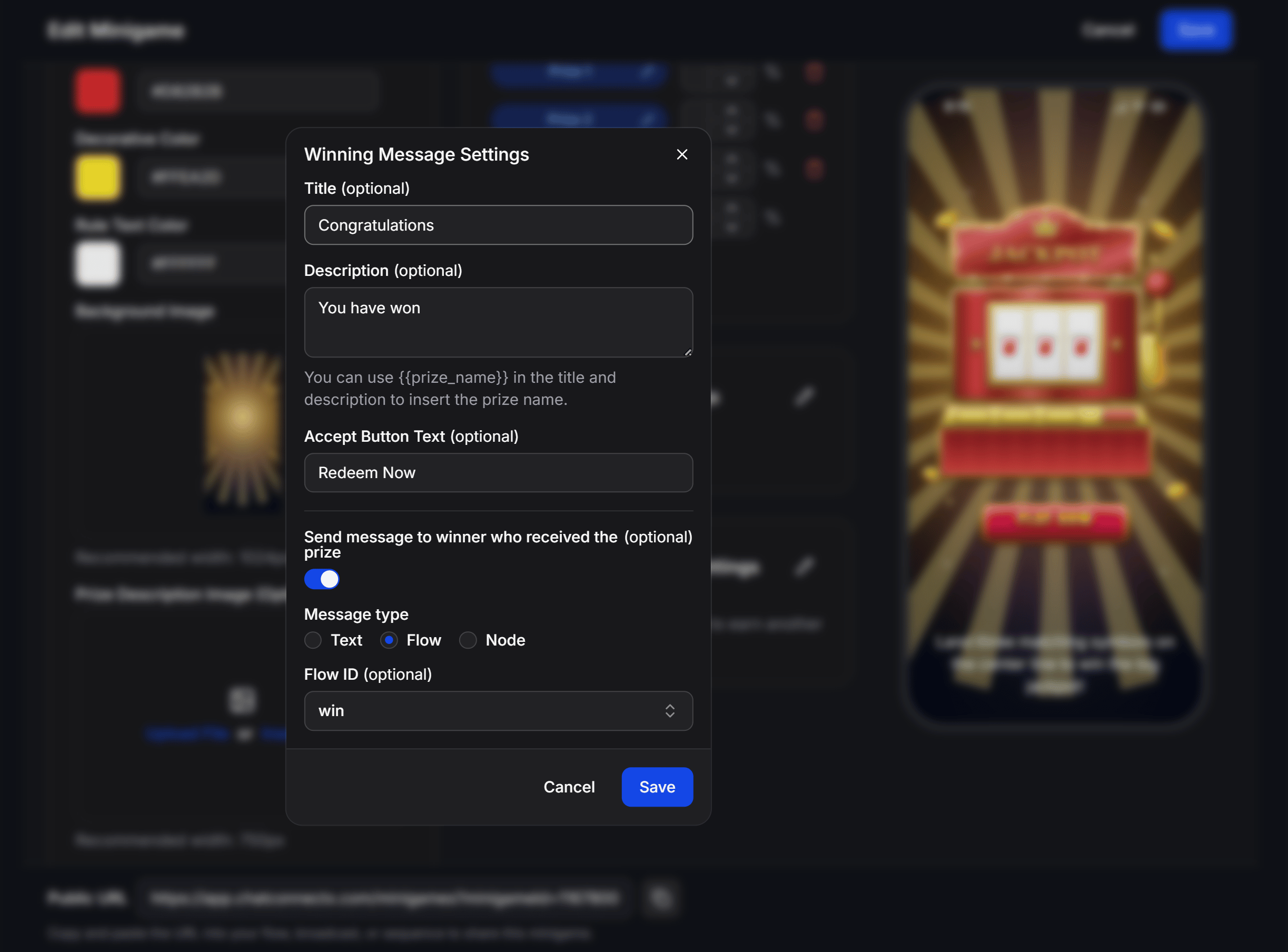 * **Title (optional):** Congratulations headline (e.g., *Congratulations*).
* **Description (optional):** Detailed winning text. Insert the `{{prize_name}}` variable to dynamically display the prize won.
* **Accept Button Text (optional):** CTA button text shown on the Webview (e.g., *Redeem Now*).
* **Send message to winner who received the prize (optional):** Enable to trigger an automated bot message immediately upon winning.
* **Message type:** Select from 3 delivery methods:
* **Text:** Sends a plain text confirmation.
* **Flow:** Triggers a complete automated sequence (select via **Flow ID**) to issue coupon codes or collect shipping addresses.
* **Node:** Navigates directly to a specific block within an existing flow.
### Non-winning Message Settings
* **Title (optional):** Congratulations headline (e.g., *Congratulations*).
* **Description (optional):** Detailed winning text. Insert the `{{prize_name}}` variable to dynamically display the prize won.
* **Accept Button Text (optional):** CTA button text shown on the Webview (e.g., *Redeem Now*).
* **Send message to winner who received the prize (optional):** Enable to trigger an automated bot message immediately upon winning.
* **Message type:** Select from 3 delivery methods:
* **Text:** Sends a plain text confirmation.
* **Flow:** Triggers a complete automated sequence (select via **Flow ID**) to issue coupon codes or collect shipping addresses.
* **Node:** Navigates directly to a specific block within an existing flow.
### Non-winning Message Settings
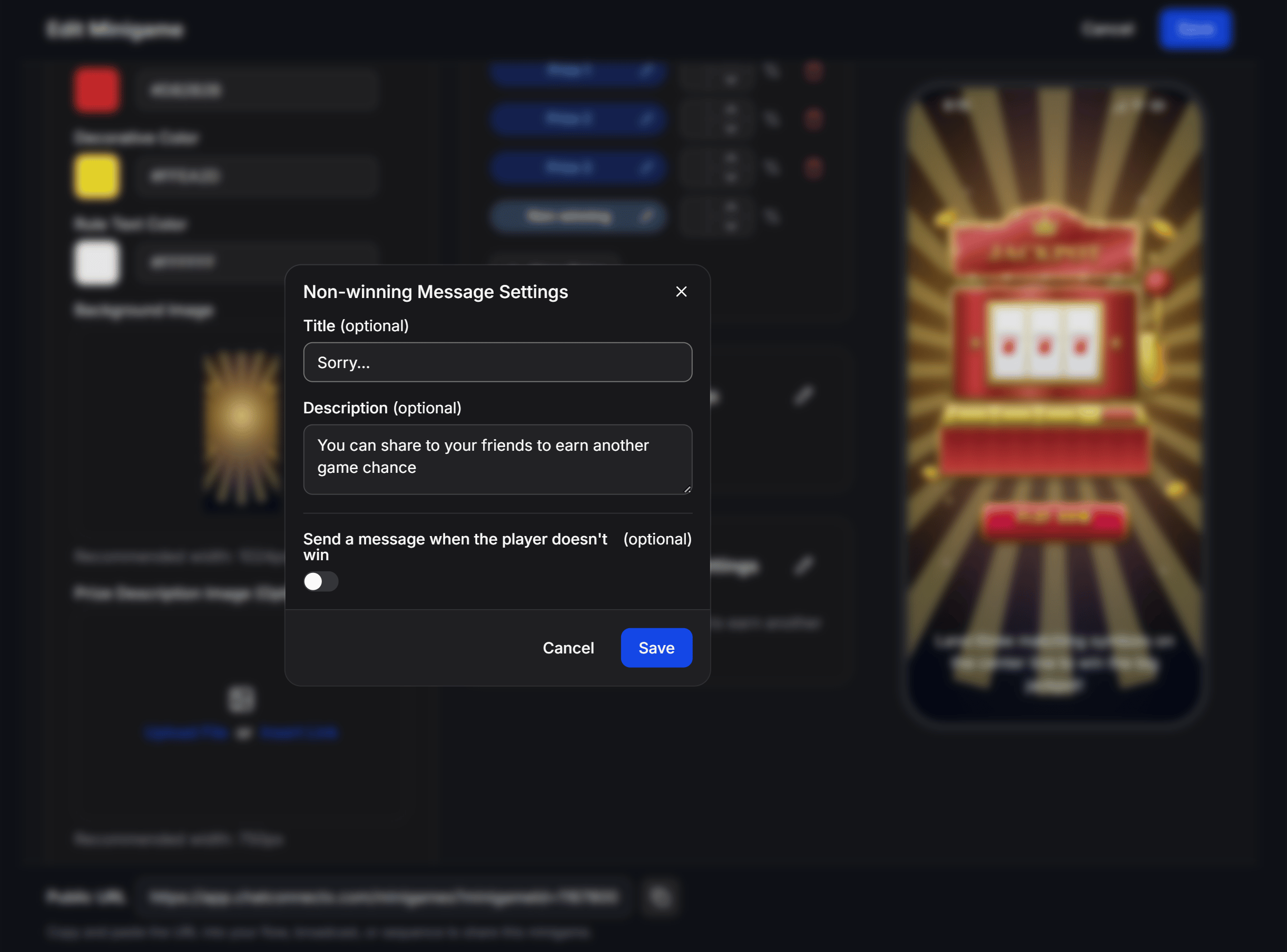 * **Title (optional):** Headline for non-winning spins (e.g., *Sorry...*).
* **Description (optional):** Encouragement message prompting the user to share the game with friends for another chance.
* **Send a message when the player doesn't win (optional):** Enable to deliver a consolation message or a participation discount code via the bot.
## Tracking Gameplay History (History)
Switch to the **History** tab in the top navigation bar to inspect detailed engagement logs:
* **Title (optional):** Headline for non-winning spins (e.g., *Sorry...*).
* **Description (optional):** Encouragement message prompting the user to share the game with friends for another chance.
* **Send a message when the player doesn't win (optional):** Enable to deliver a consolation message or a participation discount code via the bot.
## Tracking Gameplay History (History)
Switch to the **History** tab in the top navigation bar to inspect detailed engagement logs:
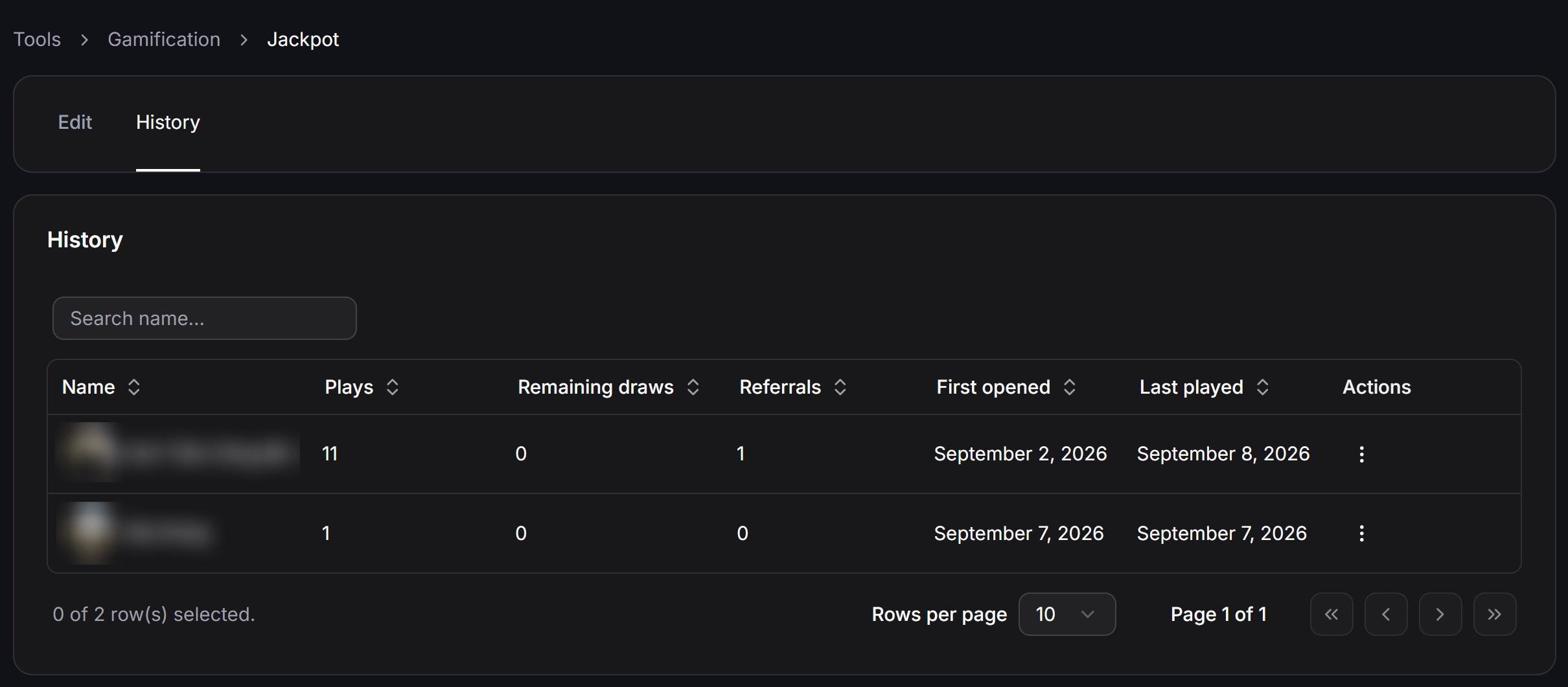 The table displays key tracking columns:
* **Name:** Contact avatar and profile name.
* **Plays:** Total spins executed by this contact.
* **Remaining draws:** Remaining unused spin balance.
* **Referrals:** Count of new friends who joined via this contact's share link.
* **First opened:** Date and time the contact first loaded the minigame.
* **Last played:** Date and time of their most recent spin.
* **Actions (⋮):** Quick management actions for individual players.
Use the **Search name...** field to find specific participants or adjust **Rows per page** pagination.
## Integrating Jackpot into Chatbot Flows
At the bottom of the editor, copy your unique **Public URL**:
```text theme={null}
https://app.chatconnectx.com/minigames?minigameId=XXXXXX
```
Paste this URL into **Open Website** buttons across Flows, Broadcasts, or Sequences. Here are 3 common implementation strategies:
### Strategy 1: Click-to-Message Ad Acquisition
Build a Flow triggered when contacts message your Facebook or Instagram ad. Attach an **Open Website** button linking to the Jackpot minigame to offer an instant welcome spin, doubling initial conversation engagement rates.
### Strategy 2: Automated Coupon Delivery
Under **Winning Message Settings**, select **Flow** as the message type. Connect a flow containing the **Set up Coupon** action from [Coupons](/docs/tools/coupons). When a contact wins, the bot automatically sends a unique coupon code with an expiration date directly into the chat.
### Strategy 3: Daily Re-engagement Campaigns
Set **Reset draws** to recurring daily resets (**Reset every 1 day**). Use [Omnichannel Broadcasts](/docs/remarketing/omnichannel-broadcasts) to notify past contacts of fresh daily spins, driving steady repeat traffic back to your channels.
The table displays key tracking columns:
* **Name:** Contact avatar and profile name.
* **Plays:** Total spins executed by this contact.
* **Remaining draws:** Remaining unused spin balance.
* **Referrals:** Count of new friends who joined via this contact's share link.
* **First opened:** Date and time the contact first loaded the minigame.
* **Last played:** Date and time of their most recent spin.
* **Actions (⋮):** Quick management actions for individual players.
Use the **Search name...** field to find specific participants or adjust **Rows per page** pagination.
## Integrating Jackpot into Chatbot Flows
At the bottom of the editor, copy your unique **Public URL**:
```text theme={null}
https://app.chatconnectx.com/minigames?minigameId=XXXXXX
```
Paste this URL into **Open Website** buttons across Flows, Broadcasts, or Sequences. Here are 3 common implementation strategies:
### Strategy 1: Click-to-Message Ad Acquisition
Build a Flow triggered when contacts message your Facebook or Instagram ad. Attach an **Open Website** button linking to the Jackpot minigame to offer an instant welcome spin, doubling initial conversation engagement rates.
### Strategy 2: Automated Coupon Delivery
Under **Winning Message Settings**, select **Flow** as the message type. Connect a flow containing the **Set up Coupon** action from [Coupons](/docs/tools/coupons). When a contact wins, the bot automatically sends a unique coupon code with an expiration date directly into the chat.
### Strategy 3: Daily Re-engagement Campaigns
Set **Reset draws** to recurring daily resets (**Reset every 1 day**). Use [Omnichannel Broadcasts](/docs/remarketing/omnichannel-broadcasts) to notify past contacts of fresh daily spins, driving steady repeat traffic back to your channels.