> ## Documentation Index
> Fetch the complete documentation index at: https://chatbotx.io/docs/llms.txt
> Use this file to discover all available pages before exploring further.
# Magic Links
> Learn how to create and use Magic Links in ChatbotX for smart redirection, passing dynamic tracking parameters (UTM), and link analytics.
**Magic Links** allow you to create smart deep links and public tracking URLs. When a user clicks a Magic Link, ChatbotX automatically redirects them to the destination **URL** while dynamically capturing and passing query string parameters using double curly brace syntax `{{variable_name}}`.
This feature helps businesses measure advertising campaign performance, append UTM tracking parameters to websites, or pass referral parameters directly into chatbot conversation flows (Messenger, WhatsApp, Telegram).
## Accessing Magic Links
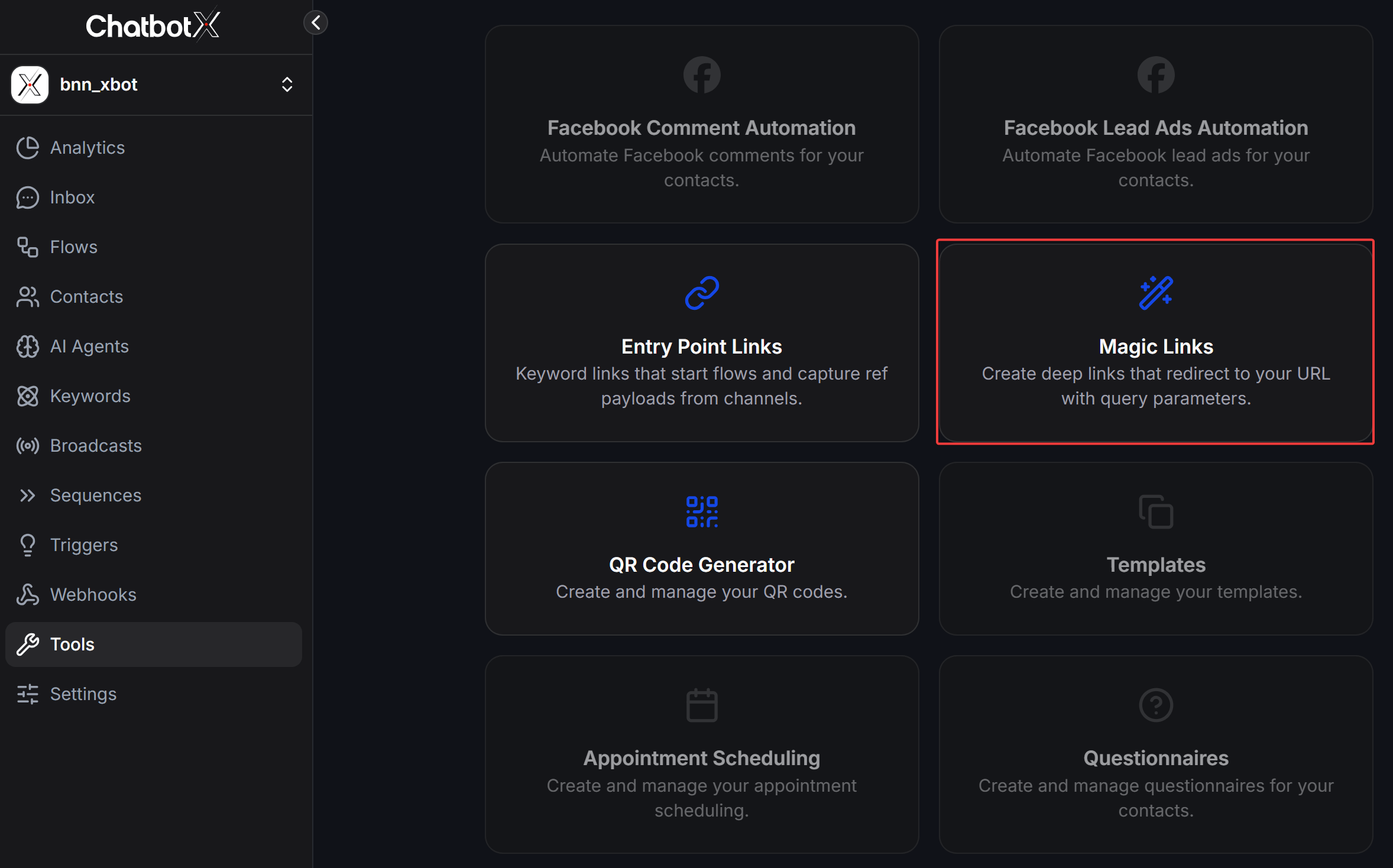
From the left navigation bar in ChatbotX, select **Tools** and click the **Magic Links** card.
 ## How to Create a New Magic Link
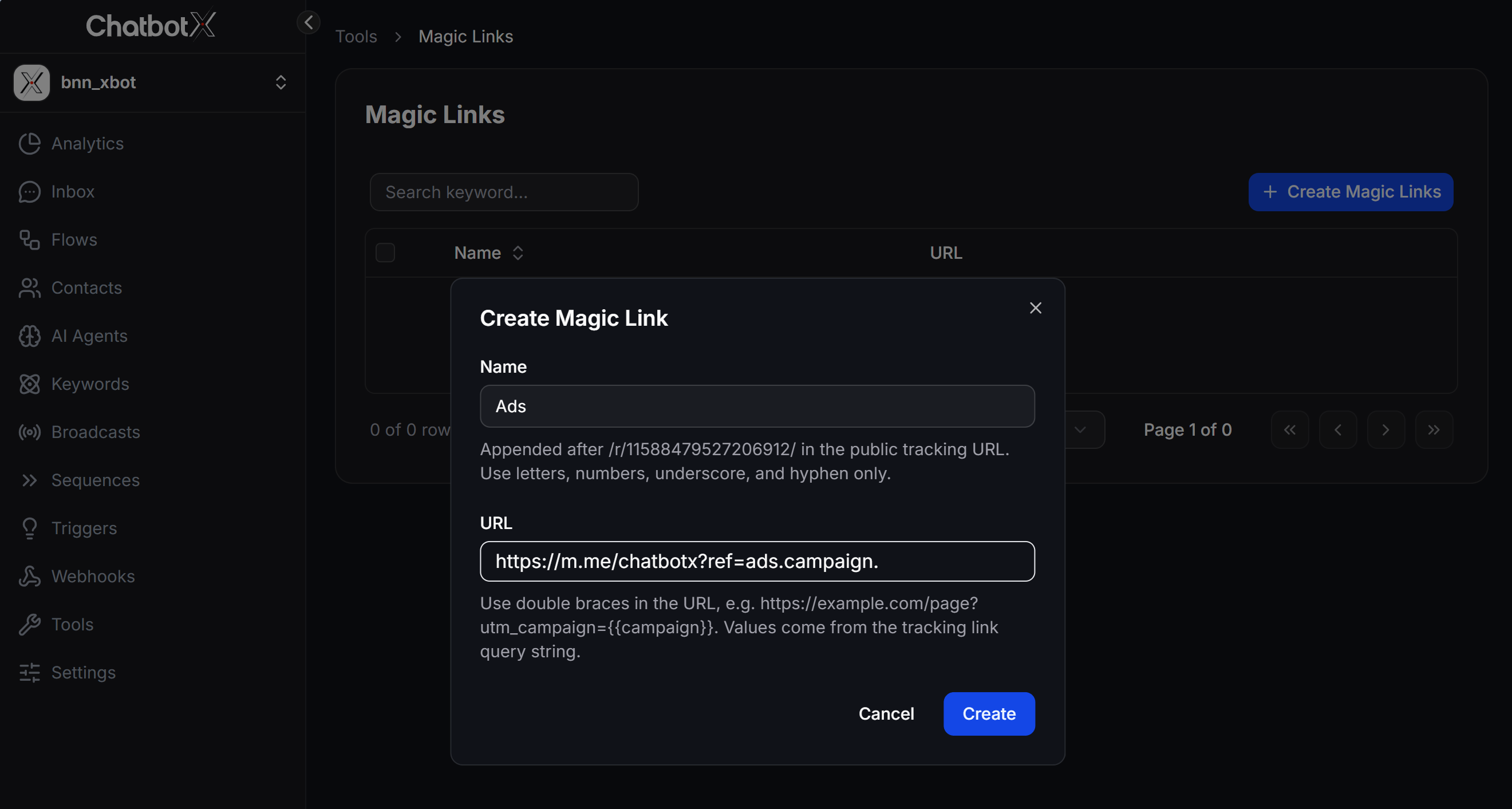
On the **Magic Links** page, click the **+ Create Magic Links** button in the top right corner.
In the configuration window, fill in the following 2 fields:
* **Name**: Enter an identifier for your Magic Link (letters, numbers, underscores `_`, and hyphens `-` only). This string will be appended immediately after `/r/BOT_ID/` in the public tracking URL (e.g., `https://app.chatbotx.io/r/11588479527206912/Ads`).
* **URL**: Enter the destination URL where users will be redirected. Use double curly brace syntax `{{variable_name}}` to dynamically populate query string values from the tracking link.
Click **Create** to save and generate your Magic Link.
## How to Create a New Magic Link
On the **Magic Links** page, click the **+ Create Magic Links** button in the top right corner.
In the configuration window, fill in the following 2 fields:
* **Name**: Enter an identifier for your Magic Link (letters, numbers, underscores `_`, and hyphens `-` only). This string will be appended immediately after `/r/BOT_ID/` in the public tracking URL (e.g., `https://app.chatbotx.io/r/11588479527206912/Ads`).
* **URL**: Enter the destination URL where users will be redirected. Use double curly brace syntax `{{variable_name}}` to dynamically populate query string values from the tracking link.
Click **Create** to save and generate your Magic Link.
 ## Standard Sample Formats for the URL Field
Below are standard sample URL structures for common use cases that you can copy and paste into the **URL** field:
### 1. Facebook Messenger Link (With Dynamic Ref Payload)
Use this format to redirect users to Facebook Messenger and automatically trigger a chatbot Flow with campaign parameters.
* **Standard Structure:** `https://m.me/PAGE_USERNAME?ref={{ref_name}}`
* **Sample URL Value:** `https://m.me/chatbotx?ref=ads.{{campaign}}.{{source}}`
* **How It Works:** When you run ads using the public tracking URL `https://app.chatbotx.io/r/11588479527206912/Ads?campaign=summer_sale&source=facebook`, clicking the link automatically redirects users to Messenger at `https://m.me/chatbotx?ref=ads.summer_sale.facebook`.
### 2. Website / Landing Page Link (Passing UTM Parameters)
Use this format when running ad campaigns and passing dynamic UTM parameters from your tracking link to a destination website.
* **Standard Structure:** `https://yourdomain.com/landing-page?utm_source={{source}}&utm_medium={{medium}}&utm_campaign={{campaign}}`
* **Sample URL Value:** `https://chatbotx.io/sale?utm_source={{source}}&utm_campaign={{campaign}}&utm_content={{ad_id}}`
* **How It Works:** When a user clicks `https://app.chatbotx.io/r/11588479527206912/Ads?source=facebook&campaign=black_friday&ad_id=123`, the system captures the parameters and redirects to `https://chatbotx.io/sale?utm_source=facebook&utm_campaign=black_friday&utm_content=123`.
### 3. WhatsApp Business Link
Use this format to direct customers into WhatsApp with pre-filled referral messages or campaign codes.
* **Standard Structure:** `https://wa.me/PHONENUMBER?text=/ref_{{campaign}}`
* **Sample URL Value:** `https://wa.me/84912345678?text=/ref_{{campaign}}`
### 4. Telegram Bot Link
Use this format to start a Telegram Bot with a referral or promo code.
* **Standard Structure:** `https://t.me/BOT_USERNAME?start={{ref_code}}`
* **Sample URL Value:** `https://t.me/bnn_xbot?start=promo_{{coupon}}`
### Summary Table of Standard Link Formats
| Channel / Goal | Standard Sample Format for URL Field |
| ------------------------ | ----------------------------------------------------------------------------- |
| Facebook Messenger | `https://m.me/PAGE_USERNAME?ref={{ref_name}}` |
| Website (UTM Parameters) | `https://yourdomain.com/page?utm_source={{source}}&utm_campaign={{campaign}}` |
| WhatsApp Business | `https://wa.me/PHONENUMBER?text=/ref_{{campaign}}` |
| Telegram Bot | `https://t.me/BOT_USERNAME?start={{ref_code}}` |
## Managing Your Magic Links
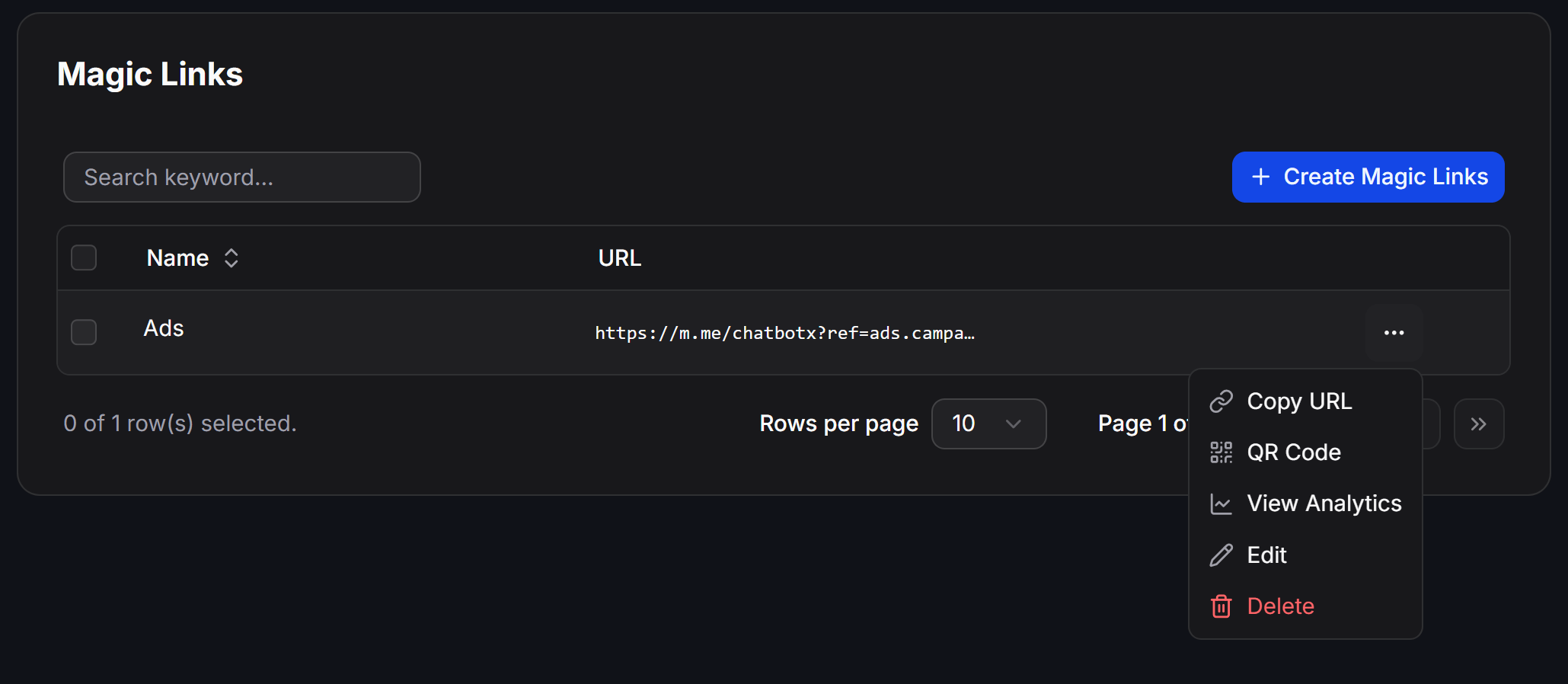
After creation, your Magic Link appears in the management table. Click the **...** action menu at the end of any row to perform actions:
* **Copy URL**: Copy the public tracking URL format (e.g., `https://app.chatbotx.io/r/11588479527206912/Ads`) to paste into ad campaigns, social media posts, or buttons.
* **QR Code**: Automatically generate a QR code for the Magic Link.
* **View Analytics**: Open real-time click analytics and performance reports.
* **Edit**: Update the **Name** or destination **URL**.
* **Delete**: Remove the Magic Link from the system.
## Standard Sample Formats for the URL Field
Below are standard sample URL structures for common use cases that you can copy and paste into the **URL** field:
### 1. Facebook Messenger Link (With Dynamic Ref Payload)
Use this format to redirect users to Facebook Messenger and automatically trigger a chatbot Flow with campaign parameters.
* **Standard Structure:** `https://m.me/PAGE_USERNAME?ref={{ref_name}}`
* **Sample URL Value:** `https://m.me/chatbotx?ref=ads.{{campaign}}.{{source}}`
* **How It Works:** When you run ads using the public tracking URL `https://app.chatbotx.io/r/11588479527206912/Ads?campaign=summer_sale&source=facebook`, clicking the link automatically redirects users to Messenger at `https://m.me/chatbotx?ref=ads.summer_sale.facebook`.
### 2. Website / Landing Page Link (Passing UTM Parameters)
Use this format when running ad campaigns and passing dynamic UTM parameters from your tracking link to a destination website.
* **Standard Structure:** `https://yourdomain.com/landing-page?utm_source={{source}}&utm_medium={{medium}}&utm_campaign={{campaign}}`
* **Sample URL Value:** `https://chatbotx.io/sale?utm_source={{source}}&utm_campaign={{campaign}}&utm_content={{ad_id}}`
* **How It Works:** When a user clicks `https://app.chatbotx.io/r/11588479527206912/Ads?source=facebook&campaign=black_friday&ad_id=123`, the system captures the parameters and redirects to `https://chatbotx.io/sale?utm_source=facebook&utm_campaign=black_friday&utm_content=123`.
### 3. WhatsApp Business Link
Use this format to direct customers into WhatsApp with pre-filled referral messages or campaign codes.
* **Standard Structure:** `https://wa.me/PHONENUMBER?text=/ref_{{campaign}}`
* **Sample URL Value:** `https://wa.me/84912345678?text=/ref_{{campaign}}`
### 4. Telegram Bot Link
Use this format to start a Telegram Bot with a referral or promo code.
* **Standard Structure:** `https://t.me/BOT_USERNAME?start={{ref_code}}`
* **Sample URL Value:** `https://t.me/bnn_xbot?start=promo_{{coupon}}`
### Summary Table of Standard Link Formats
| Channel / Goal | Standard Sample Format for URL Field |
| ------------------------ | ----------------------------------------------------------------------------- |
| Facebook Messenger | `https://m.me/PAGE_USERNAME?ref={{ref_name}}` |
| Website (UTM Parameters) | `https://yourdomain.com/page?utm_source={{source}}&utm_campaign={{campaign}}` |
| WhatsApp Business | `https://wa.me/PHONENUMBER?text=/ref_{{campaign}}` |
| Telegram Bot | `https://t.me/BOT_USERNAME?start={{ref_code}}` |
## Managing Your Magic Links
After creation, your Magic Link appears in the management table. Click the **...** action menu at the end of any row to perform actions:
* **Copy URL**: Copy the public tracking URL format (e.g., `https://app.chatbotx.io/r/11588479527206912/Ads`) to paste into ad campaigns, social media posts, or buttons.
* **QR Code**: Automatically generate a QR code for the Magic Link.
* **View Analytics**: Open real-time click analytics and performance reports.
* **Edit**: Update the **Name** or destination **URL**.
* **Delete**: Remove the Magic Link from the system.
 ## Best Practices and Important Notes
Variables inside double curly braces `{{variable_name}}` in the **URL** field are dynamically replaced by values passed through the query string of your public tracking URL. If a query string parameter is omitted, `{{variable_name}}` safely resolves to an empty string.
In the **Name** field, use letters, numbers, underscores `_`, and hyphens `-` only. Do not use spaces or special characters to prevent breaking the public tracking URL structure.
## Best Practices and Important Notes
Variables inside double curly braces `{{variable_name}}` in the **URL** field are dynamically replaced by values passed through the query string of your public tracking URL. If a query string parameter is omitted, `{{variable_name}}` safely resolves to an empty string.
In the **Name** field, use letters, numbers, underscores `_`, and hyphens `-` only. Do not use spaces or special characters to prevent breaking the public tracking URL structure.