> ## Documentation Index
> Fetch the complete documentation index at: https://chatbotx.io/docs/llms.txt
> Use this file to discover all available pages before exploring further.
# TikTok Comment Automation
> Learn how to set up TikTok Comment Automation on ChatbotX to automate public replies, send direct messages, and hide sensitive comments on your videos.
**TikTok Comment Automation** allows you to automate interactions with users commenting on your TikTok videos. When a viewer leaves a comment, the system can automatically post a public reply, send a direct message (Comment-to-Message) to their inbox, like their comment, and hide comments to protect customer data.
This tool helps you:
* **Boost Conversion Rates:** Instantly engage with potential customers while their interest in your video content is high.
* **Drive Traffic into Your Inbox:** Transition viewers from public video comments into private conversations for personalized assistance by your team or AI Agents.
* **Protect Customer Data:** Automatically hide comments containing phone numbers or sensitive details to prevent competitors from stealing your leads.
* **Save Operational Time:** Automate repetitive responses to frequently asked questions and filter out unwanted or negative remarks.
**TikTok Policy and Requirements for Private Replies (Comment-to-Message):**
Unlike other messaging platforms, TikTok enforces strict platform policies for sending direct messages from video comments:
* **Regional Availability:** Comment-to-Message is currently supported only for **TikTok Business Accounts registered in 3 countries: Vietnam, Indonesia, and Thailand**. Accounts registered in other regions cannot send direct messages from comments via the official API.
* **Account Settings:** You must allow direct messages from "Everyone" and have Comment-to-Message enabled in the settings of your connected TikTok account.
* **First-Level Comments Only:** Direct messages can only be sent for top-level comments under your video. Nested replies to comments are not eligible.
* **High Intent Detection:** TikTok's algorithms evaluate comments and only flag those with clear purchase or inquiry intent as eligible for direct messaging.
* **48-Hour Window:** Direct messages can only be sent within 48 hours of when the comment was posted.
* **Frequency Cap:** A direct message can only be sent once per comment. Additionally, no message is sent if the user has already messaged your account within the past 24 hours.
* **Webhook Latency:** TikTok delivers comment events within 5 minutes, meaning responses are not instantaneous.
## Prerequisites on Your TikTok Account
For direct messages from comments (Comment-to-Message) to work reliably, your TikTok account must allow direct messages from everyone:
1. Open the TikTok app and go to your **Profile**.
2. Tap the **Menu icon (three lines)** in the top right corner and select **Settings and privacy**.
3. Tap **Privacy** > **Direct messages**.
4. Under **Who can send you direct messages**, select **Everyone**.
If this setting is configured to "Friends" or "No one", TikTok will automatically block messages triggered from comments, preventing the bot from initiating conversations with viewers.
## Set Up Comment Automation
Follow these steps to create and configure a TikTok comment automation campaign:
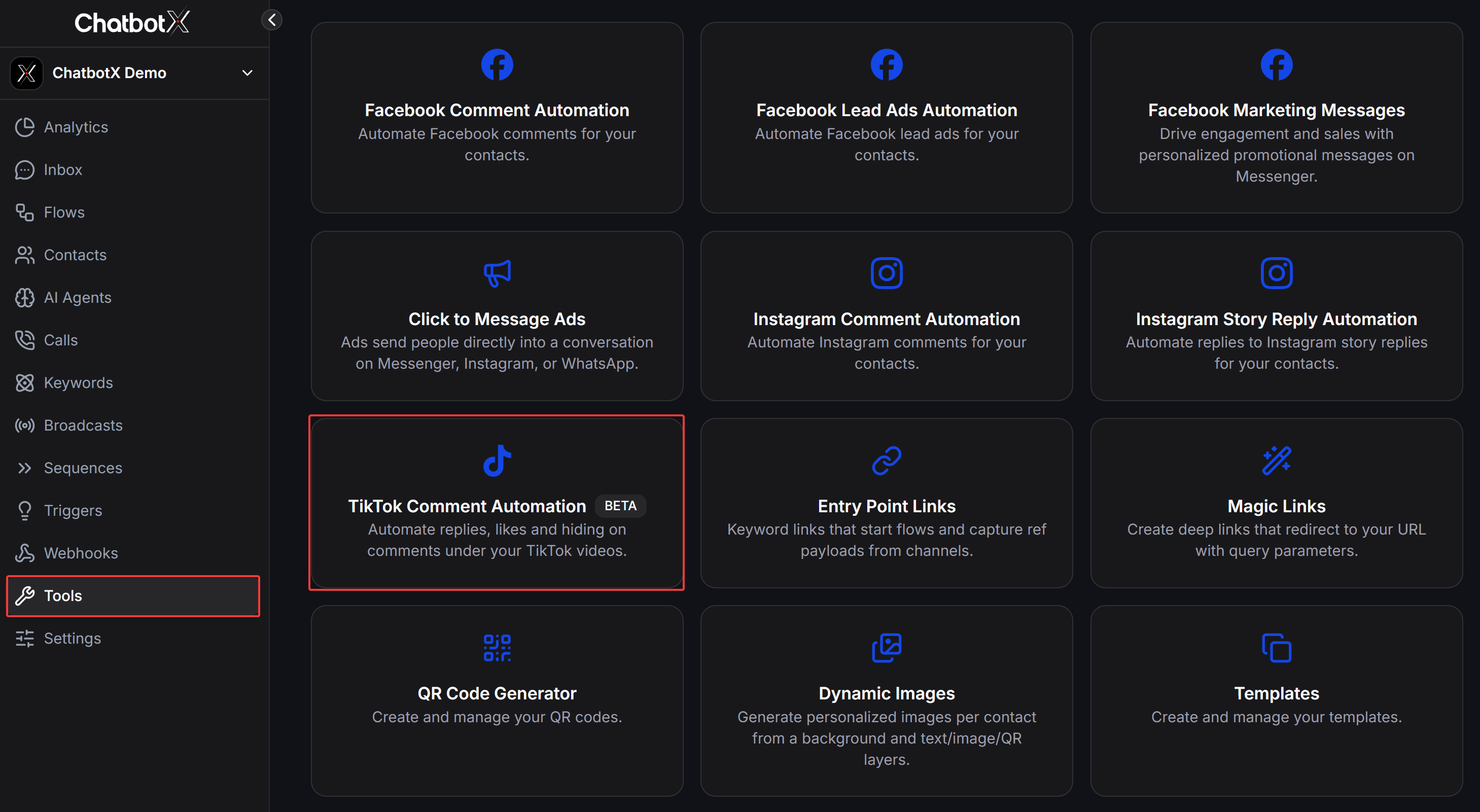
From the left navigation menu in ChatbotX, select **Tools**. In the tools catalog, click on the **TikTok Comment Automation** card.
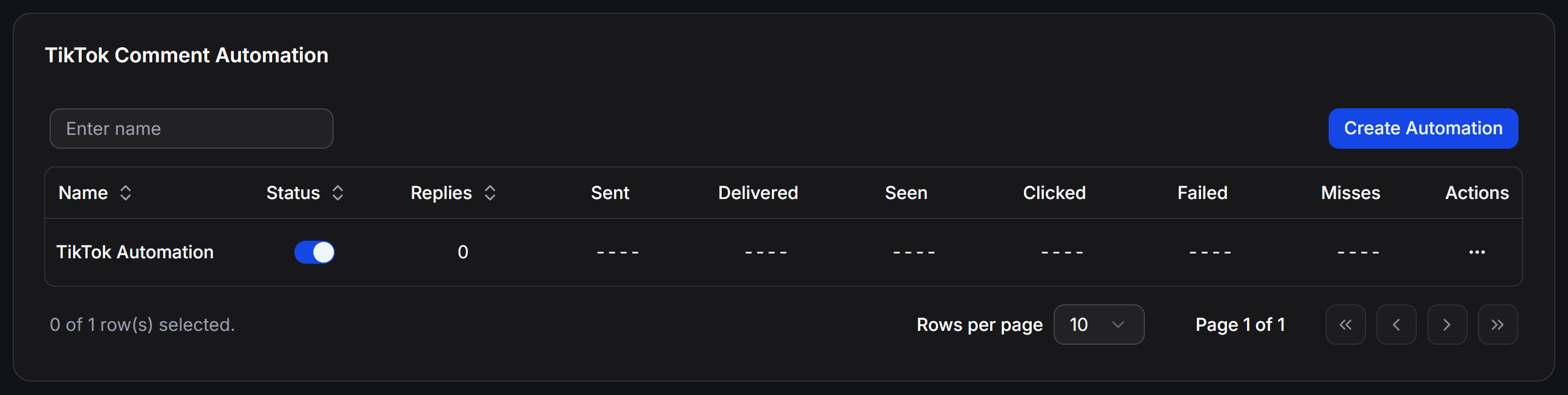
 In the TikTok Comment Automation dashboard, click the **Create Automation** button in the top right corner to start setting up your campaign.
 Under **Targeting & Reply**, configure the essential parameters for your campaign:
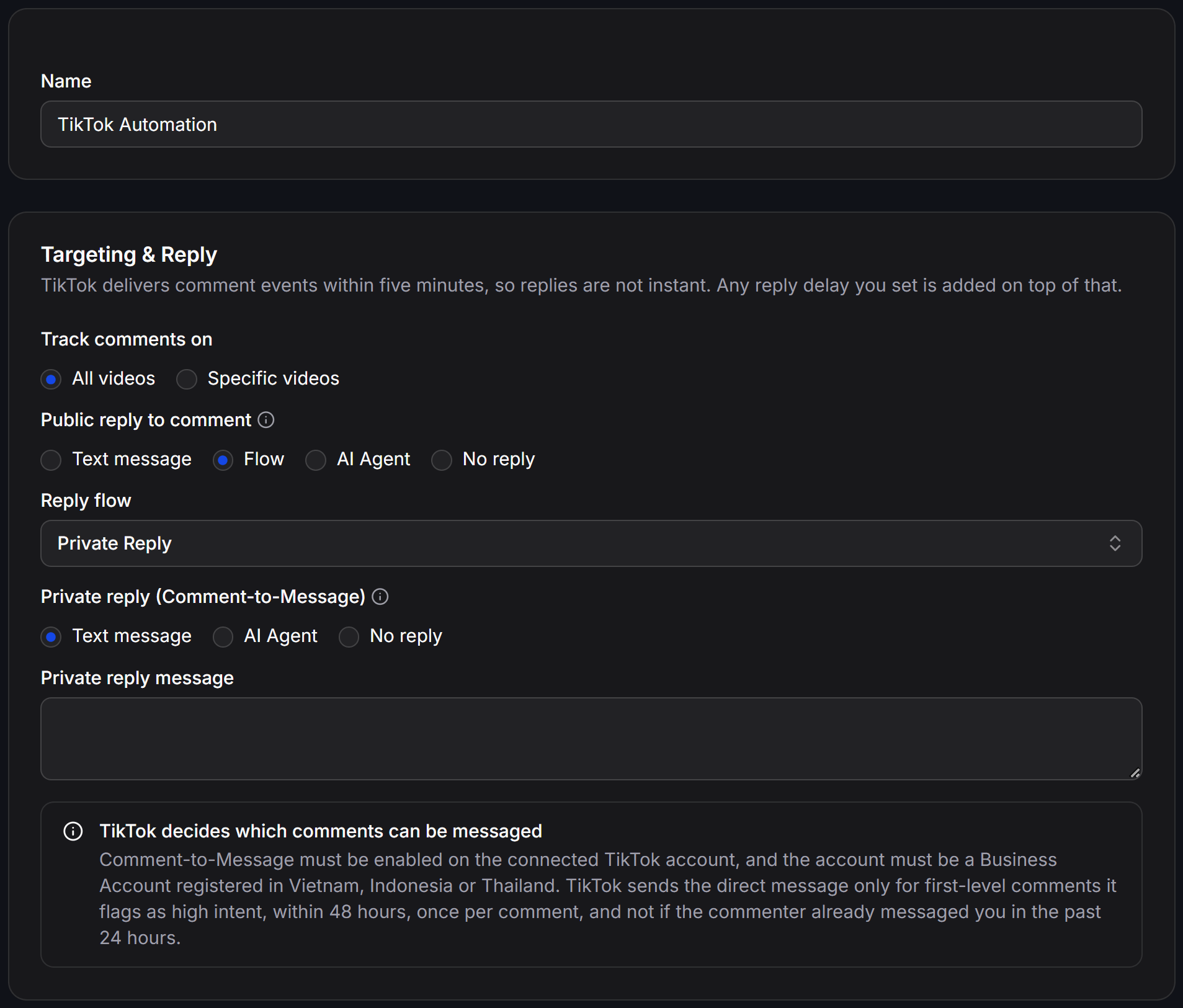 * **Name:** Enter a descriptive name to identify and manage your campaign.
* **Track comments on:**
* **All videos:** Monitor and automate replies across all current and future videos on your TikTok channel.
* **Specific videos:** Target only specific selected videos.
* **Public reply to comment:** Choose how to reply publicly under the viewer's comment:
* **Text message:** Enter static text for the system to post as a reply comment.
* **Flow:** Select an automated flow to generate the public comment reply.
* **AI Agent:** Delegate public responses to an AI Agent that reads the comment context and posts appropriate answers.
* **No reply:** Do not post a public comment reply.
* **Private reply (Comment-to-Message):** Choose how to send a direct message to the commenter's TikTok inbox:
* **Text message:** Send a direct message to the user's inbox. Enter your message text in the **Private reply message** field.
* **AI Agent:** Assign the incoming inbox conversation to an AI Agent for automated consultation.
* **No reply:** Do not send a private direct message.
Under **Filters & Options**, define targeting rules to ensure replies are delivered accurately:
* **Name:** Enter a descriptive name to identify and manage your campaign.
* **Track comments on:**
* **All videos:** Monitor and automate replies across all current and future videos on your TikTok channel.
* **Specific videos:** Target only specific selected videos.
* **Public reply to comment:** Choose how to reply publicly under the viewer's comment:
* **Text message:** Enter static text for the system to post as a reply comment.
* **Flow:** Select an automated flow to generate the public comment reply.
* **AI Agent:** Delegate public responses to an AI Agent that reads the comment context and posts appropriate answers.
* **No reply:** Do not post a public comment reply.
* **Private reply (Comment-to-Message):** Choose how to send a direct message to the commenter's TikTok inbox:
* **Text message:** Send a direct message to the user's inbox. Enter your message text in the **Private reply message** field.
* **AI Agent:** Assign the incoming inbox conversation to an AI Agent for automated consultation.
* **No reply:** Do not send a private direct message.
Under **Filters & Options**, define targeting rules to ensure replies are delivered accurately:
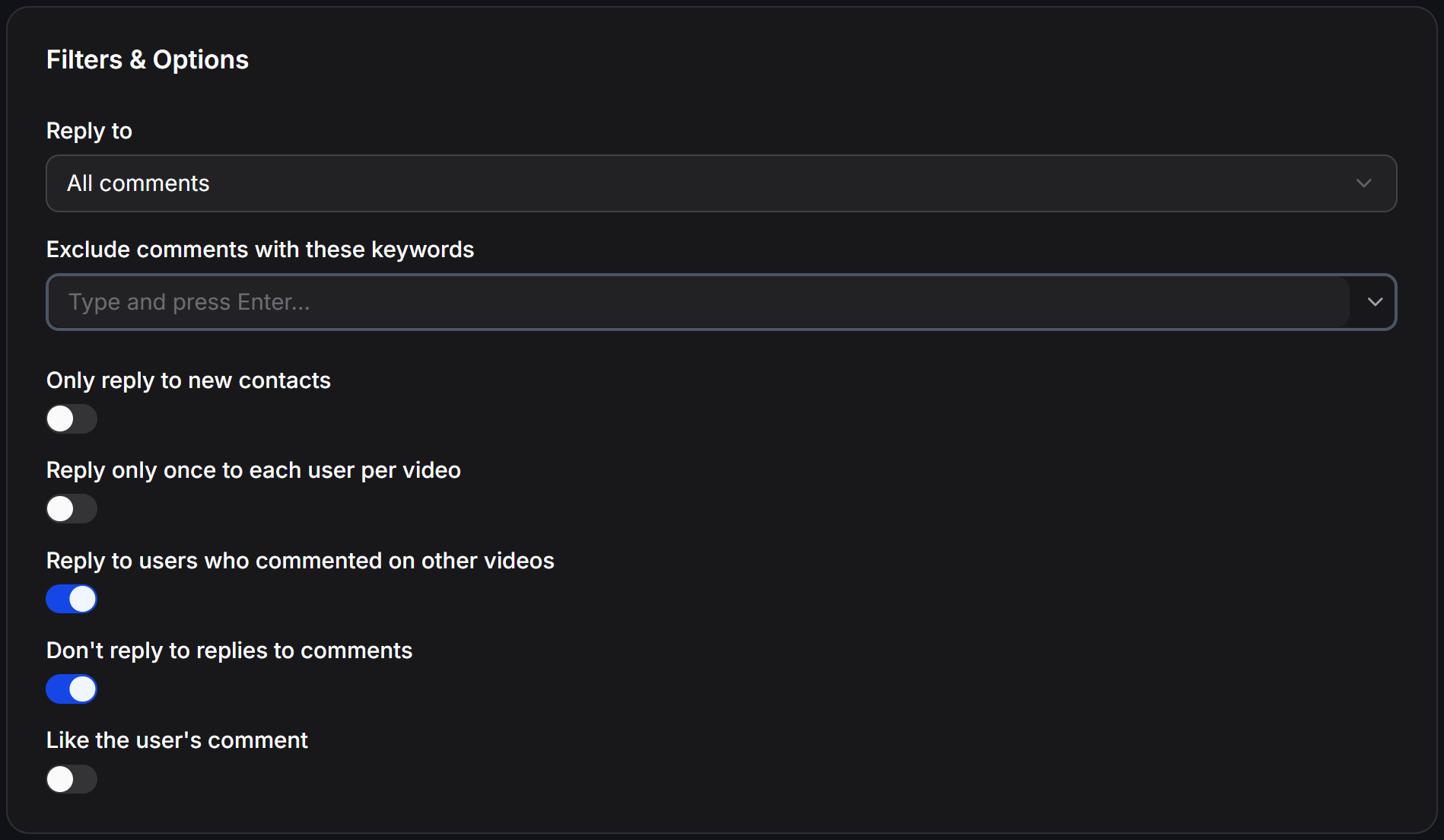 * **Reply to:** Choose which comments qualify for an automated reply (defaults to all valid comments).
* **Exclude comments with these keywords:** Enter keywords to exclude and press Enter. The system skips any comments containing these keywords.
* **Only reply to new contacts:** When turned on, replies are only triggered for first-time viewers who have not interacted with your channel before.
* **Reply only once to each user per video:** Limits responses to a maximum of one automated reply per user per video, avoiding repetitive messages if they comment multiple times.
* **Reply to users who commented on other videos:** When enabled, the system still replies to viewers who previously commented on your other videos.
* **Don't reply to replies to comments:** Skips nested comments to avoid intruding on secondary comment threads.
* **Like the user's comment:** Automatically likes the commenter's post when the reply is processed.
Under **Hide Comments**, establish rules to automatically hide sensitive or unwanted comments:
* **Reply to:** Choose which comments qualify for an automated reply (defaults to all valid comments).
* **Exclude comments with these keywords:** Enter keywords to exclude and press Enter. The system skips any comments containing these keywords.
* **Only reply to new contacts:** When turned on, replies are only triggered for first-time viewers who have not interacted with your channel before.
* **Reply only once to each user per video:** Limits responses to a maximum of one automated reply per user per video, avoiding repetitive messages if they comment multiple times.
* **Reply to users who commented on other videos:** When enabled, the system still replies to viewers who previously commented on your other videos.
* **Don't reply to replies to comments:** Skips nested comments to avoid intruding on secondary comment threads.
* **Like the user's comment:** Automatically likes the commenter's post when the reply is processed.
Under **Hide Comments**, establish rules to automatically hide sensitive or unwanted comments:
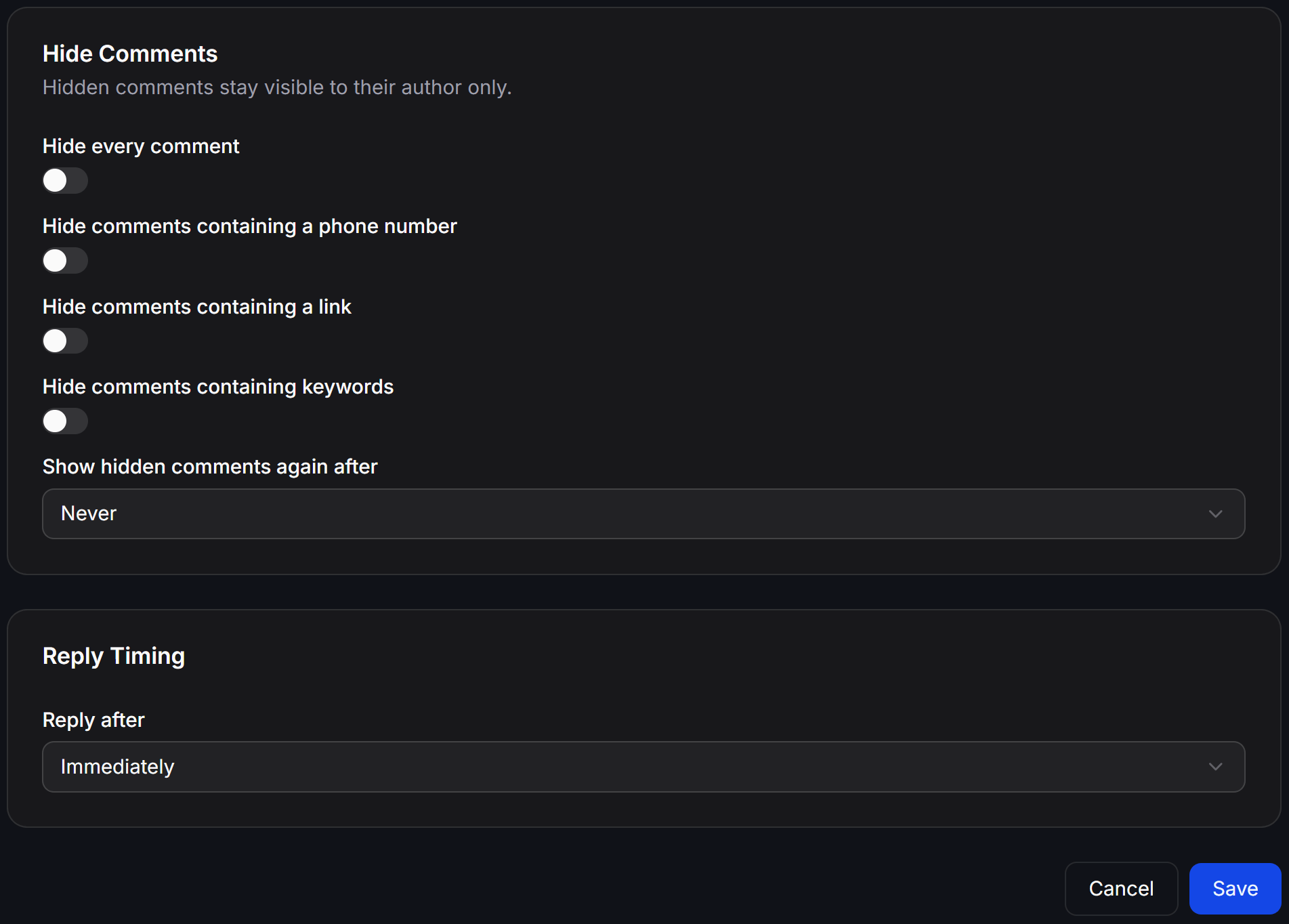 **TikTok Hiding Mechanism:** When a comment is hidden, it remains visible to its author but is concealed from all other viewers on your video.
* **Hide every comment:** Automatically hides all incoming comments on your videos.
* **Hide comments containing a phone number:** Hides comments containing phone numbers to safeguard customer privacy and protect leads from competitor poaching.
* **Hide comments containing a link:** Hides comments with URLs to eliminate link spam and malicious sites.
* **Hide comments containing keywords:** Automatically hides comments containing flagged words.
* **Show hidden comments again after:** Set a time duration after which hidden comments are unhidden (defaults to **Never** to keep them hidden permanently).
In the **Reply Timing** section, adjust how quickly the automated reply is dispatched:
* **Reply after:** Select your preferred response delay:
* **Immediately:** Sends the reply as soon as the event payload is received from TikTok.
* You can also choose random delay intervals to make automated responses appear more organic.
TikTok transmits comment events with an inherent delay of up to 5 minutes. Any custom delay configured in this setting will be added on top of TikTok's transfer time.
Click **Save** in the bottom right corner to store your settings and activate the campaign.
## Manage Comment Automations
On the main **TikTok Comment Automation** screen, monitor performance metrics and manage existing campaigns:
* **Quick Toggle:** Use the switch in the **Status** column to activate or pause any automation instantly.
* **Funnel Performance Metrics:**
* **Replies:** Total number of public comment replies posted under videos.
* **Sent:** Total number of direct messages sent to commenters' inboxes.
* **Delivered:** Total number of direct messages successfully delivered by TikTok.
* **Seen:** Total number of direct messages opened and read by recipients.
* **Clicked:** Total number of button or link clicks within sent messages.
* **Failed:** Number of failed message deliveries due to policy restrictions or connection errors.
* **Misses:** Number of comments skipped because they matched exclusion filters, were nested replies, or did not meet TikTok eligibility criteria.
* **Action Menu:** Click the three dots `...` in the **Actions** column to:
* **Edit:** Reopen campaign settings to adjust replies, filters, or timing.
* **View Analytics:** Inspect in-depth analytics, conversion trends, and event logs.
* **Rename:** Update the automation campaign name.
* **Delete:** Permanently remove the automation campaign from your workspace.
**TikTok Hiding Mechanism:** When a comment is hidden, it remains visible to its author but is concealed from all other viewers on your video.
* **Hide every comment:** Automatically hides all incoming comments on your videos.
* **Hide comments containing a phone number:** Hides comments containing phone numbers to safeguard customer privacy and protect leads from competitor poaching.
* **Hide comments containing a link:** Hides comments with URLs to eliminate link spam and malicious sites.
* **Hide comments containing keywords:** Automatically hides comments containing flagged words.
* **Show hidden comments again after:** Set a time duration after which hidden comments are unhidden (defaults to **Never** to keep them hidden permanently).
In the **Reply Timing** section, adjust how quickly the automated reply is dispatched:
* **Reply after:** Select your preferred response delay:
* **Immediately:** Sends the reply as soon as the event payload is received from TikTok.
* You can also choose random delay intervals to make automated responses appear more organic.
TikTok transmits comment events with an inherent delay of up to 5 minutes. Any custom delay configured in this setting will be added on top of TikTok's transfer time.
Click **Save** in the bottom right corner to store your settings and activate the campaign.
## Manage Comment Automations
On the main **TikTok Comment Automation** screen, monitor performance metrics and manage existing campaigns:
* **Quick Toggle:** Use the switch in the **Status** column to activate or pause any automation instantly.
* **Funnel Performance Metrics:**
* **Replies:** Total number of public comment replies posted under videos.
* **Sent:** Total number of direct messages sent to commenters' inboxes.
* **Delivered:** Total number of direct messages successfully delivered by TikTok.
* **Seen:** Total number of direct messages opened and read by recipients.
* **Clicked:** Total number of button or link clicks within sent messages.
* **Failed:** Number of failed message deliveries due to policy restrictions or connection errors.
* **Misses:** Number of comments skipped because they matched exclusion filters, were nested replies, or did not meet TikTok eligibility criteria.
* **Action Menu:** Click the three dots `...` in the **Actions** column to:
* **Edit:** Reopen campaign settings to adjust replies, filters, or timing.
* **View Analytics:** Inspect in-depth analytics, conversion trends, and event logs.
* **Rename:** Update the automation campaign name.
* **Delete:** Permanently remove the automation campaign from your workspace.