> ## Documentation Index
> Fetch the complete documentation index at: https://chatbotx.io/docs/llms.txt
> Use this file to discover all available pages before exploring further.
# Generate Code
> Tạo mã ngẫu nhiên riêng trong Flow ChatbotX cho voucher, vé, mã đơn hàng và thông tin của khách hàng.
**Generate Code** tạo một chuỗi ký tự hoặc số ngẫu nhiên riêng trong Flow. Dùng Action này khi mỗi khách hàng cần một mã khác nhau, chẳng hạn như voucher, vé sự kiện hoặc mã đơn hàng.
Flow có thể dùng kết quả đã tạo trong tin nhắn, Custom Field hoặc Action tiếp theo.
## Thêm Generate Code vào Flow
Mở Flow cần tạo mã riêng.
Thêm node **Perform Action** trước khi Flow gửi hoặc lưu mã.
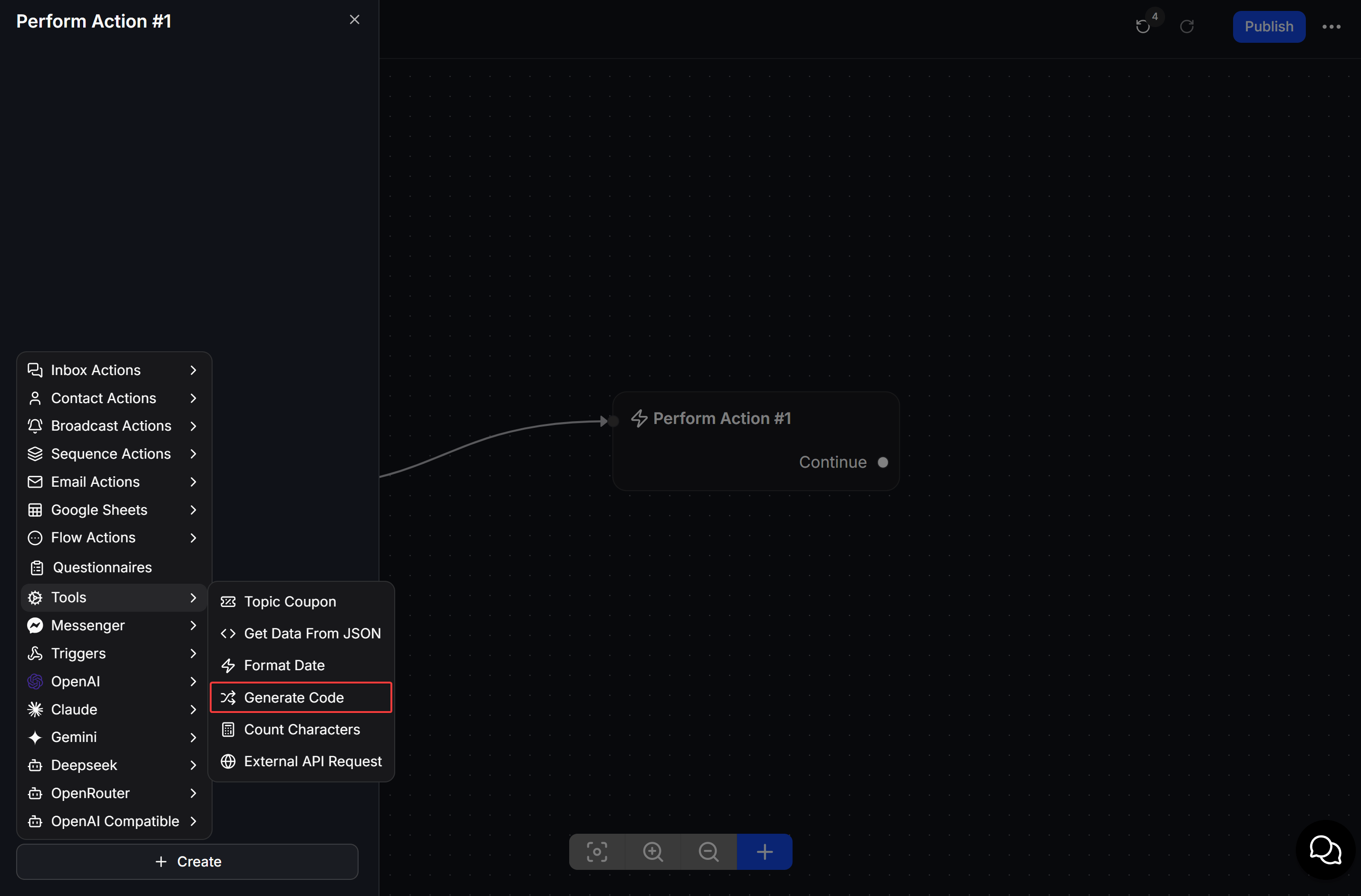
Mở node, nhấn **Create**, sau đó chọn **Tools > Generate Code**.
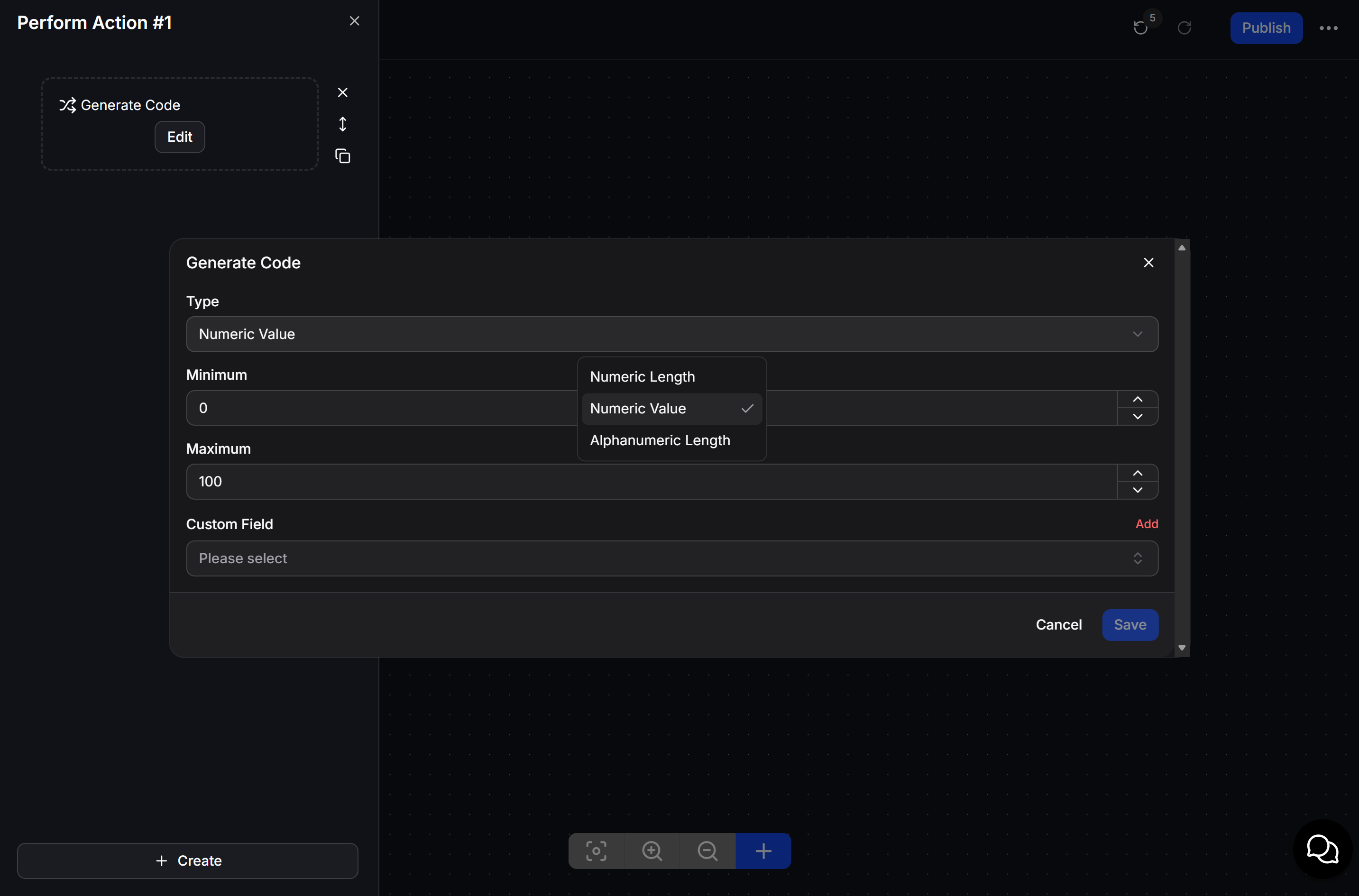
 Chọn **Type**, thiết lập giá trị theo Type đã chọn, chọn **Custom Field** sẽ nhận mã, sau đó nhấn **Save**.
 ## Chọn loại mã
| Type | Mô tả |
| ----------------------- | -------------------------------- |
| **Numeric Length** | Tạo dãy số thập phân ngẫu nhiên. |
| **Numeric Value** | Tạo dãy số nguyên ngẫu nhiên. |
| **Alphanumeric Length** | Tạo ký tự ngẫu nhiên. |
Chọn **Custom Field** nơi ChatbotX sẽ lưu mã đã tạo. Dùng **Add** khi cần tạo Custom Field mới.
## Ví dụ: gửi mã check-in
Khi khách hàng đăng ký sự kiện, Flow chạy **Generate Code** và lưu kết quả. Tin nhắn tiếp theo gửi mã này cho khách hàng làm mã check-in.
Tạo mã trước tin nhắn hiển thị mã. Điều này bảo đảm Flow đã có giá trị để chèn cho khách hàng.
## Chọn loại mã
| Type | Mô tả |
| ----------------------- | -------------------------------- |
| **Numeric Length** | Tạo dãy số thập phân ngẫu nhiên. |
| **Numeric Value** | Tạo dãy số nguyên ngẫu nhiên. |
| **Alphanumeric Length** | Tạo ký tự ngẫu nhiên. |
Chọn **Custom Field** nơi ChatbotX sẽ lưu mã đã tạo. Dùng **Add** khi cần tạo Custom Field mới.
## Ví dụ: gửi mã check-in
Khi khách hàng đăng ký sự kiện, Flow chạy **Generate Code** và lưu kết quả. Tin nhắn tiếp theo gửi mã này cho khách hàng làm mã check-in.
Tạo mã trước tin nhắn hiển thị mã. Điều này bảo đảm Flow đã có giá trị để chèn cho khách hàng.