In 2026, Facebook Messenger has evolved from a simple chat app into a high-converting sales ecosystem. This guide provides a strategic blueprint for leveraging ChatbotX to automate customer interactions, recover abandoned carts, and scale your revenue 24/7. Stop losing leads to slow response times-master the art of automated conversational marketing starting right now.
Launch agentic chat marketing in minutes with ChatbotX













What Is a Facebook Messenger Chatbot?

A Facebook Messenger Chatbot is an AI-powered automation layer embedded inside Meta’s Messenger Platform. Instead of waiting for a human agent to respond, users receive instant, contextual replies around the clock – driven by predefined logic, keyword triggers, and increasingly, large language models.
In 2026, Messenger chatbots are no longer a “nice-to-have.” With over 3.27 billion monthly active users across Meta’s family of apps, and Messenger remaining the primary touchpoint for business-to-consumer communication in Southeast Asia, North America, and Europe, brands that ignore chatbot automation are leaving measurable revenue on the table.
ChatbotX is an open-source omnichannel conversational platform that lets businesses deploy, manage, and optimize Messenger chatbots alongside WhatsApp, Instagram, Telegram, Zalo, and web chat – all from a single dashboard. If you’re planning a broader Facebook strategy, our guide on Facebook Messenger Marketing in 2026 is a strong companion read.
Why Your Business Needs One in 2026

The customer journey has fundamentally shifted. Buyers now expect:
- Sub-minute response times regardless of the hour
- Personalized interactions rather than generic broadcast blasts
- Frictionless checkout paths directly inside conversations
Traditional customer support models – staffed inboxes, ticketing systems, email queues – cannot satisfy these expectations at scale without exponential cost increases. Facebook Messenger Chatbots solve this by automating the entire top- and mid-funnel experience while keeping human agents focused on high-complexity, high-value conversations.
Core Benefits: Service Efficiency vs. Revenue Growth

Deploying a Messenger chatbot delivers value across two distinct dimensions. The most successful brands treat these as complementary, not competing.
1. Operational Efficiency: Do More with Fewer Resources
Staffing constraints are one of the most common pain points for growing e-commerce and retail brands. A well-architected chatbot absorbs the volume spikes – holiday seasons, flash sales, product launches – that would otherwise overwhelm your support team.
Through keyword-based auto-replies and structured FAQ flows, ChatbotX can autonomously handle upwards of 80% of routine inquiries: order status, return policies, store locations, product specifications. The platform’s built-in AI Agents detect user intent in real time and respond contextually, ensuring that even edge-case questions receive a meaningful answer rather than a dead end.
The compounding benefit: your human agents shift from reactive firefighters to proactive relationship managers.
2. Revenue Growth: Turning Conversations into Conversions
Most brands think of Messenger as a support channel. The highest-performing brands treat it as a revenue channel.
Unlike a static product page, a chatbot can proactively initiate a dialogue, qualify a prospect’s intent, surface the most relevant product, and deliver a payment link – all within the same thread. ChatbotX enables brands to grow their Messenger subscriber base, segment audiences by behavior, and deploy precisely timed promotional messages that convert.
Key Insight: Marketing brings traffic; service closes the sale. The brands scaling fastest in 2026 are those that integrate both within a single conversational interface.
How to Connect Facebook Messenger with ChatbotX

Connecting your Facebook Page to ChatbotX is a straightforward authorization process. Follow these steps:
Step 1: Log in to your ChatbotX admin dashboard.
Step 2: Navigate to Channels → Messenger Integration.
Step 3: Select Facebook Messenger Integration and click Connect your Facebook Account. A Meta authorization pop-up will appear.
Step 4: Confirm your login identity by clicking Continue as [Your Account].
Step 5: From the list of Pages associated with your account, select the Page you want to connect, then click Continue.
Step 6: Review the permission list Meta requires for the integration. Toggle all items on and click Next to proceed.
Step 7: Click OK to finalize the authorization handshake between Meta and ChatbotX.
Step 8: Your authorized Page will appear under the Connect Other Facebook Pages section. Click Connect to complete the linkage. Once successful, the Page will appear in your Integrated Facebook Pages list and is immediately ready for chatbot deployment.
Setting Up Auto-Reply for Facebook Comments

Comment auto-reply is one of the highest-leverage features in the ChatbotX toolkit. When a user comments on your post, they are publicly expressing interest – capturing that signal instantly, via a private Messenger conversation, converts organic reach into qualified leads.
Step 1: In the ChatbotX backend, go to Advanced Automation → Facebook/Instagram Comment Reply.
Step 2: Click New Campaign and select the Facebook Page you want the campaign to run on.
Step 3: Under Select Recent Post, choose the specific post to attach this automation to. Targeting individual posts rather than applying a global rule gives you far more control over messaging relevance.
Step 4: Define the campaign’s active time window – you may want auto-replies to run only during the 48-72 hours after publication when engagement is highest.
Step 5: Configure your trigger conditions. You can set the bot to fire on any comment, or restrict it to comments that contain specific keywords (e.g., “price,” “how to buy,” “interested”).
Step 6: Write at least one Public Comment Reply (visible to everyone) and one Private Messenger Reply (sent directly to the commenter’s inbox). For page-level notification controls, Meta Business Suite provides a complementary management layer that works seamlessly alongside ChatbotX automations.
Step 7 (Best Practice): Create multiple variations of each reply. ChatbotX will randomly rotate between them, which significantly reduces the likelihood of Meta flagging your Page for repetitive automated behavior.
Step 8: Click Publish to activate the campaign.
Building Your First Facebook Chatbot Flow

ChatbotX uses a visual flow builder – a drag-and-drop canvas where every element of your bot’s conversation is represented as a connected block. Here’s how the architecture works:
Naming and Platform Selection
When creating a new chatbot, assign it a descriptive internal name and select Facebook as the deployment platform. The builder will automatically surface only the card types supported natively by Messenger, preventing compatibility issues before they arise.
Understanding the Canvas
The flow builder opens to a full overview of your conversation map. You can pan, zoom, and rearrange blocks freely. Two controls manage your view:
- Zoom In / Zoom Out (+ / −): Adjust the canvas scale for detailed editing or high-level review.
- Full Overview: Instantly fits the entire flow within the viewport.
Adding Blocks
Each block represents a distinct moment in the conversation – a greeting, a product recommendation, a FAQ response, a checkout nudge. You add blocks by clicking the + button in the left toolbar.
Within each block, you can insert two types of message cards:
- Regular Card: Standard interactive content – text, images, quick replies, carousels, buttons, coupons – specific to the Messenger platform.
- Live Chat Card: A handoff trigger. When a user reaches this card, the conversation is escalated to a human agent via the Shared Team Inbox and the chatbot is paused for that thread. This transition is one-directional; once a conversation moves to live chat, the bot does not resume automatically.
Editing Blocks and Cards
Each block has a name field (edit this to keep complex flows readable), a card list, and a context menu (☰) that lets you expand or collapse all cards, duplicate the block, or delete it.
Adding new cards within a block is done either via the Add New Message Card button at the bottom of a block, or by hovering between two existing cards to reveal an inline + icon.
A card is the atomic unit of your chatbot – a single message, image, interactive element, or action. Cards within the same block send sequentially as part of a single conversational turn.
Automated Marketing Strategies That Drive Conversions

Strategy 1: Interactive Game Modules
Static discount codes no longer generate the excitement they once did. Gamified campaigns outperform traditional promotions because they satisfy the psychological craving for play and surprise.
ChatbotX offers five built-in interactive game modules deployable directly inside Messenger:
| Module | Best Use Case |
|---|---|
| Scratch Card | Flash sale reveals, limited-time offers |
| Lucky Wheel | Brand awareness campaigns, event activations |
| Slot Machine | Re-engagement of lapsed subscribers |
| Fortune Draw | Seasonal campaigns (Lunar New Year, etc.) |
| Gashapon / Capsule Toy | Product sampling, collectible campaigns |
For each module, you configure the prize pool, winning probabilities, and maximum redemption quantities. Campaigns deploy in minutes and work across Facebook, Instagram, WhatsApp, and Telegram simultaneously.
Strategy 2: Hyper-Segmented Broadcasts
A subscriber list with 50,000 contacts is only valuable if you can speak to each segment with relevant messaging. Mass broadcasts to undifferentiated audiences produce declining open rates, high unsubscribe rates, and eroding sender reputation.
ChatbotX’s segmented broadcast feature lets you slice your audience by:
- Interest tags assigned based on content they’ve clicked
- Behavioral signals such as which products they viewed or purchased
- Funnel stage – first-time visitors vs. repeat buyers vs. lapsed customers
The result is messaging that feels personal rather than promotional – and conversion rates that reflect that difference.
Mastering Meta’s 24-Hour Messaging Window.
Meta restricts promotional Messenger messages to users who have interacted with your Page within the previous 24 hours. To maintain the ability to reach your audience, you need to actively reset this window through micro-engagements:
- Replace raw URLs with action buttons. A “Claim My Discount” button registers as an interaction; a link does not.
- End every bot flow with a Quick Reply. Offer options like “Browse New Arrivals” or “Chat with an Expert” to keep the conversation open.
- Use keyword prompts strategically. Invite users to reply with a specific word (e.g., “Reply TRACK to check your order”) to reopen the communication window without feeling manipulative.
Strategy 3: Abandoned Cart Recovery via Messenger
Cart abandonment remains one of the most costly problems in e-commerce. According to HubSpot’s marketing research, abandonment rates consistently exceed 70% across most product categories. Email recovery sequences are well understood – and increasingly ignored.
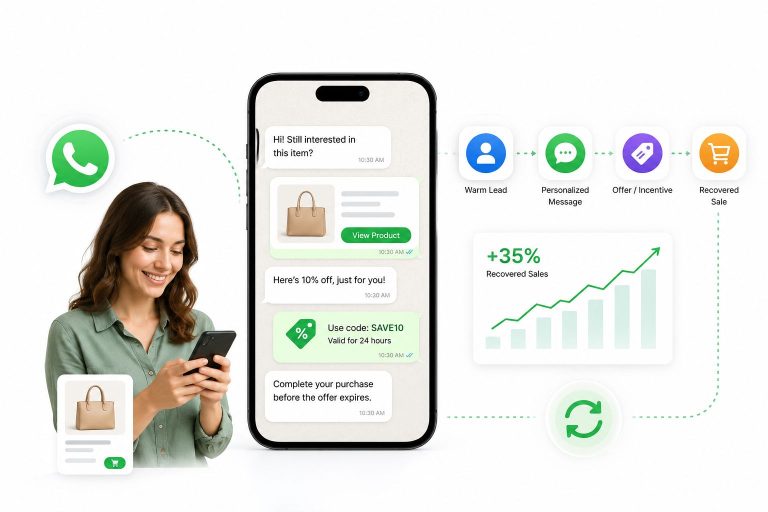
Messenger-based cart recovery is different. When ChatbotX detects an abandoned cart event from your connected e-commerce platform, it automatically sends a personalized follow-up message inside Messenger within minutes of the user leaving. The message can include:
- A direct link back to their specific cart
- A time-limited discount code to create urgency
- A quick reply to connect with a human agent if they have questions
Because Messenger open rates vastly outperform email for retargeting, this “conversational recovery” flow shortens the decision cycle and recovers revenue that would otherwise be permanently lost.
Post Engagement Tactics to Maximize Organic Reach

Automated comment replies are a two-for-one tactic: they capture leads and signal to the Facebook algorithm that your content is generating meaningful engagement, which expands its organic distribution. To understand exactly how Meta’s ranking system rewards this behavior, our article on how social media algorithms work in 2026 goes deeper on the mechanics.
High-Value Use Cases for Comment Automation
Intent Capture: When a user comments “Where can I buy this?” or simply “❤️” on a product post, they are expressing purchase intent. An auto-reply that instantly sends them a private Messenger message with product details and a purchase link converts that intent into action before it fades.
Interactive Lead Generation: Posts structured around downloadable resources (“Comment GUIDE to receive our free lookbook”), personality quizzes, or exclusive early-access offers drive comment volume while simultaneously growing your Messenger subscriber list.
Navigating Meta’s Engagement Bait Policy
Facebook’s algorithm actively identifies and penalizes content that artificially solicits engagement – a category Meta calls engagement bait. Posts that explicitly demand users to “tag a friend,” “share this to win,” or “comment your favorite emoji” without genuine value exchange are flagged, which reduces the organic reach of that post and can affect your Page’s overall distribution score.
The safe alternative: Design interactions around genuine utility. A quiz that helps users find their ideal skincare routine, a calculator that estimates their savings, or a resource that solves a real problem – these generate comments organically because they provide value, not because they coerce participation.
The Giveaway Trap: Why Irrelevant Prizes Hurt Long-Term Growth
Running a giveaway with a prize unrelated to your product category (e.g., a gaming console on a wellness brand’s Page) is a fast way to accumulate followers who have zero interest in what you sell. These “prize hunters” artificially inflate your follower count while diluting the quality of your audience data – which means your ad targeting becomes less accurate, your engagement rates drop, and your organic reach shrinks.
Recommendation: If giveaways are part of your strategy, prize them with your own products or experiences directly tied to your brand. This self-selects for genuinely interested followers and protects the integrity of your audience data over time.
FAQ

What makes ChatbotX a strong choice for Facebook Messenger automation?
ChatbotX provides an end-to-end conversational commerce stack – combining chatbot flows, live chat escalation, segmented broadcasting, gamification modules, and CRM integrations – within a single unified dashboard. Brands can manage Messenger marketing and customer support simultaneously without switching tools or losing context.
How does a Facebook Chatbot integrate with an e-commerce store?
ChatbotX syncs with major e-commerce platforms to pull real-time store data into Messenger conversations. This enables automated order status lookups, cart recovery messages, and product recommendation flows – all delivered inside the chat. For a deeper look at connecting your CRM data, see the Facebook Messenger CRM integration guide.
How does a Messenger Chatbot actually improve customer service efficiency?
By deploying keyword triggers and structured FAQ flows, ChatbotX resolves the majority of repetitive support queries – shipping timelines, return policies, size guides – autonomously and instantly. Human agents are only engaged for complex, sensitive, or high-value conversations. The result is dramatically faster resolution times with a smaller support headcount.
What is the optimal strategy for growing Facebook engagement through chatbot automation?
Prioritize value-first, two-way interactions over one-directional promotional blasts. Chatbot flows that ask users questions, help them discover relevant content, or reward their participation build active relationships. Subscribers who have genuinely engaged with your bot are significantly more likely to convert – and significantly less likely to unsubscribe – than those who received a generic broadcast.
Which e-commerce features can be integrated directly into a Facebook Messenger Chatbot?
Through ChatbotX, businesses can integrate product catalog browsing, abandoned cart recovery, post-purchase order tracking, loyalty coupon distribution, and satisfaction survey collection directly inside Messenger threads. This creates a closed-loop commerce experience that reduces drop-off at every stage of the customer journey.
Is a Facebook Messenger Chatbot effective for B2B as well as B2C brands?
Absolutely. While B2C use cases dominate (e-commerce, retail, F&B, beauty), B2B brands use Messenger chatbots effectively for lead qualification, event registrations, demo scheduling, and content distribution. The key difference is the conversation design: B2B flows tend to be longer, more information-dense, and more likely to route to a human earlier in the funnel.
Final Thoughts

A Facebook Messenger Chatbot powered by ChatbotX is not a replacement for human connection – it’s the infrastructure that makes human connection scalable. By automating the repetitive, the routine, and the time-sensitive, you free your team to focus on the conversations that actually require empathy, expertise, and relationship-building.
The brands that will win in 2026 are those that treat Messenger not as a notification channel, but as a fully realized commerce and service environment – one where every message is an opportunity to deliver value, build trust, and grow revenue.
Ready to deploy your first Facebook Messenger Chatbot? Get started with ChatbotX – free 7-day trial, no credit card required.