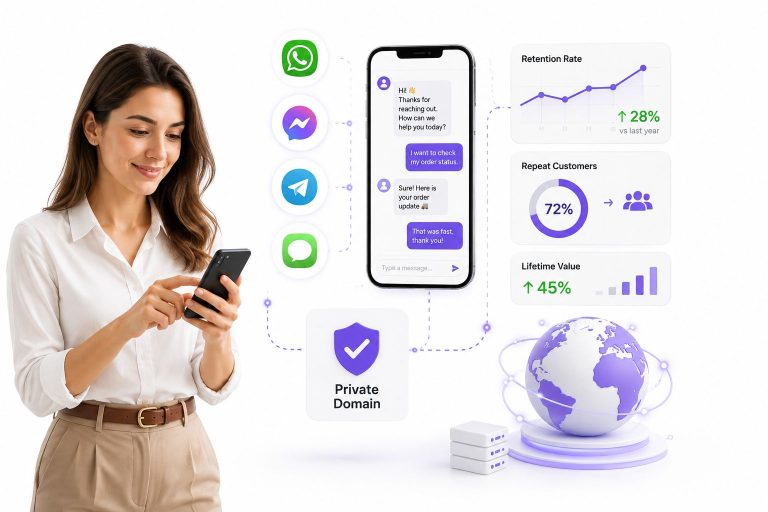
WhatsApp Message Templates are pre-approved message formats businesses use to contact customers through the WhatsApp Business API – and they are the only way to initiate conversations outside the 24-hour messaging window. With WhatsApp surpassing 3 billion monthly active users in 2025 and message open rates exceeding 90%, brands that master template messaging hold a significant edge over competitors still relying on email. In this complete guide, you’ll learn exactly how the three template categories work (Marketing, Utility, and Authentication), how to pass Meta’s approval process on the first try, which mistakes cause the most rejections, and how to connect your templates to WhatsApp automation tools that drive real revenue – not just messages sent.
Launch agentic chat marketing in minutes with ChatbotX







What Are WhatsApp Message Templates?

WhatsApp Message Templates are pre-approved, structured message formats that businesses use to initiate conversations with customers through the WhatsApp Business Platform (API). Unlike casual chat messages, these templates go through a formal review and approval process by Meta before they can be sent.
The key distinction: standard WhatsApp messages can only be sent within a 24-hour window after a customer contacts your business. Once that window closes, only approved message templates can be used to re-engage customers – making them an essential tool for proactive outreach, follow-ups, and time-sensitive communications.
Templates can include dynamic variables (like a customer’s name, order number, or appointment date), multimedia headers (images, videos, or documents), and interactive buttons (call-to-action or quick reply buttons). This flexibility allows businesses to deliver highly personalized experiences at scale.
Who needs WhatsApp Message Templates? Any business using the WhatsApp Business API – from e-commerce brands and healthcare providers to logistics companies and financial services – relies on templates to send transactional updates, promotional campaigns, and automated notifications. For a complete overview of what message types are permitted, refer to Meta’s official WhatsApp Business Messaging Policy.
Why Message Templates Matter for Business Growth
WhatsApp is no longer just a personal messaging app. With over 3 billion monthly active users globally as of 2025, it has become one of the most powerful direct-to-customer communication channels available to businesses.
Here’s why templates are central to that power:
- Reach customers where they are. WhatsApp messages achieve open rates significantly higher than email – industry benchmarks frequently exceed 90%, compared to email’s typical 20–30%. Understanding the algorithms that govern messaging platforms can further amplify your results – see how social media algorithms work in 2026 and how to adapt your strategy for a deeper breakdown.
- Bypass the 24-hour session limit. Templates are the only way to proactively message customers who haven’t interacted with your brand recently, enabling re-engagement campaigns and post-purchase outreach.
- Ensure regulatory compliance. Meta’s strict anti-spam policies require that proactive messages follow a structured, pre-approved format. Templates keep your business compliant and your account in good standing.
- Enable automation at scale. When paired with chatbots and CRM integrations, templates allow businesses to trigger personalized messages automatically based on customer behavior or system events.
The 3 Core Template Categories Explained

Meta organizes WhatsApp Message Templates into three distinct categories, each serving a different business purpose and subject to different pricing structures. For a full technical reference, consult the official WhatsApp Message Templates documentation on the Meta developer portal.
1. Marketing Templates
Purpose: Engage customers, promote products or services, and drive revenue.
Marketing templates are the broadest category and the most commonly used for outbound campaigns. They are designed for any message intended to increase brand awareness, generate leads, or encourage purchases. When running large-scale campaigns, pairing templates with a dedicated broadcast campaign tool can significantly increase reach – allowing you to segment audiences and schedule bulk sends without manual effort.
Common use cases:
- New product launches and seasonal promotions
- Flash sale announcements with limited-time offers
- Loyalty program updates and reward redemptions
- Personalized product recommendations based on purchase history
- Win-back campaigns for inactive customers
- Event invitations and webinar registrations
Marketing templates support rich media headers (images, videos) and call-to-action buttons, making them ideal for visually compelling campaigns.
2. Utility Templates
Purpose: Deliver transactional and operational information customers expect or have opted into.
Utility templates cover messages tied to a specific transaction or ongoing customer relationship. They keep customers informed and reduce the burden on your support team by proactively answering common questions. Businesses that automate these messages using a visual chatbot flow builder can trigger the right template at exactly the right moment – whether after checkout, at delivery, or following a service interaction.
Common use cases:
- Order confirmations and shipment tracking updates
- Appointment reminders and booking confirmations
- Account activity alerts (e.g., login notifications, balance updates)
- Payment reminders and invoice delivery
- Subscription renewal notices
- Post-service feedback requests
- Opt-in confirmations for communication preferences
Utility templates generally have lower per-conversation pricing compared to marketing templates, reflecting their transactional nature.
3. Authentication Templates
Purpose: Verify user identity and protect account security.
Authentication templates are purpose-built for delivering one-time passcodes (OTPs) and verification codes. They follow a rigid format defined by Meta to ensure security and consistency.
Common use cases:
- Two-factor authentication (2FA) at login
- Account registration verification
- Password reset confirmation
- Transaction authorization codes
- Identity verification for sensitive operations
Meta provides a specialized button format for authentication templates that automatically copies the OTP to the user’s clipboard, reducing friction and improving conversion rates for sign-ups and logins.
Key Business Benefits of Using WhatsApp Templates

Implementing WhatsApp Message Templates as part of your communication strategy delivers measurable advantages across multiple business functions:
Scalable Personalization
Dynamic variables allow each message to feel individually crafted, even when sending to thousands of customers simultaneously. Addressing customers by name, referencing their specific order, or mentioning their location creates a personal connection that generic broadcast messages cannot achieve.
Consistent Brand Communication
Every template undergoes an internal review before submission to Meta, encouraging businesses to standardize their tone, formatting, and messaging. The result is a coherent brand voice across all customer touchpoints – whether a customer receives an order update or a promotional offer.
Faster Response Workflows
Pre-approved templates can be deployed instantly without manual composition. Customer-facing teams can respond to high-volume inquiries using saved templates, slashing average response times and improving satisfaction scores. A unified team inbox that centralizes WhatsApp, Messenger, Instagram, and Zalo eliminates platform-switching and keeps every conversation in a single, manageable workspace.
Reduced Risk of Account Restrictions
Sending unsolicited or non-compliant messages on WhatsApp can result in account flags or restrictions. Approved templates act as a compliance safeguard, ensuring every proactive message meets Meta’s messaging standards.
Measurable Campaign Performance
When deployed through the WhatsApp Business API, template messages generate delivery receipts, read indicators, and click-through data. These insights allow marketing teams to A/B test different template versions and continuously improve engagement rates.
Automation Integration
Templates are the building blocks of automated customer journeys. Connected to a platform with powerful AI agent capabilities, they can trigger at key moments – when a cart is abandoned, when a delivery is delayed, or when a subscription is about to expire – creating seamless, timely experiences without any manual intervention. According to research from Infobip’s WhatsApp chatbot guide, businesses report 45–60% conversion rates through WhatsApp-automated conversations, compared to just 2–5% for traditional email campaigns.
How the Approval Process Works

Before any template can be sent to customers, it must be submitted to Meta for review. Here is how the process unfolds step by step:
Step 1: Create Your Template
Log in to your WhatsApp Business Manager or your BSP’s dashboard. Define the template name, category, language, and message body. Add variables, buttons, and media headers as needed.
Step 2: Select the Right Category
Choosing between Marketing, Utility, or Authentication is critical. Misclassifying a template (e.g., labeling a promotional message as Utility) is a common reason for rejection. Meta evaluates whether the actual content matches the stated category.
Step 3: Submit for Review
Once submitted, Meta’s automated and manual review systems assess the template against its Business and Commerce Policies. Review times are typically within a few minutes to 24 hours, though complex templates may take longer.
Step 4: Receive Approval or Feedback
Approved templates are immediately available for use. If rejected, Meta provides a reason, and businesses can revise and resubmit. WhatsApp Manager sends notifications via in-platform alerts and email to Business Manager admins.
Step 5: Monitor Template Quality
After deployment, Meta monitors customer reactions. If recipients frequently block or report messages from your template, its quality rating drops. Templates with consistently low quality ratings may be paused or deactivated until they are revised to improve relevance and engagement.
Common Rejection Reasons
Understanding why templates get rejected saves time and accelerates your go-to-market timeline. The most frequent causes include:
| Rejection Reason | How to Avoid It |
|---|---|
| Promotional content submitted as Utility | Ensure content matches declared category; transactional must relate to a specific action the customer took |
| Grammatical errors or unclear wording | Proofread carefully; use complete sentences with correct punctuation |
| Violating Commerce Policy | Avoid restricted product categories (e.g., firearms, tobacco, adult content) |
| Variables without sufficient context | Placeholder variables must be clearly understandable from surrounding text |
| Misleading or deceptive content | Do not use clickbait, false urgency, or unverifiable claims |
| Collecting sensitive data improperly | Avoid requesting passwords, full credit card numbers, or government ID numbers |
| URL shorteners in CTAs | Use full, branded URLs where possible for transparency |
Best Practices for Writing High-Performing Templates
Crafting templates that get approved and drive engagement requires attention to both compliance and customer psychology:
1. Lead with Value
The first line of your template should immediately communicate what the customer gains from reading on. Avoid filler openers like “We wanted to reach out…” and get straight to the benefit.
2. Keep It Concise
WhatsApp is a mobile-first channel. Messages that exceed three to four short paragraphs risk low read-through rates. Aim for clarity over completeness – link to longer content rather than embedding it.
3. Personalize Strategically
Use variables for the customer’s name, purchase details, or location, but avoid over-engineering personalization that could seem intrusive. The goal is relevance, not surveillance.
4. Use Interactive Buttons Purposefully
Call-to-action buttons (“Track Order”, “Book Now”, “Claim Offer”) outperform passive text links. Quick-reply buttons reduce friction for simple responses. Limit buttons to two or three per message to avoid decision fatigue.
5. Match Tone to Context
Authentication and utility messages should be professional and factual. Marketing messages have more room for brand personality, urgency language, and emojis – but use them judiciously and consistently with your brand guidelines.
6. Optimize for Re-Engagement
For customers who haven’t interacted recently, acknowledge the gap naturally. A message like “It’s been a while – here’s something we saved for you” performs better than a generic promotion because it signals awareness of the relationship.
7. Test Before Scaling
Before deploying a template to your entire customer list, test it on a smaller segment. Analyze delivery rates, read rates, and reply rates to validate performance before a full rollout.
Getting Started with the WhatsApp Business API

Accessing WhatsApp Message Templates requires the WhatsApp Business API (officially called the WhatsApp Business Platform), not the standard WhatsApp Business App. The API unlocks template messaging, multi-agent access, automation, and analytics – but it must be set up through a WhatsApp Business Solution Provider (BSP).
Why Work with a BSP?
Setting up the API directly through Meta involves technical configuration, including webhook management, API authentication, and compliance verification. A BSP abstracts this complexity, providing:
- A managed onboarding process for API access and phone number registration
- A dashboard for creating, submitting, and managing templates without code
- Pre-built integrations with CRMs, e-commerce platforms, and helpdesk tools
- Chatbot builders and broadcast campaign tools on top of the API infrastructure
- Dedicated support for resolving account issues or template rejections
Key Features to Look for in a BSP
When evaluating BSP partners, prioritize platforms that offer:
- Template management workflows with version history and approval tracking
- Broadcast campaign scheduling with audience segmentation – a feature core to platforms like ChatbotX’s broadcast tool
- Chatbot automation built on a flexible visual flow builder that triggers templates based on user behavior
- Unified inbox for managing WhatsApp alongside other messaging channels – as offered by ChatbotX’s team inbox
- Analytics dashboards with template-level performance metrics
- Compliance tools to monitor quality ratings and prevent account flags
Not sure how leading platforms compare? The ChatbotX alternatives comparison page offers a detailed side-by-side breakdown of omnichannel chatbot providers across automation depth, AI capabilities, channel coverage, and pricing – useful reading before committing to a platform.
Setup Timeline
For most businesses, getting from zero to live campaigns takes one to two weeks, depending on the complexity of business verification and the number of templates requiring approval. Working with an experienced BSP can significantly compress this timeline.
Frequently Asked Questions

How long does Meta take to approve a WhatsApp message template?
Most templates receive a decision within a few minutes to 24 hours. Straightforward templates with clear category alignment and error-free copy typically process faster. Using a BSP that has established relationships with Meta can also improve throughput.
Can I include images, videos, or documents in my templates?
Yes. WhatsApp supports “Media Templates” that include a header containing an image, video, or document (such as a PDF invoice or product brochure). Media headers increase visual engagement and are particularly effective for marketing and utility use cases.
What happens if my template gets a low quality rating?
Meta tracks recipient feedback signals (e.g., blocks and reports) to assign quality ratings to each template. A declining quality rating triggers warnings, and if it falls below an acceptable threshold, the template may be automatically paused. To restore it, revise the content to improve relevance and resubmit.
Is there a limit to how many templates I can create?
Meta allows businesses to create up to 6,000 message templates per WhatsApp Business Account (WABA). There are also per-category limits depending on your account tier. Most businesses operate well within these limits during normal operations.
Can I use the same template in multiple languages?
Yes. Each template can be submitted in multiple language variants under the same template name. This is particularly useful for businesses operating across regions with different primary languages, allowing consistent messaging adapted for each audience.
What is the difference between a WhatsApp template message and a regular WhatsApp message?
A regular (free-form) message can only be sent during an open 24-hour customer service window after a customer contacts you first. A template message is the only type of message that can be sent outside this window, enabling proactive outreach – but only after Meta has approved it.
Do WhatsApp template messages cost more than regular messages?
WhatsApp uses a conversation-based pricing model. Template-initiated conversations (where a business starts the chat using a template) are priced differently from user-initiated conversations. Marketing templates are generally priced higher than utility or authentication templates. Exact pricing varies by country – refer to the official Meta WhatsApp pricing documentation or consult your BSP for current rates.
Final Thoughts

WhatsApp Message Templates are not simply a compliance checkbox – they are a strategic asset for businesses that want to communicate with customers proactively, at scale, and with measurable results. From re-engaging lapsed buyers with targeted promotions to automating delivery updates that reduce support volume, templates enable a level of customer communication that traditional channels struggle to match.
The key to success lies in three areas: choosing the right template category, crafting messages that deliver genuine value, and partnering with a BSP that handles the technical and compliance complexity so your team can focus on strategy and creativity.
As WhatsApp continues to expand its business features in 2026 – including deeper integration with AI-powered chatbots and enhanced interactive components – businesses that build strong template messaging foundations today will be best positioned to capitalize on what comes next.
Power Your WhatsApp Templates with ChatbotX
If you’re ready to move from static templates to a fully automated, omnichannel conversation engine, ChatbotX is a platform worth serious consideration.
Built as an open-source alternative to closed platforms like ManyChat, ChatbotX gives businesses complete control over their automation stack – without vendor lock-in or escalating pricing tiers. It supports WhatsApp, Messenger, Zalo, and Webchat from a single dashboard, and its core features are designed to complement every stage of the WhatsApp template workflow:
- AI Agent – Deploy intelligent bots that respond to customer messages 24/7, qualify leads, and trigger the right template at the right moment without manual input.
- Visual Flow Builder – Map out multi-step customer journeys using a no-code drag-and-drop interface and export flows as JSON for portability.
- Broadcast Campaigns – Import contacts, segment audiences by behavior or demographics, and launch high-volume WhatsApp campaigns from a single tool.
- Unified Team Inbox – Centralize all incoming conversations across channels so your support team never misses a message, regardless of where it originated.
Whether you’re a small business sending your first template or an enterprise scaling automated conversations across thousands of customers, ChatbotX offers the flexibility, transparency, and AI power to grow with you.