
Quick answer: A knowledge base chatbot is an AI assistant that answers customer questions using only the content you approve: help articles, policy pages, manuals, and Q&A pairs. It searches that content, writes a short reply, and passes the conversation to a person whenever it lacks a reliable answer. Most teams can launch one in a single afternoon.
Key Takeaways
- Customers rarely fail because your answers do not exist. They fail because they cannot find them.
- A knowledge base chatbot uses retrieval-augmented generation (RAG), so replies stay grounded in your own documents.
- Your business is responsible for everything the bot says, so “answer only from approved sources” is a rule, not a preference.
- Content quality matters more than model choice. Clean, current, single-source articles beat a bigger model every time.
- Always design a human handoff before launch, and review unanswered questions every week.
Launch agentic chat marketing in minutes with ChatbotX






Why Customers Still Cannot Find Answers in Your Help Center
Most support teams have already written the answers to their top questions. The trouble is discovery. A Gartner survey of 5,728 customers found that only 14% of service issues were fully resolved in self-service, and that figure climbed to just 36% for problems customers themselves described as very simple. The most frequent point of failure was not wrong content. It was customers being unable to locate anything relevant.
That gap is exactly what a knowledge base chatbot is built to close. Instead of making someone hunt through menus and search boxes, it lets them type a question in plain language and returns a concise, sourced reply in seconds.
What Is a Knowledge Base Chatbot?
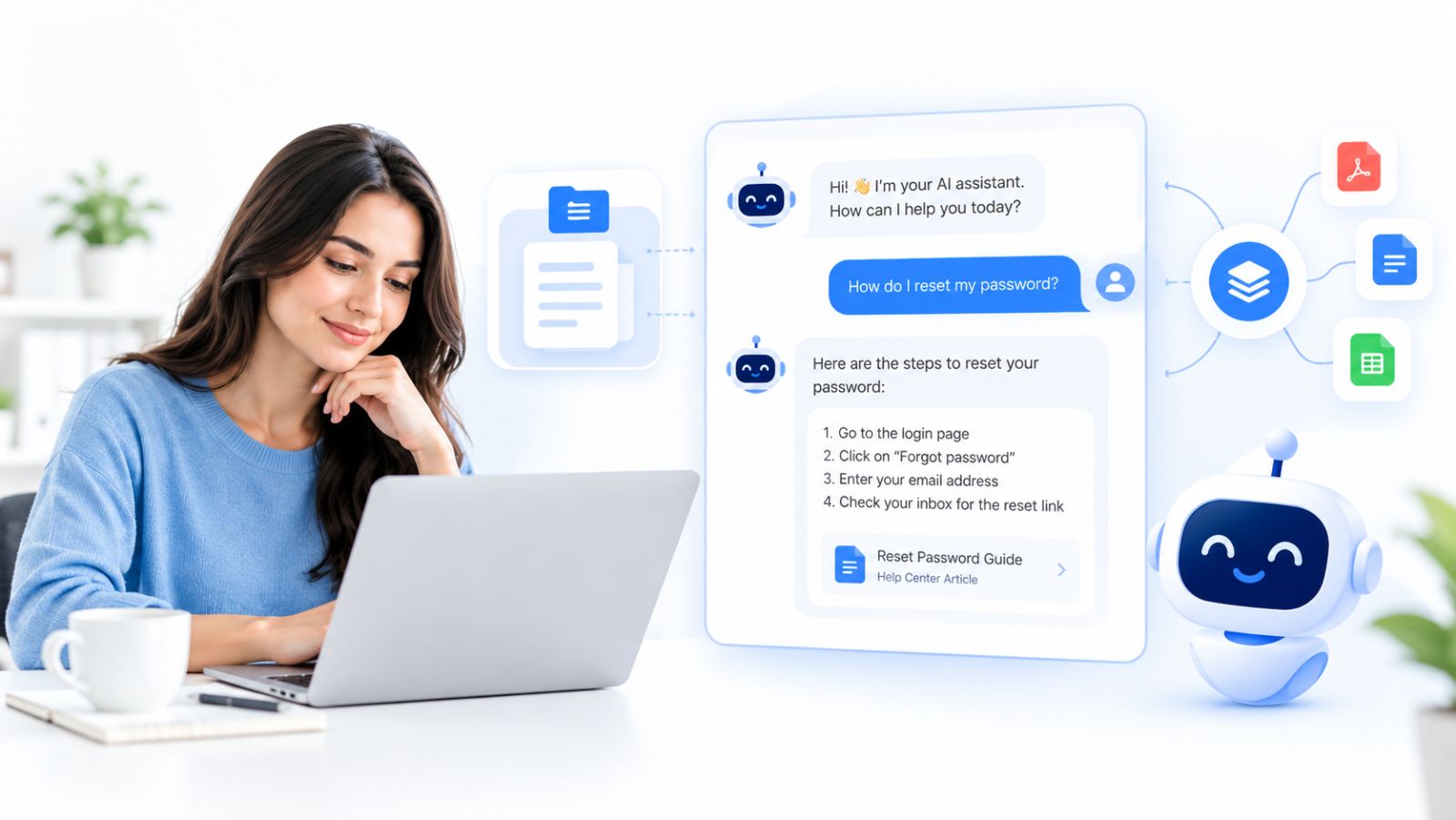
A knowledge base chatbot is a conversational AI agent connected to a defined body of company knowledge. When a customer asks something, the agent retrieves the most relevant passages from that knowledge, composes an answer from them, and declines or escalates when the material does not cover the question.
Because it relies on retrieval first and generation second, you will often see it described as a RAG chatbot.
How the RAG process works
- Question arrives. The customer writes in their own words, typos and slang included.
- Retrieval. The system searches your indexed content and surfaces the passages most likely to contain the answer.
- Grounded generation. A language model drafts the reply using those passages as its source material.
- Fallback. If nothing relevant is found, the bot says so and offers a human instead of improvising.
Knowledge base chatbot vs. FAQ chatbot vs. general AI chatbot
| Rule-based FAQ bot | General AI chatbot | Knowledge base chatbot | |
|---|---|---|---|
| Source of answers | Pre-written replies | Everything the model learned online | Your approved content only |
| Handles rephrased questions | Poorly | Yes | Yes |
| Risk of invented answers | Low, but limited coverage | High | Low when sources are curated |
| Maintenance | Add every question by hand | Minimal, but unreliable | Update the underlying content |
| Best for | Tiny, fixed menus | Open-ended brainstorming | Support, onboarding, policy questions |
An FAQ bot forces you to predict every question. A knowledge base chatbot only needs you to have documented the answer once, somewhere in your content.
Why “Answer Only From Our Content” Is Non-Negotiable
In Moffatt v. Air Canada, a Canadian tribunal held the airline responsible after its website chatbot gave a customer wrong information about bereavement fares. As summarized by ABA Business Law Today, the ruling reinforced a simple point: companies remain liable when an AI tool gives customers inaccurate information.
Three working rules follow from that case:
- Ground every reply in approved sources. Do not let the bot lean on general internet knowledge for policy, pricing, or legal topics.
- Prefer an honest “I’m not sure” over a confident guess. A handoff costs minutes. A wrong refund promise can cost far more.
- Keep one source of truth. If the same policy appears in three places with three different time windows, the bot will eventually quote the wrong one.
What Content to Feed Your Knowledge Base Chatbot

The bot is only as good as what it reads. Collect sources in this order of value:
- Help center articles. Already written to answer customer questions. One topic per article, with a descriptive title, retrieves far better than a long page covering many subjects.
- Policy and pricing pages. Shipping, returns, warranties, billing, plans. High-volume questions where mistakes hurt most.
- Product documentation. Setup guides, troubleshooting steps, manuals in PDF, Word, or spreadsheet form.
- Hand-written Q&A pairs. For anything that must be stated word for word, such as legal disclaimers, fees, or emergency contacts.
What to leave out
- Outdated pages and superseded policy versions
- Internal notes, agent macros, and drafts never meant for customers
- Marketing copy heavy on adjectives and light on facts
- Duplicate or near-duplicate pages that can produce mixed answers
Quick gap check: export your last 100 tickets or chats, list the 20 most common questions, and confirm each has a clear written answer in your sources. Any question without one is a content task, not an AI problem.
How to Build a Knowledge Base Chatbot in One Afternoon
The workflow below fits most platforms. Screen names differ, but the sequence holds.
Step 1 (about 1 hour): Audit and clean your content
Gather every candidate source, delete what is outdated, merge duplicates, and write exact Q&A pairs for sensitive answers. This hour improves accuracy more than any setting you will touch later.
Step 2 (about 1 hour): Connect your knowledge sources
Add your website pages, uploaded documents, and Q&A entries. Choose pages deliberately: include help and policy sections, skip careers and blog archives. After training, preview what the bot actually ingested and fix anything that came through as noise, such as navigation menus or cookie banners.
Step 3 (about 1 hour): Configure the AI agent
With a platform like ChatbotX, you create an AI Agent, write a system prompt that defines its role, tone, and boundaries, attach your knowledge, and choose a model. The system prompt is where your grounding rule lives. A solid starting template:
You are the customer support assistant for [Company]. Base every answer on
the attached knowledge sources and nothing else. Keep replies short and
friendly, and point to the relevant help article when one exists.
If the sources do not clearly cover the question, say you cannot confirm it
and offer to bring in a teammate. Never estimate prices, delivery dates,
refund eligibility, or exceptions. If a request is unclear, ask one
clarifying question. Respond in the customer’s language.
Choosing a model: for support, instruction-following and speed matter more than creativity. A fast, cost-efficient model that obeys “use only the sources” usually outperforms a larger one that likes to elaborate. Move up a tier only if testing shows the smaller model misreads complex articles.
Step 4 (about 1 hour): Test with real questions, then launch
Ask 20 genuine customer questions exactly as customers phrase them. Then ask five questions your content does not cover and confirm the bot hands off rather than invents. When an answer is weak, fix the content first and the prompt second. Once results hold up, publish the agent on the channels your customers already use. One knowledge base can serve all of them.
Design the Handoff Before You Launch

A support bot without an exit frustrates people within two messages. Build these paths up front:
- Human takeover. Route the conversation to a shared team inbox so the agent sees the full history and the customer never repeats themselves. ChatbotX’s Shared Inbox keeps bot and human conversations in one place with assignment and notes. For a deeper look at the model, see this guide to a unified inbox for customer service.
- Structured escalation. For issues that need investigation, such as billing errors or damaged orders, use a Flow Builder journey to collect details and push them to your helpdesk through a webhook or HTTP request.
- Offline honesty. Outside office hours, say so clearly and state when a reply will come.
- Prompt-level rules. Refunds, cancellations, account access, and legal matters should always go to a person, even when an article exists.
Keep It Accurate After Launch
A knowledge base chatbot is only as current as its content. Adopt a light routine:
- Re-sync after changes. Update the article, then refresh the source so the old version is replaced.
- Remove retired content. Unpublishing a page does not make the bot forget it. Delete the source explicitly.
- Review “I don’t know” answers weekly. Each one is a missing article. Write it, add it, and the same question gets answered next time.
- Turn repeat tickets into articles. If agents answer the same question three times in a week, it belongs in the knowledge base.
5 Mistakes That Make Knowledge Base Chatbots Fail

- Training on everything. Pointing the bot at an entire site buries useful answers under noise. Curate.
- No way out. If a customer types “human” and receives another article, you have built a wall.
- Loose policy answers. Exceptions and refund rules need exact wording and human routing.
- Testing with your own questions. Use real customer phrasing from past tickets.
- Treating launch as the finish line. Prices and policies change. Without an owner for the content, the bot will be confidently wrong within months.
How to Measure Success
Track a small set of metrics from week one and compare them to your starting point:
- Resolution rate: conversations that finish without escalation
- Handoff rate: share of chats passed to a person
- Unanswered questions: frequency and topics, which double as your content to-do list
- Accuracy spot checks: review 20 random conversations weekly
- Customer satisfaction: a one-question rating after the chat
ChatbotX Analytics surfaces response times, team performance, and bot handoff quality in one dashboard, which makes the weekly review much faster.
Looking ahead, Gartner predicts that agentic AI will autonomously resolve 80% of common customer service issues by 2029. Note the wording: common issues, and a forecast rather than today’s reality. Teams that invest in clean, governed knowledge now are the ones positioned to reach that level. For the bigger strategic picture, read this playbook on agentic chat marketing and autonomous customer conversations.
Build Your Knowledge Base Chatbot With ChatbotX

ChatbotX is an open-source, agentic omnichannel chatbot platform that brings WhatsApp, Messenger, Instagram, Telegram, Zalo, TikTok, Email, and Webchat into a single workspace. For knowledge base use cases, it gives you:
- AI Agents guided by a system prompt, connected to your documents and business knowledge, with support for models such as OpenAI, Claude, Gemini, and DeepSeek
- A visual Flow Builder to set guardrails, collect details, and trigger actions without code
- A Shared Inbox with human takeover, so no conversation gets stuck
- Analytics to see where your bot succeeds and where content is missing
- Self-hosting and white-labeling, so you control your data and branding. You can explore the code, deployment options, and roadmap in the ChatbotX GitHub repository
Selling this as a service
If you build for clients, a help center agent is one of the easiest AI offerings to explain and renew, because the client already pays people to answer the questions the bot now handles. A typical package combines a one-time setup (content audit, knowledge sources, agent, handoff rules, testing) with a monthly retainer (weekly review of unanswered questions, new articles, re-syncing, and a short performance report). ChatbotX supports separate client workspaces, white-labeling, and reselling, and this breakdown of an AI agent agency tech stack shows how the pieces fit together.
Frequently Asked Questions
What is a knowledge base chatbot?
It is an AI chatbot that answers questions from a curated set of company content, such as help articles, documents, and Q&A pairs, instead of relying on general internet knowledge. When it cannot find a reliable answer, it escalates to a human.
How is a knowledge base chatbot different from a regular chatbot?
A regular rule-based bot follows scripted paths, and a general AI bot answers from broad training data. A knowledge base chatbot retrieves passages from your own sources first and writes its reply from them, which makes answers more accurate and easier to audit.
Do I need technical skills to build one?
No. Modern no-code platforms let you connect content, write a prompt, and publish to your channels without programming. Developers can extend the setup with APIs, webhooks, and open-source code.
How long does setup take?
A focused team can launch a first version in an afternoon. Most of that time goes into cleaning and organizing content, not into configuration.
How do I stop the chatbot from giving wrong answers?
Restrict it to approved sources, instruct it to admit when it does not know, route sensitive topics to people, remove outdated content, and review real conversations every week.
Which content works best?
Focused help articles with clear titles, current policy pages, product documentation, and exact Q&A pairs for answers that must never be paraphrased.
Start Building Your Knowledge Base Chatbot Today
You already own the hard part: the answers. What is missing is a smarter way to put them in front of customers at the moment they ask. Clean up your best content, set one firm rule that the bot answers only from it, add a clear path to a human, and launch where your customers already chat.
Ready to try it? Create your first AI agent in ChatbotX, connect your help center, and start resolving questions around the clock. Prefer full control? Self-host the platform, make it your own, and give the project a star on GitHub while you are there. Your customers are already asking. Give them answers they can actually find.