WhatsApp stopped being “just a messaging app” for businesses years ago. Today it is the default customer-service, sales, and retention channel for companies that want to be found where their audience already spends time. But raw access to the WhatsApp Business API only gets you halfway there. The real value shows up when you layer artificial intelligence on top of it turning a static messaging pipe into a system that understands intent, resolves requests, and moves conversations toward a sale without waiting on a human to type every reply.
This guide breaks down exactly what AI integration with the WhatsApp Business API looks like in practice: the underlying architecture, the capabilities worth building first, a rollout plan you can follow step by step, and the platform decisions that determine whether your project ships in weeks or drags on for a quarter.
Launch agentic chat marketing in minutes with ChatbotX














Why AI on WhatsApp Is No Longer Optional
The numbers explain the urgency. WhatsApp messages are opened at rates far above email and SMS, and a growing share of consumers now expect brands to respond inside the chat thread rather than redirect them to a phone line or web form, according to aggregated WhatsApp Business performance data drawn from Meta and independent messaging benchmarks. On the enterprise side, industry analysts note that a large majority of customer service leaders are being pushed by their own executives to deploy AI-driven support this year, with self-service resolution rates still lagging behind expectations set by leadership a gap that conversational AI is specifically designed to close.
Put simply: the channel already has the audience. AI is what makes that audience serviceable at scale without ballooning headcount.
How AI Integration With the WhatsApp Business API Actually Works

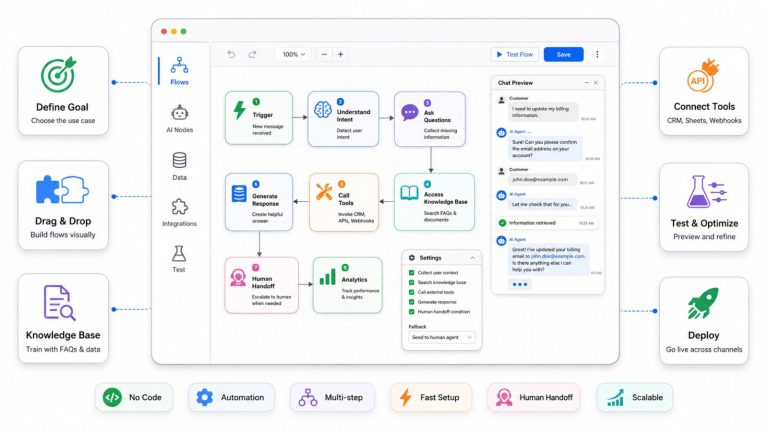
At a technical level, the WhatsApp Business API officially the WhatsApp Business Platform is a messaging layer, not an intelligence layer. It handles message delivery, template approval, opt-in management, and webhook events. AI has to be integrated on top of it through a separate orchestration layer that:
- Receives inbound messages via webhook from the Business API.
- Classifies intent using a language model or NLU engine (order status, product question, complaint, booking request, and so on).
- Retrieves context order history, prior conversations, CRM records so the response isn’t generic.
- Generates or selects a response, either through a scripted flow, a generative model, or a hybrid of both.
- Executes actions, such as updating a CRM field, triggering a payment link, or escalating to a human agent.
- Logs the interaction for analytics, quality review, and model improvement.
That orchestration layer is where platforms differentiate themselves. Some vendors bolt a chatbot widget onto WhatsApp and call it “AI.” Others build genuine agentic behavior systems that can hold multi-turn context, call external tools, and hand off cleanly to a human when confidence drops. For an official reference on how the underlying platform, webhooks, and message types work, Meta’s WhatsApp Business Platform documentation is the authoritative source to bookmark before you scope any integration project.
Core AI Capabilities Worth Building First

Not every AI feature delivers equal return. These four consistently produce the fastest payback:
1. Intent Detection and Smart Routing
Instead of forcing customers through rigid button menus, an AI layer reads free-text messages and routes them instantly – sales inquiries to a lead-qualification flow, support questions to a knowledge-base-backed agent, and anything ambiguous to a human. This alone typically removes the single biggest source of customer drop-off: waiting for the “right” menu option.
2. AI Agents for 24/7 Resolution
A properly configured AI agent can answer product questions from your knowledge base, check order status against a connected system, and even complete a transaction – all without a human touching the conversation. The agent only escalates when it hits a genuine edge case, which keeps your team focused on the interactions that actually need a person.
3. Visual Flow Design for Non-Developers
AI doesn’t have to mean “engineers only.” A no-code flow builder lets marketing and support teams design conversation logic – branching paths, conditional triggers, AI hand-off points without writing code or waiting on a sprint cycle.
4. CRM-Synced Context
An AI reply is only as good as the data behind it. Syncing WhatsApp conversations with CRM contact records means the AI already knows whether it’s talking to a first-time visitor or a repeat customer with three prior orders, and can tailor tone and offers accordingly.
A Step-by-Step Rollout Plan

Step 1 – Secure API access. Verify your business on Meta’s platform, register a phone number, and choose between the Cloud API (Meta-hosted, faster to launch) and an on-premise deployment. Most new projects in 2026 default to the Cloud API for lower operational overhead.
Step 2 – Map your top conversation intents. Pull six months of support tickets or chat logs and identify the five to ten reasons customers actually message you. Build AI flows around those first – not a generic “ask me anything” bot.
Step 3 – Connect your data sources. Link your CRM, order management system, and knowledge base so the AI can answer with real information instead of guesses.
Step 4 – Design the escalation path before you launch. Decide explicitly what confidence threshold or intent type triggers a handoff to a human, and route those conversations into a shared inbox so agents see full conversation history, not a blank slate.
Step 5 – Pilot with a message template set. Submit a small batch of approved templates (welcome, order confirmation, re-engagement) and test end-to-end delivery before scaling volume.
Step 6 – Monitor, then expand. Track resolution rate, handoff rate, and response time weekly for the first month, then widen the AI’s scope to additional intents as confidence grows.
For a deeper look at choosing the infrastructure partner behind all of this, our related guide on selecting a WhatsApp Business Solution Provider walks through the eight criteria that separate a reliable BSP from one that puts your account at risk.
Build vs. Buy: Choosing the Right AI Layer
Teams generally land on one of three paths:
| Approach | Speed to launch | Ongoing flexibility | Best fit |
|---|---|---|---|
| Custom-built (in-house) | Slow – months | Highest | Enterprises with dedicated engineering teams and unique compliance needs |
| Closed SaaS chatbot platform | Fast | Limited by vendor roadmap | Small teams that accept platform lock-in for convenience |
| Open-source, self-hostable platform | Fast | High – full source access | Teams that want speed without sacrificing control |
This is where an open-source, agentic omnichannel platform like ChatbotX fits naturally into the conversation. It ships with AI Agents, a visual Flow Builder, a shared team inbox, and CRM contact management already wired to WhatsApp, Messenger, Instagram, Zalo, and more – so instead of stitching together an orchestration layer from scratch, teams can self-host, white-label, and go live with AI-driven WhatsApp conversations in days rather than months, while still owning the full codebase.
Because the platform is fully open-source, you can inspect exactly how conversations are processed and extend it however your use case demands. The core repository is available on GitHub, and the releases page documents new AI and channel capabilities as they ship, which is useful if your team wants to track the roadmap before committing engineering time to a custom build.
For teams already running lead-generation campaigns, it’s also worth reading how AI-driven WhatsApp follow-up compares with other channels in our Facebook Lead Ads and CRM integration guide – the same automation logic applies once a lead lands in your CRM.
Measuring ROI After You Launch

Track these four metrics from day one:
- First-response time – how quickly the AI acknowledges a new message.
- Automated resolution rate – the share of conversations closed without human involvement.
- Escalation quality – whether handed-off conversations arrive with enough context for a human to resolve them quickly.
- Conversion or retention lift – whether AI-driven conversations translate into completed orders, bookings, or renewed engagement, not just faster replies.
Analysts researching AI-driven customer service broadly agree that the businesses seeing the strongest returns are the ones that scope AI to specific, high-volume use cases first, rather than trying to automate every possible conversation type on day one – a pattern documented in Gartner’s analysis of customer service AI use cases, which evaluates initiatives on both business value and implementation feasibility.
Frequently Asked Questions
Does AI integration require the paid WhatsApp Business API, or does it work with the free app?
AI automation requires the WhatsApp Business Platform (API), not the free WhatsApp Business app. The free app supports only basic quick replies and away messages; programmatic AI responses need API-level access.
How long does a typical AI + WhatsApp Business API integration take?
With an existing platform handling the orchestration layer, teams can often go live within one to two weeks. Fully custom builds from scratch typically take two to four months, depending on the number of integrated systems.
Can AI on WhatsApp handle payments and order tracking, not just FAQs?
Yes, provided the AI layer is connected to your order management, payment gateway, or e-commerce platform via API. Without that connection, the AI can only answer from static content.
What happens if the AI gives a wrong or uncertain answer?
A well-designed system defines confidence thresholds and specific intents that trigger automatic handoff to a human agent, along with the full conversation history, so nothing gets lost in the transition.
Is self-hosting an AI WhatsApp platform actually more secure than a SaaS tool?
Self-hosting gives you direct control over where conversation data lives and how it’s processed, which matters for teams with strict data-residency or compliance requirements – though it does shift infrastructure responsibility onto your own team.
Ready to Put AI to Work on WhatsApp?

AI integration with the WhatsApp Business API isn’t a future trend it’s already the baseline customers expect. The businesses pulling ahead in 2026 are the ones treating WhatsApp as a full conversational sales and support channel, powered by AI that actually understands context, not just keyword triggers.
If you’re ready to move from planning to a live deployment, explore how ChatbotX combines AI Agents, a visual Flow Builder, and a shared inbox into one open-source platform you can self-host, white-label, and launch on WhatsApp in days. Get started for free and see what an AI-powered WhatsApp conversation looks like from the inside.