

Supported Data Types
Bot Fields support 6 standard data types:- Short Text: A single line of text. Suitable for phone numbers, hotlines, addresses, brand names, or weekly voucher codes.
- Long Text: Multi-line text with line breaks. Suitable for company background, policy summaries, or shared context for AI Agents.
- Number: Integer or decimal numeric values. Used for global counters, discount percentages, or gift slot quotas.
- Date: Date format (Day/Month/Year). Commonly used for promotion start or end dates.
- Datetime: Date and time format including hour and minute. Ideal for precise campaign expiration timestamps or webinar schedules.
- Boolean: Logic values of True or False (
True/False). Used to track global toggle states such asStore_Open,Holiday_Mode, orMaintenance_Active.
How to Create and Manage Bot Fields
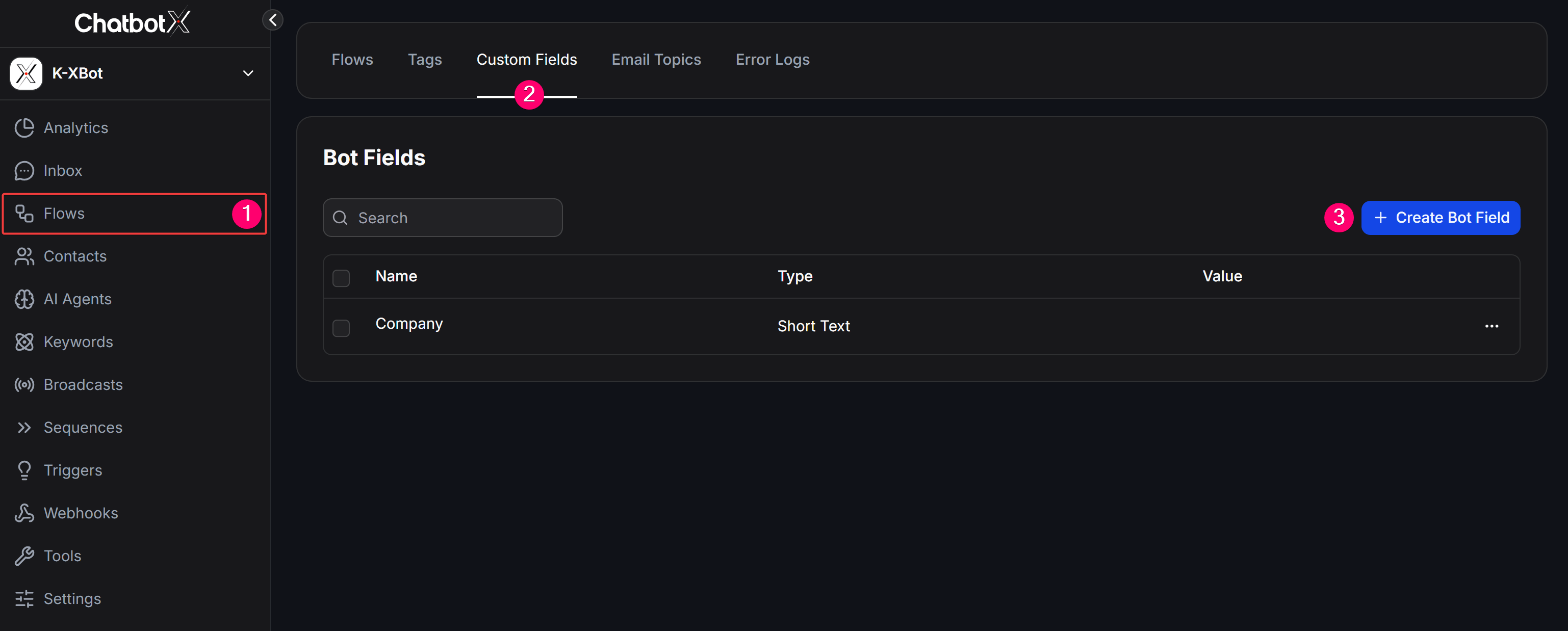
You can create and manage Bot Fields in the Flows section of ChatbotX:Steps to Create a Bot Field
1
Go to Flows
From the left navigation menu in ChatbotX, select Flows (1).
2
Select the Custom Fields tab
Switch to the Custom Fields tab (2) on the top horizontal navigation bar.
3
Click Create Bot Field
Scroll down to the Bot Fields section and click the blue + Create Bot Field button (3) on the right.
4
Configure Bot Field parameters
Enter the Name, select the Type, set an initial Value, and click Save.
Real-World Use Cases for Bot Fields
Bot Fields save operational time and prevent mistakes whenever company-wide information changes:1. Synchronizing Brand and Contact Information
- Recommended fields:
Hotline,Company_Address,Support_Email,Website_URL,Brand_Name. - Use case: Insert these variables into welcome messages, support menus, or message footers. When your business changes phone numbers or moves office, you only need to update the Bot Field once instead of editing dozens of individual Flows.
2. Managing System-Wide Promotions and Campaigns
- Recommended fields:
Current_Voucher_Code,Discount_Rate,Promotion_End_Date. - Use case: When launching a new weekly or monthly promotion, update the voucher code in the
Current_Voucher_CodeBot Field (e.g., fromSUMMER20toFALL30). Every automated voucher Flow will immediately distribute the new code.
3. Routing by Store Operating Hours or Maintenance Status
- Recommended fields:
Is_Store_Open(Boolean),Maintenance_Notice(Short Text). - Use case: Pair the
Is_Store_OpenBot Field with a Condition block in your Flow. During holidays or emergency closures, simply toggle the variable toFalseso the bot automatically serves off-hours notices without disrupting chat flows.
4. Providing Shared Context to AI Agents
- Recommended fields:
Company_Introduction,Return_Policy_Summary,Warranty_Rules. - Use case: Use Long Text Bot Fields to store policy summaries or company background. You can inject
{{Bot_Field_Name}}directly into the AI Agent’s System Prompt, ensuring the AI always adheres to the latest company policies.
5. Managing Global Gift or Registration Quotas
- Recommended fields:
Remaining_Gift_Slots(Number). - Use case: For limited gift campaigns, use an Action to decrease the Bot Field value by
1every time a customer claims a gift. When the value reaches0, the Condition node automatically closes registrations for all users.
How to Use Bot Fields in Flows
Once created, you can use Bot Fields across your chatbot architecture:1. Automatically Update Values (Set Bot Field Action)
Use the Set Bot Field action to update global bot variable values through an admin Flow or automated operational action.2. Branching Flows with Condition Blocks
Compare the value of any Bot Field using logical operators (equals, contains, greater than, less than, true/false) to route conversations based on system-wide states.3. Displaying Shared Values in Messages
Insert variables directly into message text using the{{bot_field_name}} syntax. ChatbotX automatically replaces the placeholder with the current global system value when sending the message.