

How to create a new Reflink
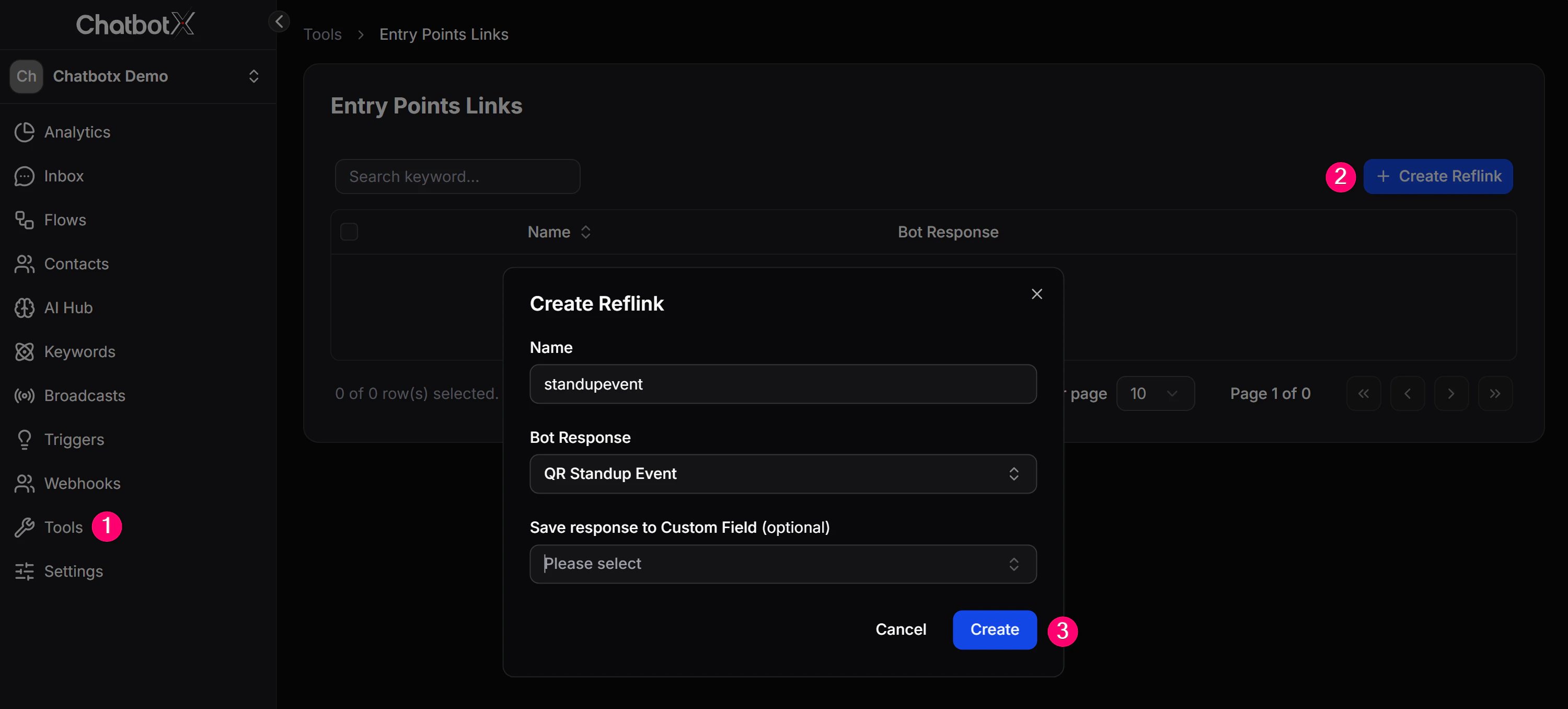
- Go to Tools -> Entry Point Links.
- Click + Create Reflink.
- Fill in the fields in the dialog:
Name
Use a name that makes the link easy to recognize, such asads-facebook-march, qr-standup-event, or email-newsletter.
Bot Response
Choose the Flow that should start as soon as the customer clicks this link. For example, a product consultation Flow, a gift registration Flow, or a welcome Flow.Save response to Custom Field (optional)
If you want to save additional information from the link into the customer’s profile, choose the matching Custom Field here. The value will be stored automatically when the link is opened.- Click Create to save it.
After the Reflink is created
Open the … menu next to the Reflink name, then choose Copy URL to get the channel-specific version of that link:
Paste that link into an ad, email, QR code, or website, and the customer will jump straight into the correct Flow.
Real example
Scenario: You are running 2 Facebook ad campaigns, one for product A and one for product B. You want to know which ad brings more customers into the chatbot, and you want each group to receive a different consultation Flow. How to set it up:- Create 2 Reflinks:
ads-product-aandads-product-b - Point each Reflink to the matching product consultation Flow
- Insert the correct link into each ad
Note: Entry Point Links support every channel connected to ChatbotX. One Reflink can generate multiple channel-specific links with the same name but different URL formats.