

- Boost Conversion Rates: Instantly engage with potential customers while their interest in your video content is high.
- Drive Traffic into Your Inbox: Transition viewers from public video comments into private conversations for personalized assistance by your team or AI Agents.
- Protect Customer Data: Automatically hide comments containing phone numbers or sensitive details to prevent competitors from stealing your leads.
- Save Operational Time: Automate repetitive responses to frequently asked questions and filter out unwanted or negative remarks.
Prerequisites on Your TikTok Account
For direct messages from comments (Comment-to-Message) to work reliably, your TikTok account must allow direct messages from everyone:- Open the TikTok app and go to your Profile.
- Tap the Menu icon (three lines) in the top right corner and select Settings and privacy.
- Tap Privacy > Direct messages.
- Under Who can send you direct messages, select Everyone.
If this setting is configured to “Friends” or “No one”, TikTok will automatically block messages triggered from comments, preventing the bot from initiating conversations with viewers.
Set Up Comment Automation
Follow these steps to create and configure a TikTok comment automation campaign:1
Access the Tool
From the left navigation menu in ChatbotX, select Tools. In the tools catalog, click on the TikTok Comment Automation card.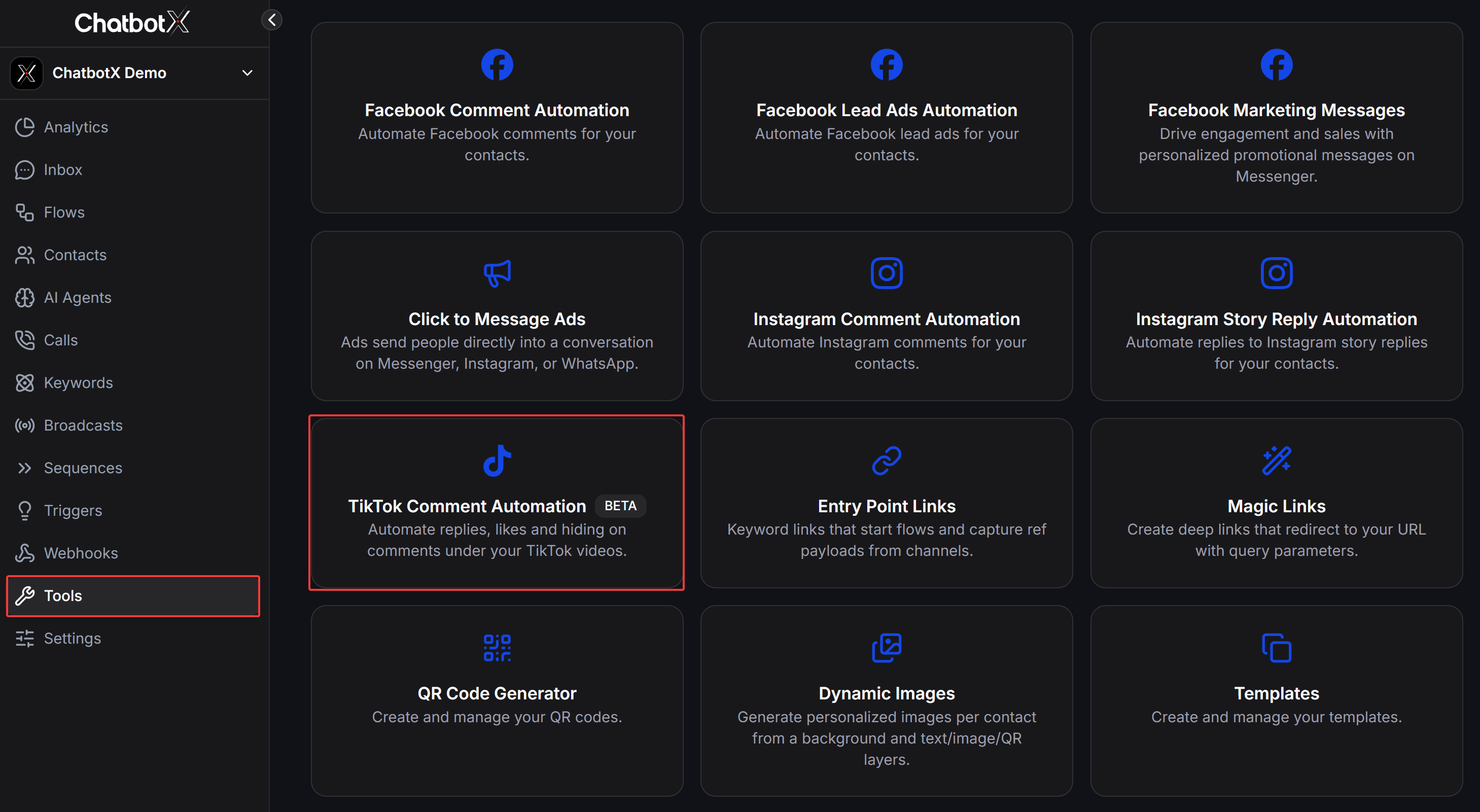
2
Create a New Automation
In the TikTok Comment Automation dashboard, click the Create Automation button in the top right corner to start setting up your campaign.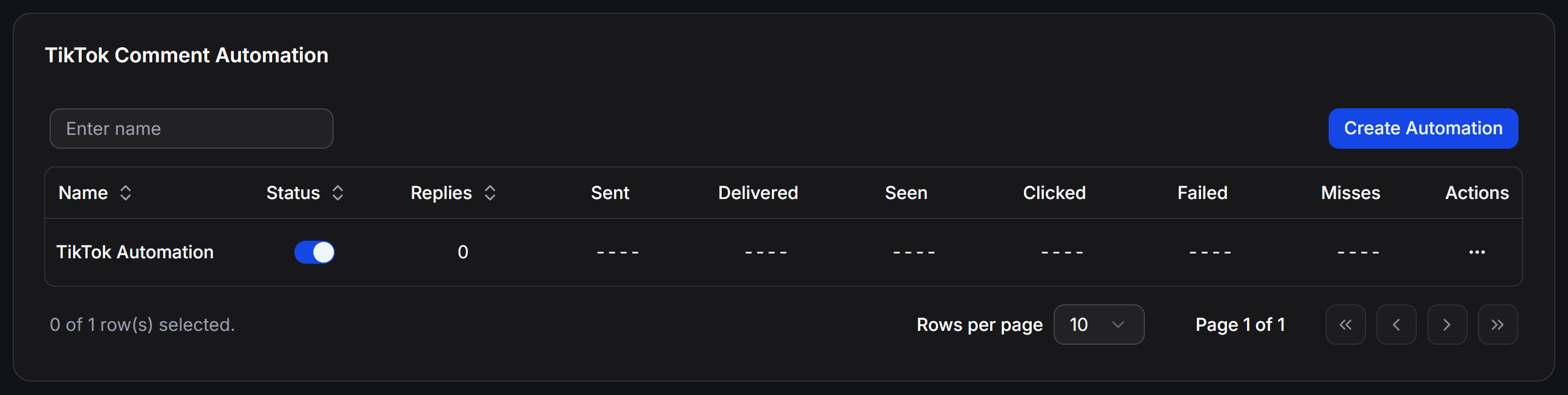
3
Configure Targeting & Reply
Under Targeting & Reply, configure the essential parameters for your campaign: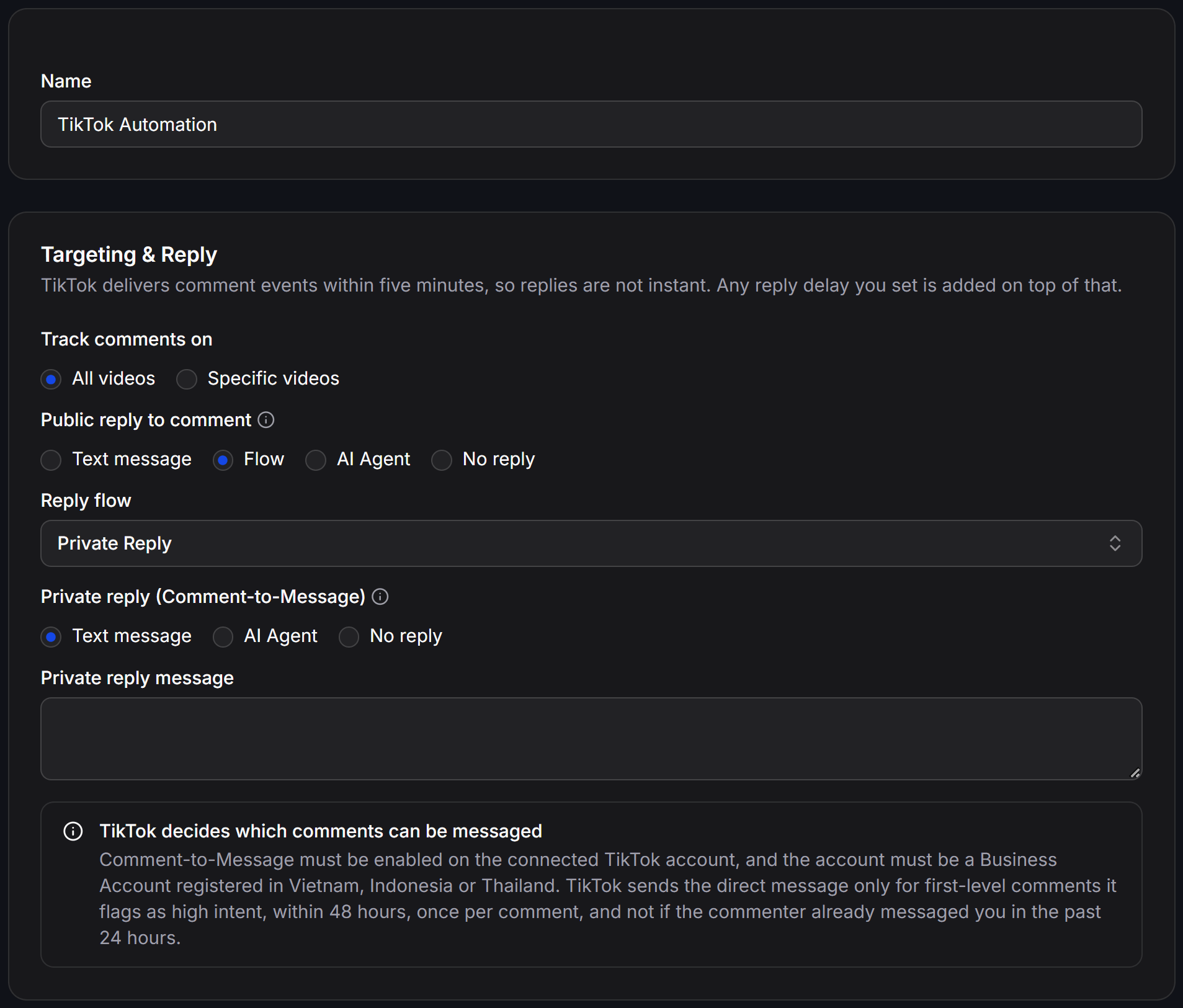
- Name: Enter a descriptive name to identify and manage your campaign.
- Track comments on:
- All videos: Monitor and automate replies across all current and future videos on your TikTok channel.
- Specific videos: Target only specific selected videos.
- Public reply to comment: Choose how to reply publicly under the viewer’s comment:
- Text message: Enter static text for the system to post as a reply comment.
- Flow: Select an automated flow to generate the public comment reply.
- AI Agent: Delegate public responses to an AI Agent that reads the comment context and posts appropriate answers.
- No reply: Do not post a public comment reply.
- Private reply (Comment-to-Message): Choose how to send a direct message to the commenter’s TikTok inbox:
- Text message: Send a direct message to the user’s inbox. Enter your message text in the Private reply message field.
- AI Agent: Assign the incoming inbox conversation to an AI Agent for automated consultation.
- No reply: Do not send a private direct message.
4
Configure Filters & Options
Under Filters & Options, define targeting rules to ensure replies are delivered accurately: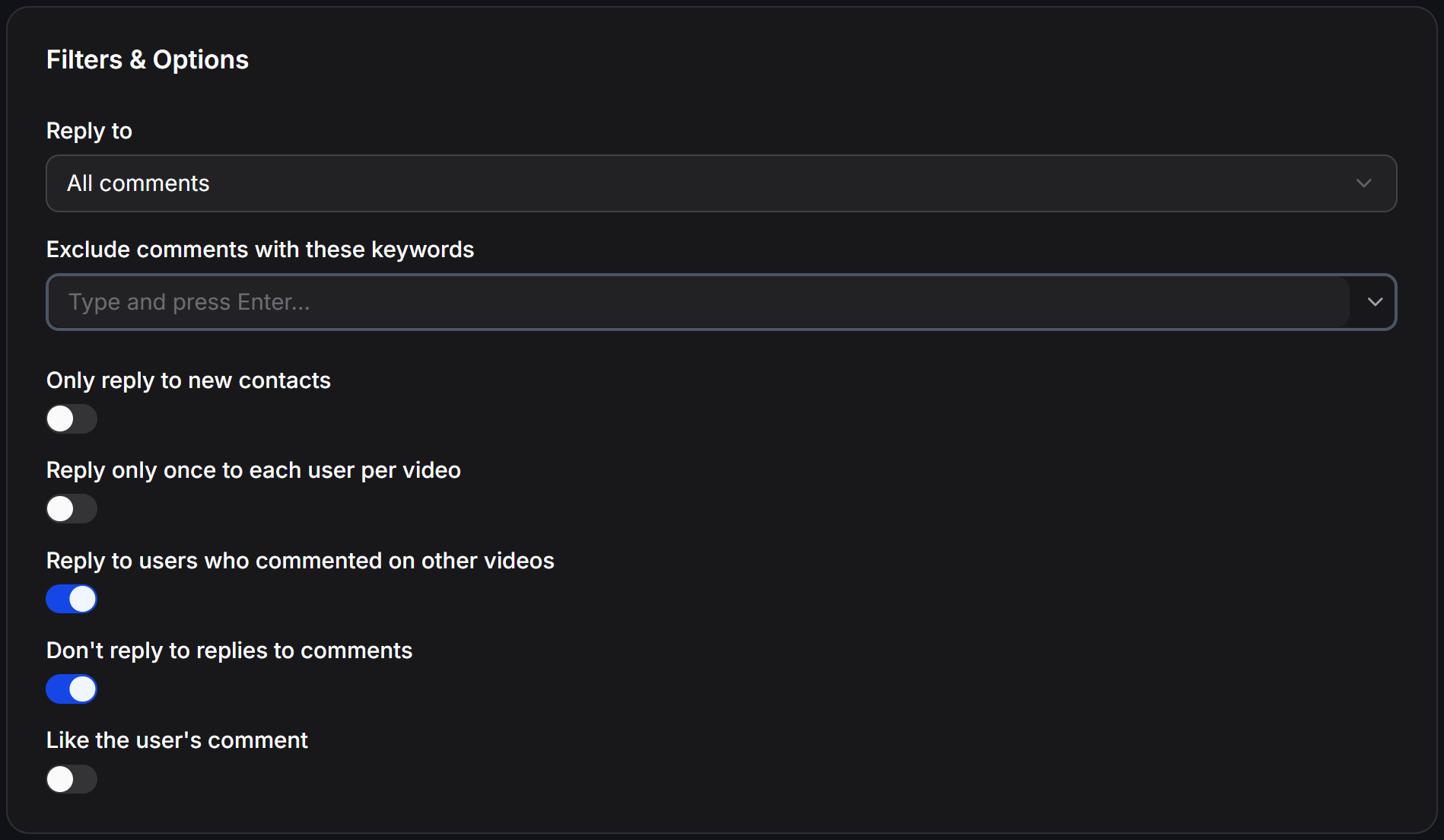
- Reply to: Choose which comments qualify for an automated reply:
- All comments: Reply to all eligible comments on your videos.
- Exact match: Reply only when the comment matches the specified keywords exactly.
- Contains: Reply when the comment contains designated keywords.
- Comments when enough mentions: Reply only when the viewer tags/mentions at least the specified minimum count of other users.
- Exclude comments containing (optional): Filter out unwanted comments using two flexible modes:
- Comments equal to: Skip comments that match the specified phrase exactly.
- Comments that contain: Skip comments containing specific keywords. Type each keyword and press Enter.
- Only reply to new contacts: When turned on, replies are only triggered for first-time viewers who have not interacted with your channel before.
- Reply only once to each user per video: Limits responses to a maximum of one automated reply per user per video, avoiding repetitive messages if they comment multiple times.
- Reply to users who commented on other videos: When enabled, the system still replies to viewers who previously commented on your other videos.
- Don’t reply to replies to comments: Skips nested comments to avoid intruding on secondary comment threads.
- Like the user’s comment: Automatically likes the commenter’s post when the reply is processed.
5
Configure Hide Comments
Under Hide Comments, establish rules to automatically hide sensitive or unwanted comments: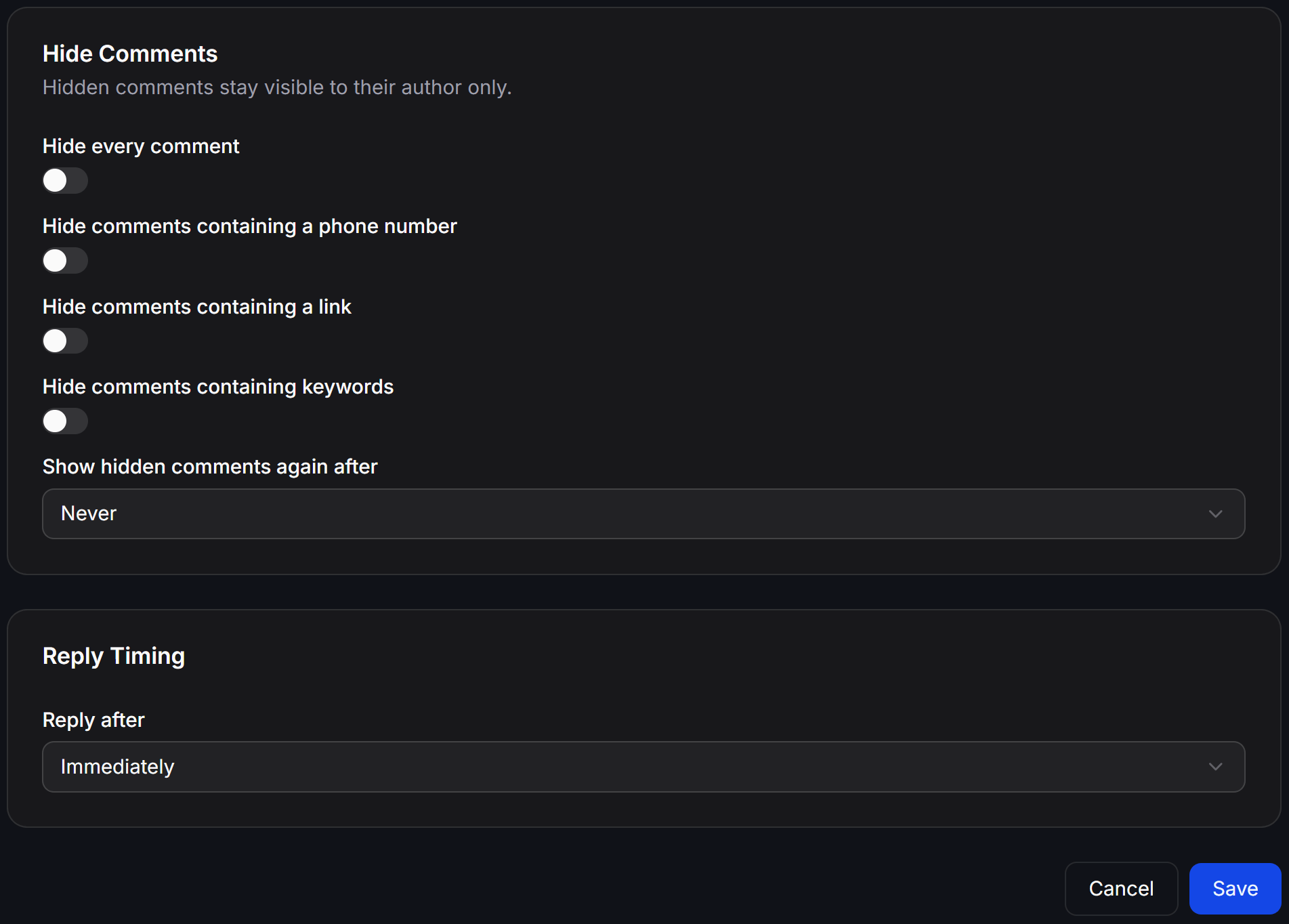
TikTok Hiding Mechanism: When a comment is hidden, it remains visible to its author but is concealed from all other viewers on your video.
- Hide every comment: Automatically hides all incoming comments on your videos.
- Hide comments containing a phone number: Hides comments containing phone numbers to safeguard customer privacy and protect leads from competitor poaching.
- Hide comments containing a link: Hides comments with URLs to eliminate link spam and malicious sites.
- Hide comments containing Emoji: Automatically hides comments containing emoji characters.
- Hide comments containing keywords: Automatically hides comments containing flagged words.
- Show hidden comments again after: Set a time duration after which hidden comments are unhidden (defaults to Never to keep them hidden permanently).
6
Set Reply Timing and Save
In the Reply Timing section, adjust how quickly the automated reply is dispatched:Click Save in the bottom right corner to store your settings and activate the campaign.
- Reply after: Select your preferred response delay:
- Immediately: Sends the reply as soon as the event payload is received from TikTok.
- You can also choose random delay intervals to make automated responses appear more organic.
TikTok transmits comment events with an inherent delay of up to 5 minutes. Any custom delay configured in this setting will be added on top of TikTok’s transfer time.
Manage Comment Automations
On the main TikTok Comment Automation screen, monitor performance metrics and manage existing campaigns:- Quick Toggle: Use the switch in the Status column to activate or pause any automation instantly.
- Funnel Performance Metrics:
- Replies: Total number of public comment replies posted under videos.
- Sent: Total number of direct messages sent to commenters’ inboxes.
- Delivered: Total number of direct messages successfully delivered by TikTok.
- Seen: Total number of direct messages opened and read by recipients.
- Clicked: Total number of button or link clicks within sent messages.
- Failed: Number of failed message deliveries due to policy restrictions or connection errors.
- Misses: Number of comments skipped because they matched exclusion filters, were nested replies, or did not meet TikTok eligibility criteria.
- Action Menu: Click the three dots
...in the Actions column to:- Edit: Reopen campaign settings to adjust replies, filters, or timing.
- View Analytics: Inspect in-depth analytics, conversion trends, and event logs.
- Rename: Update the automation campaign name.
- Delete: Permanently remove the automation campaign from your workspace.